
NLP in Document Processing: How Natural Language Processing Reads Business Documents
- John Hall
- Customs Specialist at iCustoms.ai
NLP document processing software uses natural language processing to read a business document, understand what the text means, and extract the right information from it. Where optical character recognition (OCR) only turns an image into characters, NLP interprets the language: it recognises that a string is a supplier name, a date, or a total, and it understands the context around it. This guide explains what NLP is, how it reads documents, and how it works inside intelligent document processing to automate trade and business paperwork.
This is a technical topic, so it is written for solution architects, enterprise architects, and IT teams who are evaluating how document automation actually works under the surface, not just what it claims to do.
NLP Fundamentals: What Natural Language Processing Is
Natural language processing is the branch of artificial intelligence that lets software work with human language, whether written or spoken. In document processing, NLP is what turns raw text into structured, meaningful data. A few related terms are worth separating, because they are often used loosely:
- NLP (natural language processing) processes and analyses language.
- NLU (natural language understanding) is the part of NLP focused on meaning and intent.
- OCR converts an image of text into machine-readable characters, but does not understand them.
- Computer vision interprets the layout and visual structure of a document.
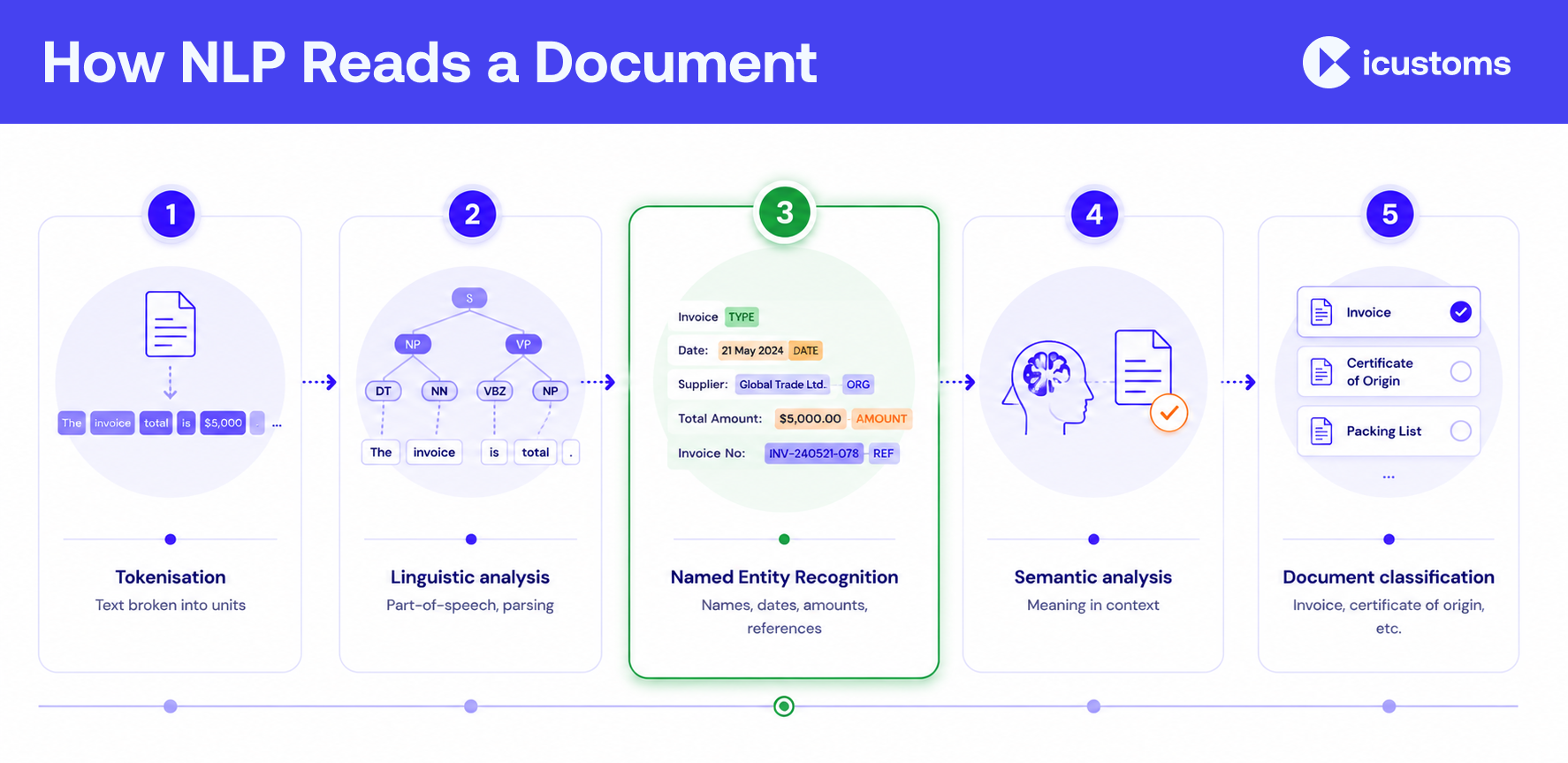
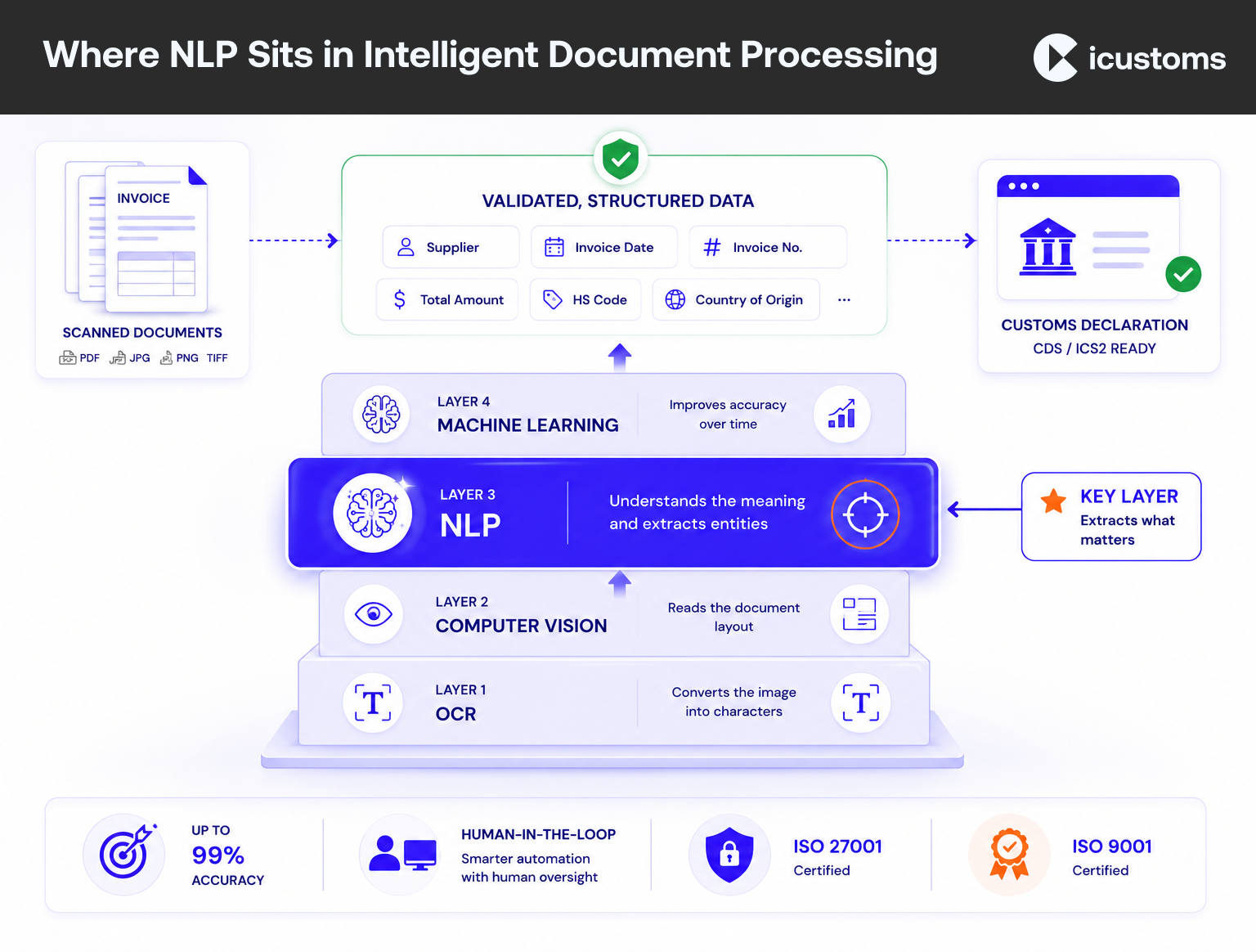
Modern document AI combines these. OCR reads the characters, computer vision reads the layout, and NLP reads the meaning. Machine learning ties them together and improves accuracy over time. If you want the practical comparison, see our note on the difference between OCR and IDP.
How NLP Understands Documents
Reading a document with NLP is a pipeline of steps. In simplified terms:
- Tokenisation. The text is broken into units, such as words and numbers, that the model can work with.
- Linguistic analysis. Part-of-speech tagging and parsing work out the grammatical role of each token and how they relate.
- Named Entity Recognition. NER identifies entities such as company names, dates, amounts, and reference numbers, so entity extraction can pull them out reliably.
- Semantic analysis. The model interprets meaning in context, so it knows which number is the invoice total rather than a line-item price.
- Classification. Document classification labels the whole document, for example as a commercial invoice or a certificate of origin.
This is why NLP document understanding copes with documents that vary in wording and layout: it works from meaning and context, not from a fixed template.
NLP in Intelligent Document Processing
On its own, NLP is a capability, not a product. It delivers business value inside intelligent document processing, where it works alongside OCR, computer vision, and machine learning as one pipeline.
In an IDP workflow, the division of labour is clear: OCR converts the scan to text, computer vision reads the layout, and NLP extracts and interprets the content, applying Named Entity Recognition and semantic analysis. Validation then checks the result, and confidence scoring flags anything uncertain for a human to review. The outcome is not just extracted text but structured, verified, meaningful data.
OCR vs NLP: they are not the same job
A common misconception is that OCR and NLP compete. They do not. OCR answers what characters are on the page; NLP answers what those characters mean. OCR vs NLP is really a question of layers: you need both, and in complex documents NLP is what makes the data usable. NLP does not replace OCR; it builds on it.
Want to see NLP-driven document understanding on your own paperwork?
Watch a demo and see AI read, interpret, and validate a trade document.
Business Applications: What NLP Can Read
NLP document processing applies to almost any text-heavy business document. Common examples include:
- Commercial invoices and purchase orders.
- Packing lists and freight invoices.
- Bills of lading and air waybills.
- Customs declarations, certificates of origin, and EUR1 certificates.
- Contracts and insurance certificates.
The value is highest where documents are varied and unstructured, which describes most trade and customs paperwork. For customs, NLP reads a supplier’s free-text goods description, identifies the entities that matter, and turns them into declaration-ready data, supporting customs document automation across manufacturing, logistics, pharma, and finance.
The Future: LLMs, RAG, and Agentic Document AI
NLP is advancing fast, and it is worth knowing where it is heading:
- Large language models (LLMs) bring stronger contextual understanding, so models grasp meaning across a whole document rather than field by field.
- Multimodal AI reads text, layout, and images together, which suits messy real-world documents.
- Retrieval-augmented generation (RAG) grounds answers in trusted data, useful for checking a document against current rules.
- AI agents can chain steps together, moving from reading a document to acting on it.
The practical point for architects is that these advances make document understanding more accurate and more autonomous, but the core need stays the same: extract the right data, validate it, and keep a human in the loop for exceptions.
How iCustoms Uses NLP for Trade Compliance
iCustoms applies NLP within its intelligent document processing to read and interpret trade documents, not just scan them. Its iCheck feature classifies documents, and the AI extracts and validates the meaningful fields.
- Understanding: reads structured, semi-structured, and unstructured documents, using classification and entity extraction to find the right data.
- Accuracy and validation: up to 99% accuracy, with a validation engine and confidence scoring that flags exceptions for a human check.
- Integration and security: feeds validated data into declarations and your systems through API, EDI, or CSV, and holds ISO 27001 and ISO 9001 certification.
For the foundational overview, our guide to intelligent document processing explains how these components fit together.
Frequently Asked Questions
What is NLP in document processing?
NLP, or natural language processing, is the AI that lets software understand the language in a document. In document processing it interprets the text, identifies entities like names, dates, and totals, and turns them into structured data.
How does NLP differ from OCR?
OCR converts an image of text into machine-readable characters but does not understand them. NLP interprets what those characters mean. They work together: OCR reads the characters, NLP reads the meaning.
What is the difference between NLP and Intelligent Document Processing?
NLP is a capability. Intelligent document processing is the full platform that combines OCR, computer vision, NLP, and machine learning to classify, extract, validate, and route documents.
What is Named Entity Recognition (NER)?
NER is an NLP technique that identifies and labels entities in text, such as company names, dates, amounts, and reference numbers, so they can be extracted reliably.
Can NLP process customs documents?
Yes. NLP reads varied, unstructured trade documents such as invoices, packing lists, and certificates, identifies the fields that matter, and turns them into declaration-ready data.
Does NLP replace OCR?
No. NLP builds on OCR. OCR turns the image into text; NLP interprets that text. Complex documents need both layers.
You may also like:
Struggling to Extract, Catagorise & Validate Your Documents?

Capture & Upload Data in Seconds with AI & Machine Learning
Subscribe to our Newsletter
About iCustoms
iCustoms is an all-in-one solution helping businesses automate customs processes more efficiently. With AI-powered and machine-learning capabilities, iCustoms is designed to streamline your all customs procedures in a few minutes, cut additional costs and save time.
Struggling to Extract, Catagorise & Validate Your Documents?
Capture & Upload Data in Seconds with AI & Machine Learning