
AI-Based Form Processing Software: Automating Structured and Unstructured Forms
- John Hall
- Customs Specialist at iCustoms.ai
AI-based form processing software uses artificial intelligence to read a form, understand its layout, and extract the data, whether the form is neatly structured or messy and unstructured. Unlike template-based OCR, which needs a fixed layout to work, AI form processing adapts to forms it has not seen before, so it keeps working when a supplier changes a layout or sends a scan. This guide explains what AI form processing is, why it beats rigid templates, and how it automates high-volume forms across customs, logistics, healthcare, and insurance.
It is written for operations managers, documentation officers, and IT teams who process a lot of forms and are tired of templates that break every time a document changes.
Understanding AI Form Processing
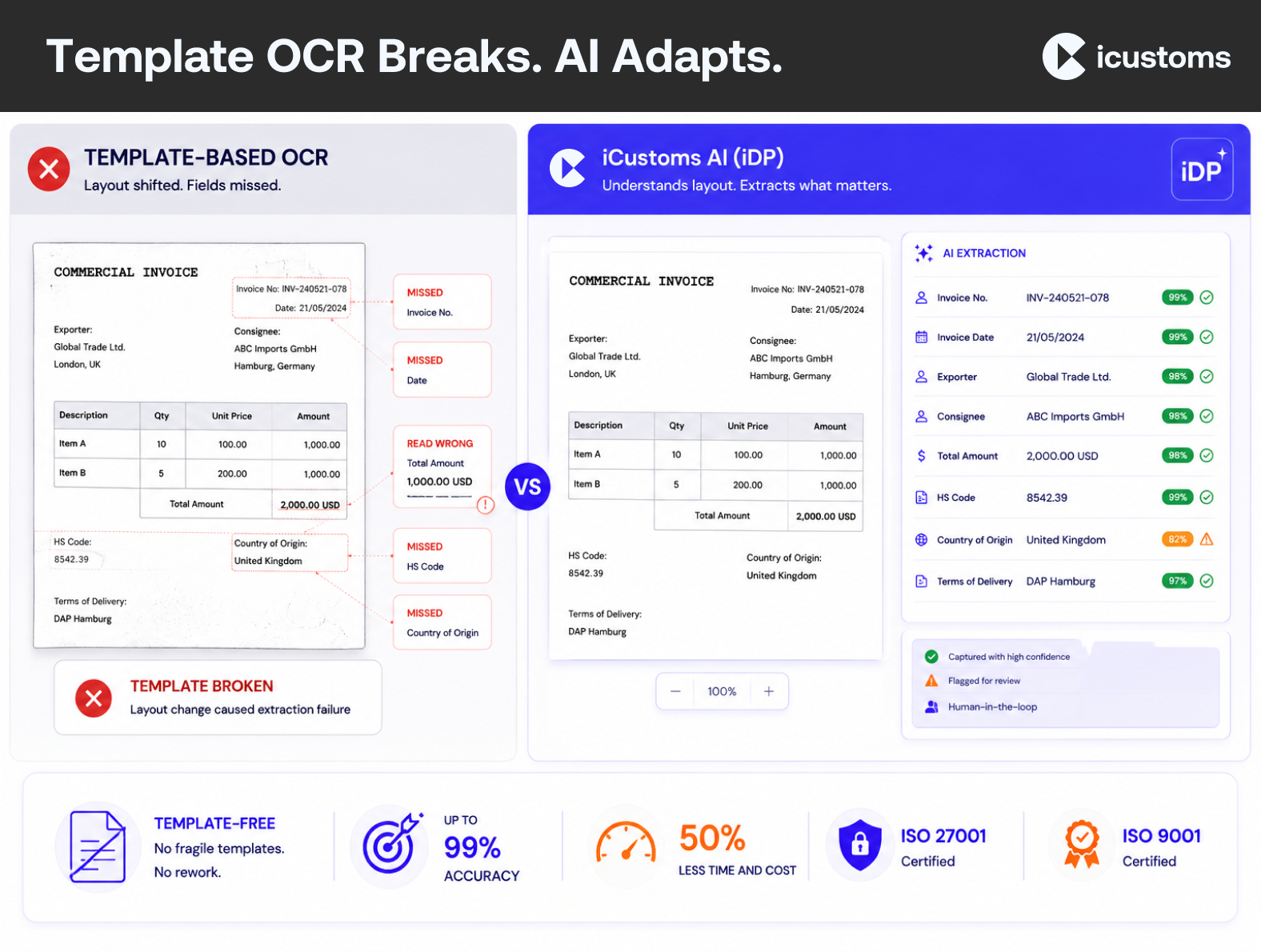
Form processing means capturing the data from a form and turning it into structured, usable information. Traditional tools do this with templates: you tell the software exactly where each field sits, and it reads those coordinates. That works until the layout changes, and then it fails.
AI-based form processing software works differently. Instead of fixed coordinates, it uses intelligent document processing to recognise fields by meaning and context. Intelligent form recognition understands that a value is a date, an amount, or a reference number wherever it appears, so template-free extraction handles new and varied layouts without reconfiguration.
Why template-based OCR struggles
Template-based OCR is brittle. Every new supplier layout, every scan at a slight angle, every extra column means someone has to build or fix a template. For teams handling many form types, that maintenance never ends. AI form automation removes it by learning from the content rather than the coordinates.
Structured vs Unstructured Forms
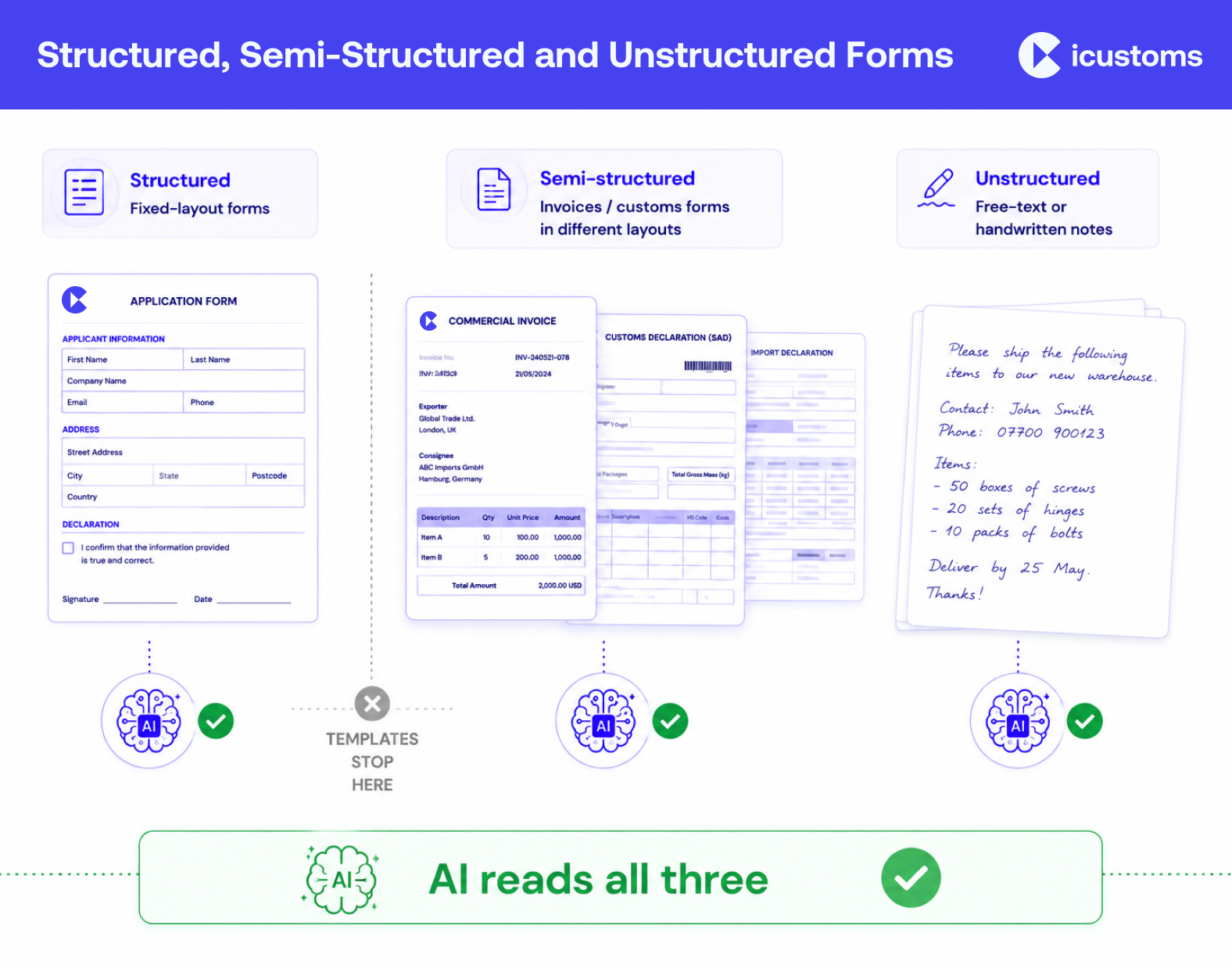
Forms fall into three broad types, and the difference is exactly why AI matters:
- Structured forms have a fixed layout, the same every time, such as a standard application form. Template tools can manage these.
- Semi-structured forms carry the same information in different layouts, such as invoices or customs forms from different sources. This is where templates start to fail.
- Unstructured forms have no fixed format at all, such as free-text correspondence or handwritten notes.
Most real business documents are semi-structured or unstructured. Modern AI processes all three without predefined templates, which is the core advantage of automated form processing over older capture tools.
Tired of templates that break every time a form changes?
Watch a demo and see AI read a form it has never seen before.
How AI Processes Forms
AI form processing is a pipeline that combines several techniques into one flow:
- Capture. OCR converts the scanned or PDF form into machine-readable text, and computer vision reads its layout.
- Classify. Document classification identifies the form type, so the system knows what it is looking at.
- Extract. Machine learning and NLP perform AI data extraction, finding the fields by meaning rather than position.
- Validate. Validation rules check the data and confidence scoring flags anything uncertain for a human review.
- Route. Clean data flows into the destination system through an API, with a full audit trail.
OCR vs AI: the key difference
OCR vs AI is a common question here. OCR reads characters at fixed positions; AI understands the form regardless of layout. Plain OCR can also read handwriting only crudely, whereas AI copes far better with handwritten and low-quality forms. In short, OCR is one component; AI form processing is the full capability.
Business Applications: Forms AI Can Automate
AI-based form processing suits almost any high-volume form. Common examples across industries include:
In customs and trade, it automates C88 and SAD customs forms, EUR1 certificates, commercial invoices, and packing lists. Beyond trade, the same technology handles insurance claim forms, healthcare records, tax forms, and HR documents. Wherever a team keys data from forms by hand, customs form automation and its equivalents remove the manual step.
- Customs: C88, SAD, EUR1, commercial invoices, packing lists.
- Insurance: claim forms and supporting evidence.
- Healthcare: patient and record forms.
- Finance and HR: tax forms, applications, and onboarding documents.
Selecting AI Form Processing Software
When you evaluate AI form processing software, check that it:
- Uses template-free extraction, so it handles new layouts without reconfiguration.
- Processes structured, semi-structured, and unstructured forms, including handwriting.
- Validates data and flags exceptions with confidence scoring and human review.
- Integrates with your systems through an API, and keeps an audit trail.
- Scales to high volumes and meets your security requirements.
How iCustoms Automates High-Volume Form Processing
iCustoms applies its intelligent document processing to forms of every kind, without rigid templates. Its iCheck feature classifies the form, and the AI extracts and validates the data.
- Template-free understanding: reads structured, semi-structured, and unstructured forms, including typed, scanned, and handwritten input.
- Accuracy and validation: up to 99% accuracy, with a validation engine and confidence scoring that flags exceptions for a human check.
- Integration and security: routes validated data into your systems through API, EDI, or CSV, and holds ISO 27001 and ISO 9001 certification.
If you are weighing older capture tools against AI, our note on the difference between OCR and IDP is a useful companion read.
Frequently Asked Questions
What is AI-based form processing?
It is software that uses AI to read a form, understand its layout, and extract the data, whether the form is structured or unstructured, without needing a fixed template.
What is the difference between OCR and AI form processing?
OCR converts an image into text at fixed positions. AI form processing understands the form regardless of layout, classifies it, extracts fields by meaning, and validates them. OCR is one component of the wider AI capability.
Can AI process unstructured forms?
Yes. AI reads structured, semi-structured, and unstructured forms by recognising fields from meaning and context rather than a fixed position, so it handles varied and free-form layouts.
Can AI process handwritten forms?
Yes. AI copes far better with handwritten and low-quality forms than plain OCR, though a human review step should confirm any field flagged as uncertain.
What is template-free document processing?
It means extracting data without pre-defining where each field sits. The AI recognises fields by meaning, so it handles new layouts without someone building a template first.
Can AI automate customs forms?
Yes. AI form processing automates customs forms such as C88, SAD, and EUR1, plus invoices and packing lists, turning them into declaration-ready data.
You may also like:




Struggling to Extract, Catagorise & Validate Your Documents?

Capture & Upload Data in Seconds with AI & Machine Learning
Subscribe to our Newsletter
About iCustoms
iCustoms is an all-in-one solution helping businesses automate customs processes more efficiently. With AI-powered and machine-learning capabilities, iCustoms is designed to streamline your all customs procedures in a few minutes, cut additional costs and save time.
Struggling to Extract, Catagorise & Validate Your Documents?
Capture & Upload Data in Seconds with AI & Machine Learning