
SAD Form Software: Automating the Single Administrative Document for Customs
- John Hall
- Customs Specialist at iCustoms.ai
SAD form automation uses AI to fill a Single Administrative Document from your trade documents, instead of a person keying each field by hand. The software reads the commercial invoice, packing list, and other paperwork, maps the data to the right fields, checks it, and prepares the customs declaration for submission. This guide explains what the SAD and C88 forms are, what goes on them, and how SAD form software automates the whole process for customs teams.
For customs declarants, brokers, and clearing agents, the declaration is where errors get expensive. A wrong figure or a missing field can hold a shipment or trigger a penalty. Automating the form removes most of that risk, and it frees your team from slow, repetitive data entry.
What Is the Single Administrative Document (SAD)?
The Single Administrative Document is the standard customs declaration form used for imports, exports, and transit across the EU and, historically, the UK. It captures everything customs authorities need about a consignment: the parties involved, the goods, their value, their origin, and the customs procedure being used. In short, it is the form that tells customs what is moving, for whom, and under what rules.
What is a C88 form, and is it the same as the SAD?
Yes, in practice they are the same document. The C88 form is the UK’s version of the Single Administrative Document. When people say SAD form C88, they mean the same customs declaration. So a C88 customs form and a SAD customs form describe the same set of data, just under different names in different places.
One important update: in the UK, the Customs Declaration Service (CDS) has replaced the old CHIEF system. Declarations are now submitted electronically as structured data elements rather than as the paper C88 box layout. The SAD and C88 remain the reference point that most people still search for and talk about, but modern SAD form automation works by populating those electronic data elements, not a paper form.
When is a SAD form required, and who completes it?
A SAD, or its electronic equivalent, is required whenever goods cross a customs border and need a declaration, whether import, export, or transit. It is usually completed by a customs declarant, a customs broker, or a clearing agent acting for the importer or exporter. Freight forwarders and manufacturers with in-house customs teams complete them too.
What Goes on a SAD Form?
A Single Administrative Document has many fields, and each must be right. The core information includes:
- Exporter, importer, and declarant details.
- A description of the goods, with the commodity code or HS code for each item.
- The customs value and the currency.
- The country of origin and destination.
- The Customs Procedure Code (CPC) that sets how the goods are treated.
- Transport, packaging, and delivery terms (Incoterms).
To fill these fields you draw on the supporting trade documents: the commercial invoice, packing list, bill of lading or air waybill, and any origin or preference certificate. Getting the Customs Procedure Code and the HS code right is where most errors happen, because they decide the duty owed. For a wider view of the process, see our guide to customs declaration.
Tired of keying SAD and C88 fields by hand?
Watch a demo and see AI fill a customs declaration straight from your documents.
How SAD Form Automation Works
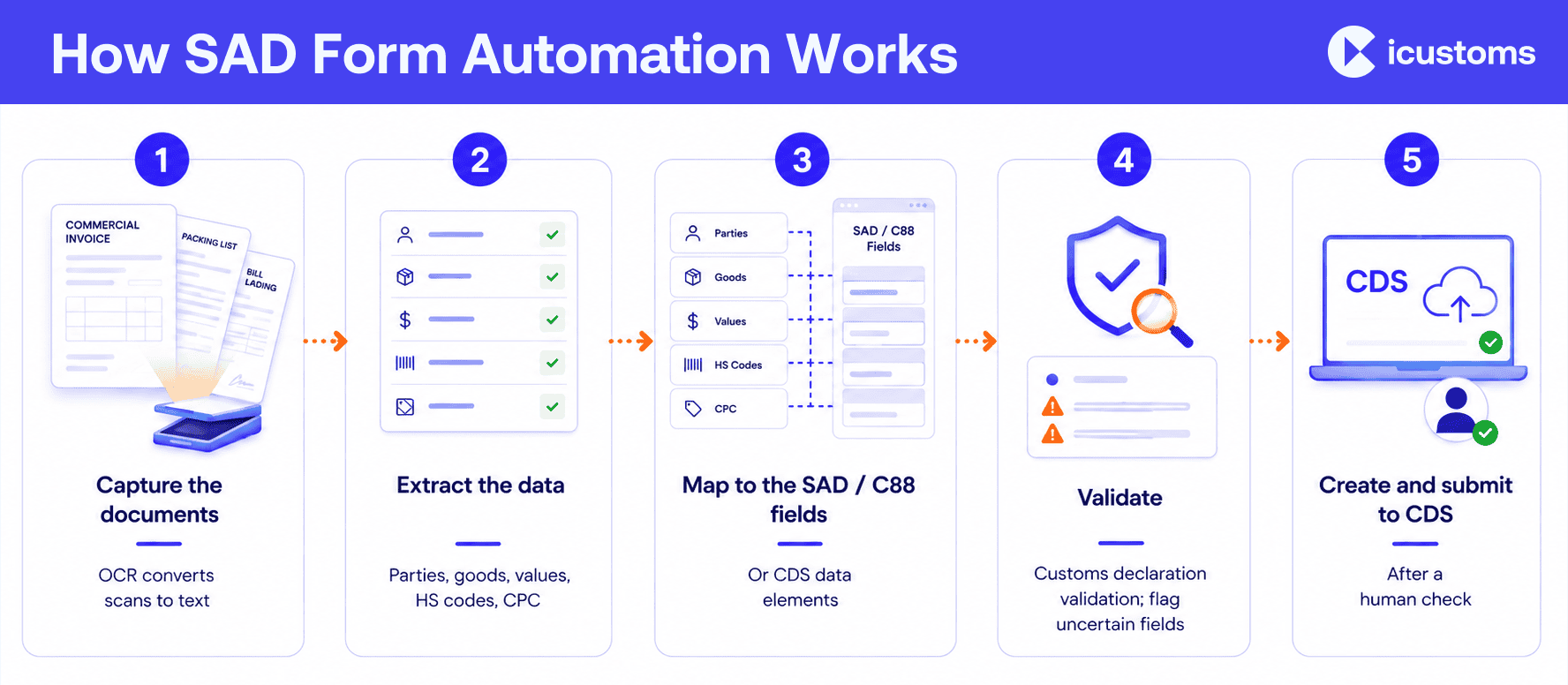
SAD form automation is built on intelligent document processing. Rather than reading documents and typing fields, the software does the reading and mapping for you. Here is the sequence.
- Capture the documents. Upload or forward the invoice, packing list, and other paperwork in any format, including scans. OCR customs software converts images into machine-readable text.
- Extract the data. AI-based field extraction pulls the parties, goods, values, and codes from the documents into structured declaration data.
- Map to the SAD fields. The software populates each SAD or C88 field, or the matching CDS data element, from the extracted data.
- Validate. Customs declaration validation checks the entry for completeness and consistency, flags anything uncertain, and applies current rules before submission.
- Create and submit. The automated declaration is prepared and can be submitted to the customs system, such as CDS, once a person confirms it.
This is how AI customs declaration software turns hours of manual entry into a quick review. A human stays in control at the final step, so you get the speed of automation with the certainty of a check.
The Business Benefits of Automating the SAD
- Faster declaration preparation, so shipments clear sooner.
- Far less manual entry, freeing declarants for higher-value work.
- Fewer customs errors, because data is validated before it is filed.
- Stronger compliance, with a full audit trail of every declaration.
- Consistency and productivity as volumes grow, without extra headcount.
What to Look for in SAD Form Software
When you evaluate SAD customs software or a wider customs declaration automation platform, check that it:
- Reads your real documents accurately, including scanned and mixed formats.
- Validates entries and flags errors before submission.
- Integrates with your customs system and ERP through an API.
- Handles both import declaration and export declaration data.
- Keeps a clear audit trail for compliance and reviews.
How iCustoms Automates SAD and C88 Declarations End to End
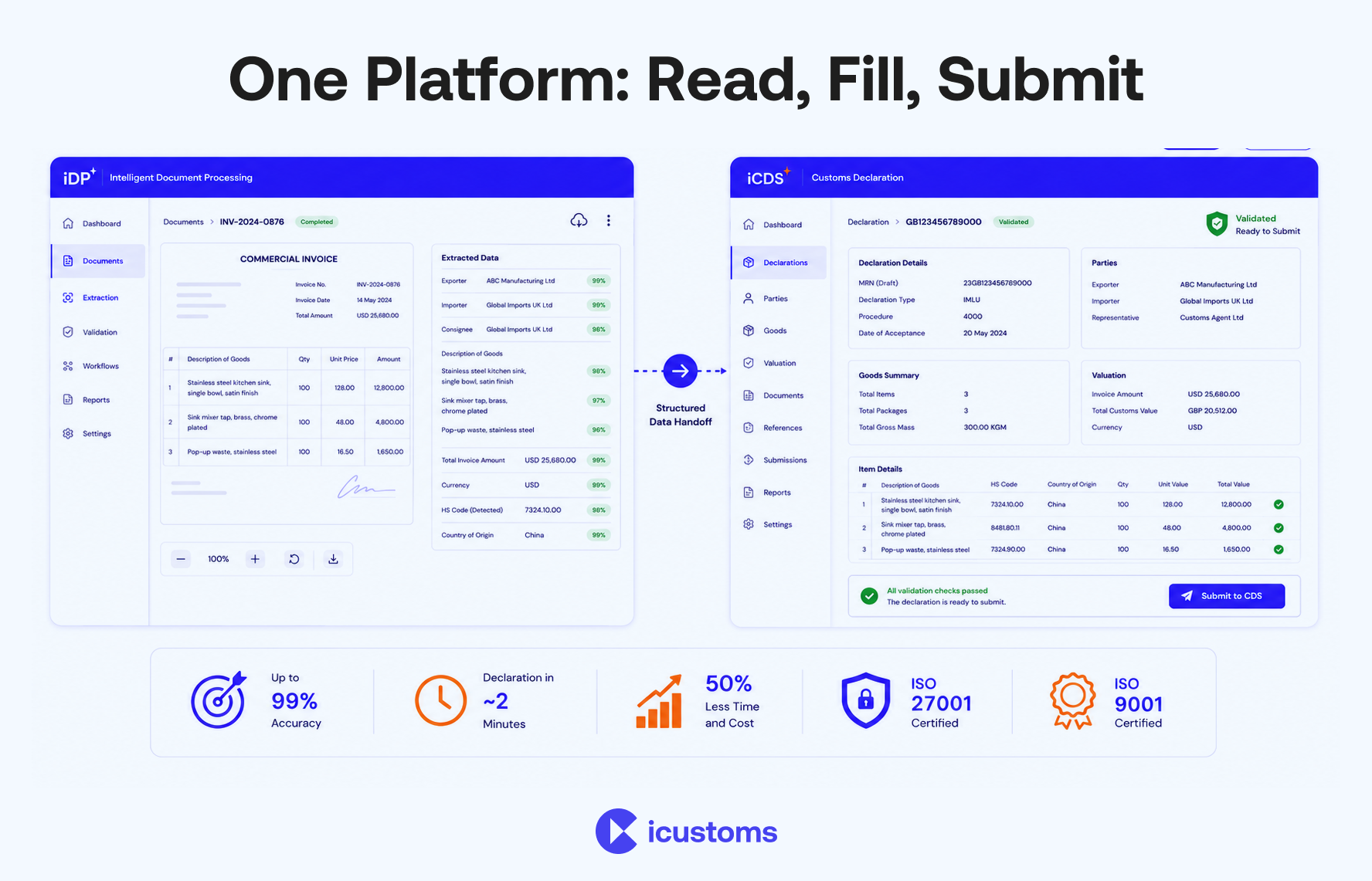
iCustoms pairs two products to complete the SAD from start to finish. Its intelligent document processing reads and validates the data from your trade documents, and iCDS for UK import and export prepares and submits the declaration to the Customs Declaration Service.
For customs teams, the practical points are:
- Extraction and auto-fill: iDP extracts data from invoices, packing lists, and waybills and pre-fills the declaration fields.
- Accuracy and validation: up to 99% accuracy, with a validation engine that flags any field under full confidence for a quick human check.
- Speed and savings: declarations in around two minutes and roughly 50% less time and cost, with data reused for repeat shipments.
- Integration and security: connects through API, EDI, or CSV, and holds ISO 27001 and ISO 9001 certification.
Frequently Asked Questions
What is a Single Administrative Document (SAD)?
The SAD is the standard customs declaration form used for imports, exports, and transit across the EU and historically the UK. It records the parties, goods, value, origin, and customs procedure for a consignment.
What is a C88 form?
The C88 is the UK name for the Single Administrative Document. A C88 customs form and a SAD form hold the same declaration data.
Is the C88 form the same as the SAD?
Yes. C88 is simply the UK term for the SAD. Under the UK Customs Declaration Service, the data is now submitted electronically rather than on the paper C88 layout.
Who completes the SAD form?
A customs declarant, customs broker, or clearing agent usually completes it for the importer or exporter. Freight forwarders and in-house customs teams complete them too.
Can a SAD form be automated?
Yes. SAD form automation software reads your trade documents, extracts the data, fills the fields, validates them, and prepares the declaration for submission, with a person confirming the final entry.
What software can complete a SAD form?
AI customs declaration software such as iCustoms uses intelligent document processing to extract data and iCDS to prepare and submit the declaration to the Customs Declaration Service.
You may also like:
Subscribe to our Newsletter
About iCustoms
iCustoms is an all-in-one solution helping businesses automate customs processes more efficiently. With AI-powered and machine-learning capabilities, iCustoms is designed to streamline your all customs procedures in a few minutes, cut additional costs and save time.
Struggling with Customs Declaration Data Entry?

Auto-fill SAD and CDS fields with up to 99% accuracy