
Customs Invoice Automation: How to Automate Billing for Third-Party Customs Services
- John Hall
- Customs Specialist at iCustoms.ai
Customs brokers and agents have automated a lot of the work of filing declarations. Billing for that work is often still manual: someone exports a list of declarations, looks up each customer’s rates, builds invoices in a separate tool and chases payment by email.
Customs invoice automation closes that gap. Every declaration you file for a customer becomes a priced charge, every charge lands on the right invoice, and the invoice moves through approval and payment without being re-keyed. This guide shows how to get there, step by step, and how iInvoice by iCustoms does it inside the platform where your declarations are made.
This guide covers:
- What customs invoice automation means, and how it differs from automating declarations
- A six-step framework to automate billing for third-party customs services
- A worked example of one month’s billing for a customer with three branches
- What to set up first, and the decisions to make before you go live
New to the topic? Start with our guide to customs invoice software.
What is customs invoice automation?
Customs invoice automation is the use of software to bill customers for customs work without manual data entry. When a customs broker or agent files a declaration for a customer, the automation records that usage, applies the customer’s agreed price, adds the charge to the right invoice and tracks the invoice until it is paid.
It is worth separating three things that often get mixed up in search results:
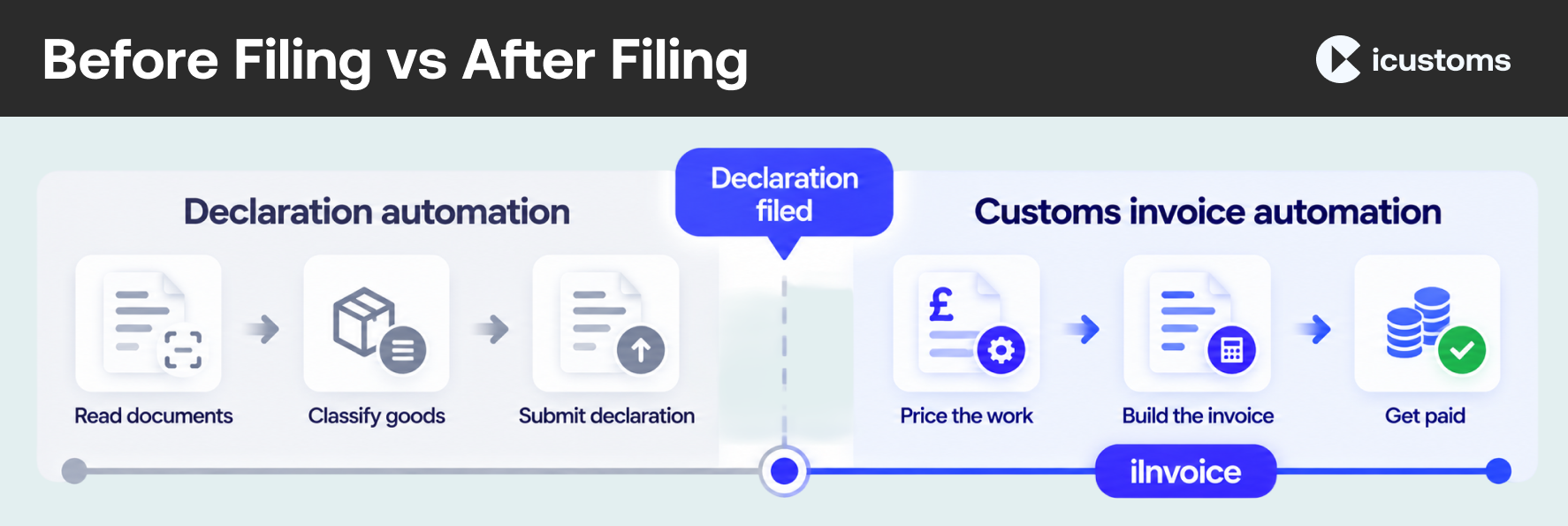
- Declaration automation happens before filing. AI reads commercial invoices and packing lists, suggests commodity codes and submits the declaration. Our guide on how to automate TSS declarations covers this stage.
- Third-party payer billing in shipping usually means charging duties and taxes to someone other than the shipper, depending on the Incoterms agreed.
- Customs invoice automation, the subject of this guide, is how a customs service provider bills its own customers for the declarations and services it provides.
Manual vs automated customs invoicing
Here is where time goes in a typical manual billing cycle, and what changes when it is automated.
| Stage | Manual | Automated with iInvoice |
|---|---|---|
| Capturing usage | Declarations exported or copied into a spreadsheet | Usage from iCustoms recorded against each customer as declarations are filed |
| Pricing | Each customer’s rates looked up and applied by hand | Rate cards apply the agreed rules automatically |
| Exceptions | Missing rates noticed late, if at all | Unpriced charges flagged as they appear |
| Invoice build | Lines typed into a separate invoicing tool | Priced usage comes in as invoice lines, grouped how you choose |
| Approval | Emails and spreadsheets passed around | Draft, pending approval and approve in one place |
| Sending | PDF saved and attached manually | Approve and email in one step |
| Payment follow-up | Manual chasing from a list | Payment statuses, overdue invoices and reminders |
| Regular customers | Invoices recreated every month | Repeating invoices on a schedule |
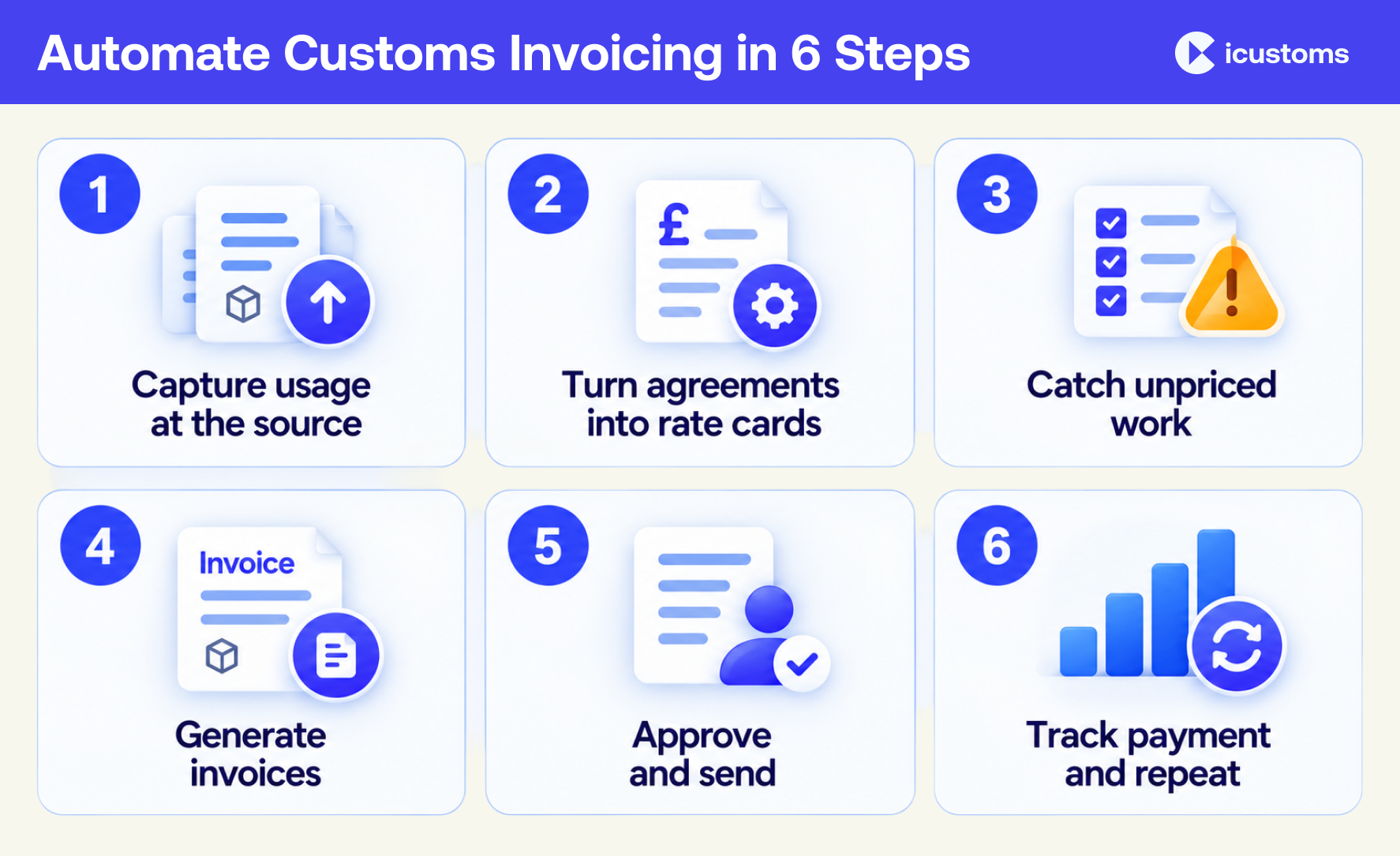
How to automate customs invoicing in six steps
Step 1: Capture billable usage at the source
Automation is only as good as its starting point. If billing begins with someone exporting declarations into a spreadsheet, every later step inherits that manual work. The goal is for each declaration to be recorded as billable usage against the right customer the moment it is filed.
In iInvoice: declarations and billing sit on the same platform. Your iCustoms modules are already listed as billable products, so their usage arrives ready to price. You add your own products only for extra services you sell, and you can add manual lines for one-off charges.
Step 2: Turn every customer agreement into a rate card
Most billing errors in customs services come from pricing, not arithmetic. Each customer has its own agreement, and agreements change. Write them down once as rules, and let the software apply them.
In iInvoice: a rate card sets the price for a product for all customers (your default), one customer or a customer group, with optional start and end dates, a tax rate and a linked discount. Pricing rules include a fixed fee on every declaration, a fee for each item, a price per unit or per batch, tiered prices, a set fee per band, an amount that depends on the job, and a fixed fee that applies only when a condition matches. Rules used across many cards can be saved to a shared library, with an override price for any customer who pays differently.
Step 3: Catch unpriced and unbilled work
An automated process needs an exceptions queue. A declaration with no matching price shouldn’t quietly disappear from the invoice; it should be flagged so someone can decide what to charge.
In iInvoice: any usage with no matching rate card is marked as unpriced. Add or extend a rate card and the charge is priced automatically. Unbilled usage shows every priced charge not yet invoiced, by customer, and by how long it has been waiting, so nothing ages out of sight.
Step 4: Generate invoices from priced usage
Once usage is priced, building an invoice should take a choice, not a morning. Choose the customer, and their priced usage comes in as invoice lines.
In iInvoice: group lines per product, per declaration or per item. The total is the same whichever you pick. The Explain view adds a breakdown of each declaration, showing how every amount was reached, which answers most customer queries before they are asked. You can add your own rows, attach supporting files and use the Freight and Customs Invoice template designed for billing declarations and filings.
Step 5: Add approval controls and send
Automation should remove typing, not judgement. Keep a review step before an invoice is final, especially for large customers or new rate cards.
In iInvoice: save and close keeps an invoice as an editable draft. Submit it for approval if someone else signs invoices off. Approve and email approves the invoice, gives it its number and sends it to the customer, or you can approve only, get a link or print the PDF. Once approved, an invoice is locked, which keeps your records consistent.
Step 6: Track payment and automate repeat billing
Billing isn’t finished until the invoice is paid. Automate the follow-up and the invoices that repeat every month.
In iInvoice: invoices move through draft, pending approval, awaiting payment and paid, with overdue invoices shown in red. Payment reminders can be switched on or off. For regular customers, repeating invoices run on a schedule you set, with payment terms and a choice of saving each one as a draft or approving it. You can also import invoices using a template and export your invoice list. Ask the iCustoms team which accounting connections are available for your account.
Worked example: one month of billing for a customer with three branches
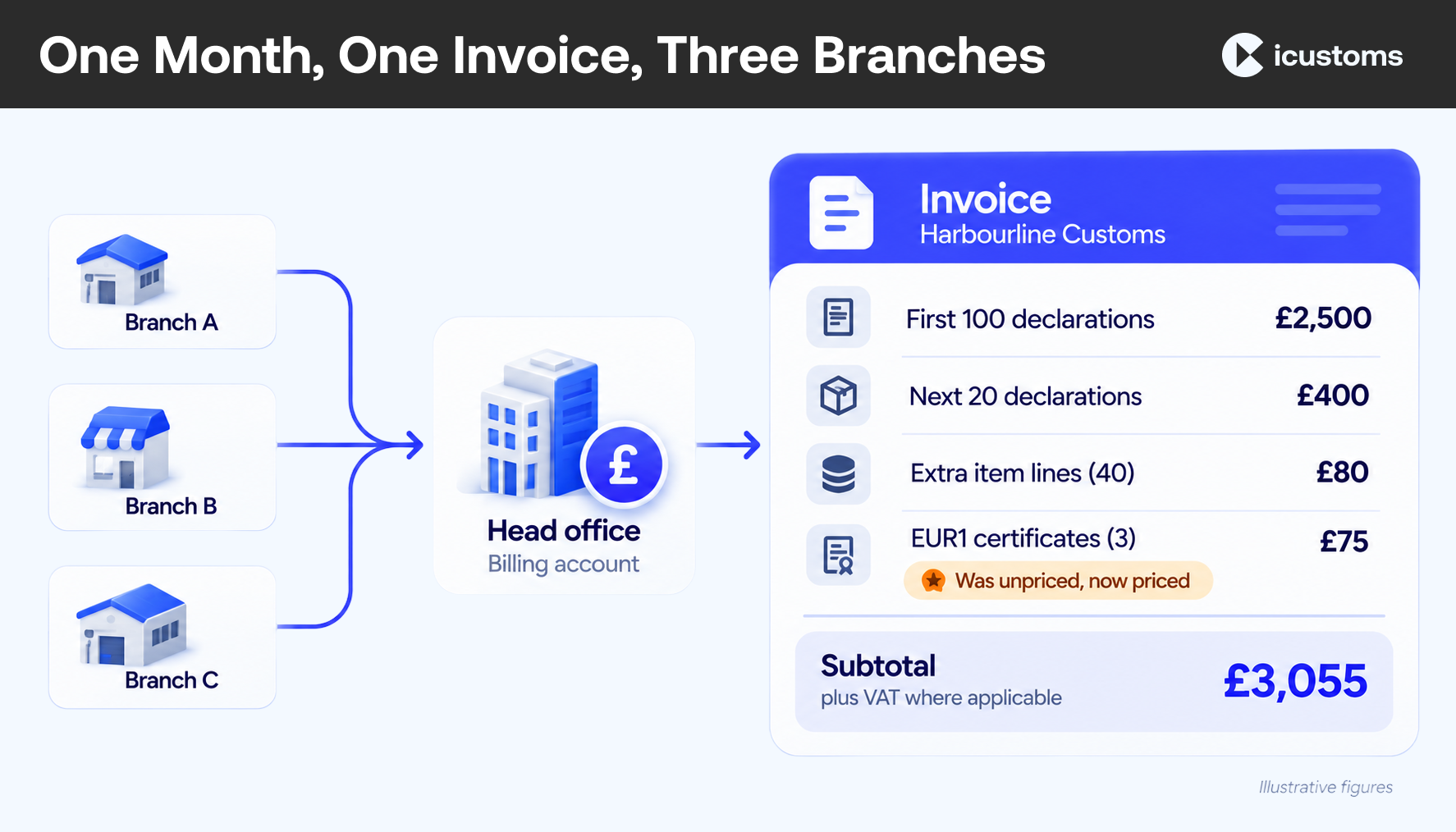
Harbourline Customs files import declarations for Northgate Retail, which has three branches. Northgate’s head office pays for all of them. Here is how the month runs in iInvoice:
- Set up once. Northgate’s three branches are contacts, linked to a billing account for the head office. Northgate’s rate card charges £25 per import declaration for the first 100 declarations in a month and £20 after that, plus £2 for each item line above five.
- Usage builds up. Over the month, the team files 120 import declarations across the three branches. Each one is recorded and priced automatically.
- An exception appears. Three shipments needed an EUR1 certificate, which isn’t on Northgate’s rate card. Those charges show as unpriced instead of being missed.
- The gap is closed. The billing lead adds a £25 EUR1 charge to the rate card. The three charges are priced automatically.
- One invoice is drafted. At month end, the head office invoice is built from priced usage: £2,500 for the first 100 declarations, £400 for the next 20, £80 for 40 extra item lines and £75 for three EUR1 certificates. That is £3,055, plus VAT where it applies.
- Approved and sent. The finance manager reviews the draft with the per-declaration breakdown, approves it and emails it in one step. A reminder follows if it isn’t paid by the due date.
Nobody re-keyed a declaration, looked up a rate or typed an invoice line. The one decision a person made was what to charge for the EUR1 certificate, which is exactly the kind of judgement that should stay with your team.
What to set up before you automate
- Organisation details and VAT number. These print on every invoice, so add them first. HMRC lists what a VAT invoice must include in its guidance on what invoices must include.
- Base currency. It defaults to pounds sterling and locks once your first invoice is approved, so choose carefully.
- Invoice numbering. Set a prefix and the number of digits before you approve your first invoice.
- Your default rate cards. An All customers card for each product you bill means nothing goes unpriced while customer-specific cards are added.
- Customer groups and billing accounts. Group customers who share a price, and link branches to the account that pays.
- Who approves. Decide which invoices need a second person before they are sent.
- Your baseline. Record how long a billing cycle takes today and how many queries invoices generate, so you can measure the change.
Common mistakes when automating customs billing
- Automating a messy price list. Clean up and agree rates first; automation applies whatever you give it, consistently.
- Skipping the default rate card. Without one, every new customer’s first declarations show as unpriced.
- Treating unpriced charges as noise. They are billable work waiting for a decision. Review them every week, not at month end.
- Removing the human review. Keep approval for large or unusual invoices, at least until the rate cards are proven.
- Changing everything at once. Start with a few customers, compare against your baseline, then widen.
Why automate customs invoicing with iInvoice
- Starts from the declaration: usage from iCustoms is captured and priced without exports or re-keying
- Pricing that matches your agreements: eight types of pricing rule, rate cards by customer or group, effective dates and a shared rule library
- Exceptions you can see: unpriced charges flagged, and unbilled usage shown by customer and by age
- Invoices customers understand: lines per product, declaration or item, with a per-declaration breakdown
- Control where it matters: drafts, approval, numbering that locks on approval, payment statuses and reminders
- Repeat billing handled: repeating invoices on your schedule
- Trusted platform: iCustoms is ISO 27001:2022, ISO 9001:2015 and Cyber Essentials certified, and recognised by HMRC and Irish Revenue
Your declarations are already in iCustoms. iInvoice turns them into invoices, so your team spends its time on customs work, not on billing admin.
Why choose iInvoice by iCustoms
- Built for customs work: prices declaration usage, not generic line items
- Inside iCustoms: declarations and billing on one platform, with no re-keying
- Flexible pricing: eight types of pricing rule, rate cards by customer or group, effective dates and shared rules
- Nothing slips through: unpriced charges and unbilled usage are visible by customer and by age
- Clear invoices: group lines your way and show a per-declaration breakdown
- In your control: drafts, approval, payment tracking, reminders and repeating invoices
- Trusted: iCustoms is ISO 27001:2022, ISO 9001:2015 and Cyber Essentials certified, and recognised by HMRC and Irish Revenue
Your team already does the customs work. iInvoice makes sure every declaration is priced, invoiced and paid.
Frequently Asked Questions
What is customs invoice automation?
Customs invoice automation means billing the declarations you file for customers without re-keying them. Declaration usage is captured at the source, priced by rate cards and turned into invoices that go through approval, sending and payment tracking in one workflow.
How is billing automation different from automating customs declarations?
Declaration automation happens before filing: reading documents, classifying goods and submitting the declaration. Billing automation happens after filing: pricing that work and invoicing the customer for it. iInvoice handles the billing stage inside iCustoms.
Can customs invoicing be fully automated?
Most of it can. Capturing usage, applying agreed rates and building invoice lines can run automatically. Approval should stay with a person, because an approved invoice is numbered and locked. iInvoice lets you choose whether repeating invoices are saved as drafts or approved.
How do you automate pricing when every customer pays differently?
Turn each agreement into a rate card. Rate cards can apply to all customers, one customer or a customer group, between set dates, using rules such as fixed fees per declaration, per-item fees and tiered prices.
What happens to declarations that don't match a rate card?
In iInvoice they are flagged as unpriced rather than left off the invoice. Once you add or extend a rate card to cover them, they are priced automatically.
Can I bill a head office for all of its branches?
Yes. Billing accounts link several contacts to one payer, so a head office can receive one invoice for work done for its branches.
Does iInvoice connect to my accounting software?
You can import invoices with a template and export your invoice list from iInvoice. Ask the iCustoms team which accounting connections are available for your account.
Where should I start with customs invoice automation?
Start with your rate cards. Put your default prices and your largest customers' agreements into rate cards, check unbilled usage for anything unpriced, then run one billing cycle for a few customers before widening.
You may also like:
Billing That Runs Itself

Price, invoice and track every declaration automatically.
Subscribe to our Newsletter
About iCustoms
iCustoms is an all-in-one solution helping businesses automate customs processes more efficiently. With AI-powered and machine-learning capabilities, iCustoms is designed to streamline your all customs procedures in a few minutes, cut additional costs and save time.
Your Rate Cards Do the Pricing
Set each customer’s rates once and bill without re-keying.