
Third-Party Customs Billing: How to Declare and Invoice for Your Clients in One Platform
- John Hall
- Customs Specialist at iCustoms.ai
Hauliers, couriers, freight forwarders and customs agents file customs declarations for their clients every day. Filing is only half the job. Every declaration is also a service you need to price, invoice and get paid for, and that is where many teams still fall back on spreadsheets.
iCustoms brings both halves together. AI prepares and checks the declarations you file for clients, and iInvoice turns each one into a priced charge and an invoice, on the same platform. No exports, no re-keying, no missed charges.
Third-party customs declaration explained
A third-party customs declaration is filed by one business on behalf of another. The business moving or handling the goods, or a specialist it appoints, declares them to customs for the importer or exporter. The client gets compliant clearance; the filer earns a fee for every declaration.
| If you are a… | You file declarations for… | What you need to bill |
|---|---|---|
| Haulier or road carrier | Shippers whose loads you move across borders | A fee per declaration, often bundled with the haulage job |
| Courier or parcel operator | Senders of high volumes of smaller consignments | Low per-item fees at high volume, often tiered |
| Freight forwarder | Importers and exporters you move freight for | Clearance fees plus extras such as inspections |
| Customs agent or broker | Many clients, each on its own agreement | Customer-specific rates, groups and branch billing |
Why third-party customs billing breaks down
Declarations are fast and digital. Billing often isn’t. A team exports last month’s filings, matches each to a client, looks up that client’s agreed rates, adds extra-line and inspection fees by hand, and builds invoices in a separate tool. Every step is a chance to under-charge, delay an invoice or field a query. And the more clients you serve, the bigger that gap grows.
How iCustoms automates third-party customs declarations and billing
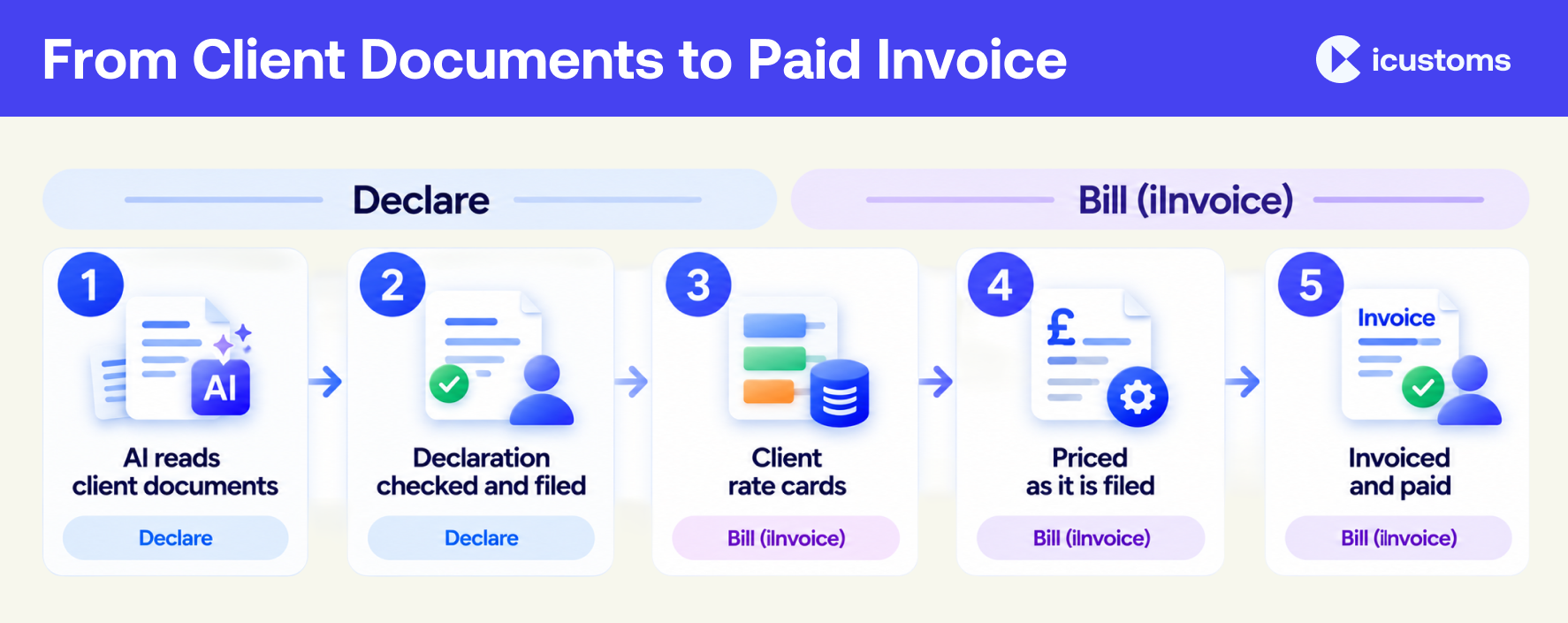
1. Capture client documents with AI
Clients send commercial invoices, packing lists and spreadsheets in every format. iCustoms uses intelligent document processing (iDP) to read them and pull out the parties, goods, values and weights, so nobody keys them in.
2. Build, check and file the declaration
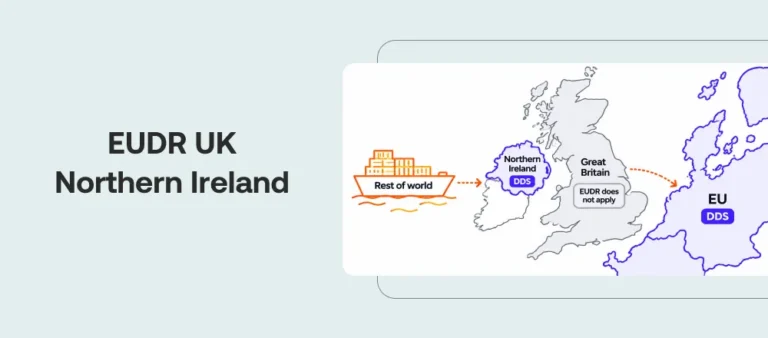
The extracted data becomes a draft declaration. AI suggests commodity codes, built-in validation checks every field, and your team approves before submission. For GB to Northern Ireland movements, iTSS prepares, checks and submits TSS declarations in around 90 seconds.
3. Digitise every client contract as a rate card
Automation fails on unstructured prices. In iInvoice, each agreement becomes a rate card for all clients, one client or a client group, with dates it applies between. Typical rules for third-party customs services include:
- A base clearance fee per declaration type, such as import, export or transit
- A fee for each item line above an agreed limit
- Tiered or banded prices for high-volume clients
- A fixed fee only when a condition matches, such as a physical inspection or a rush filing
4. Price every declaration as it is filed
Because declarations are filed in iCustoms, each one is recorded as billable usage against the right client and priced by the matching rate card. Anything without a price is flagged as unpriced instead of slipping off the invoice. Add or extend a rate card and it prices automatically.
Example: a declaration with 15 item lines, for a client paying £50 for up to five lines plus £5 per extra line, is priced at £100. If it was selected for a physical inspection and the client’s rate card has a £60 inspection fee, the charge becomes £160, with no one doing the maths.

5. Invoice, approve and get paid
At billing time, each client’s priced usage comes in as invoice lines, grouped per product, per declaration or per item. The Explain view shows how every amount was reached, and you can attach supporting files. Approve and email in one step, track payment status, send reminders and run repeating invoices for regular clients. A head office can pay for all its branches through one billing account.
For a deeper look at this stage, read our guides to customs invoice software and customs invoice automation.
One platform vs a patchwork of tools
| Separate filing and billing tools | iCustoms ecosystem | |
|---|---|---|
| Client documents | Re-keyed into the filing system | Read by AI |
| Declarations | Filed, then exported for billing | Filed and recorded as billable usage |
| Pricing | Looked up per client | Applied by rate cards automatically |
| Missed charges | Found late, if at all | Flagged as unpriced straight away |
| Invoices | Built in another tool | Built from priced usage, with a per-declaration breakdown |
| Payment | Chased manually | Statuses, reminders and repeating invoices |
Why customs service providers choose iCustoms
- One platform, end to end: documents, declarations and invoices in the same place
- AI where it saves time: document capture, classification suggestions and field checks
- Billing that matches your contracts: eight types of pricing rule, client and group rate cards and conditional fees
- Every filing billed: unpriced charges and unbilled usage are visible by client and by age
- You stay in control: team review before submission and approval before invoices are numbered and sent
- Trusted: ISO 27001:2022, ISO 9001:2015 and Cyber Essentials certified, and recognised by HMRC and Irish Revenue
You already do the customs work for your clients. Make sure every declaration you file is priced, invoiced and paid.
Frequently Asked Questions
What is a third-party customs declaration?
A customs declaration filed by one business on behalf of another, such as a haulier, courier, freight forwarder or customs agent declaring goods for a client. The filer usually charges the client for that service.
Can hauliers and courier companies file customs declarations for clients?
Yes. Many hauliers, couriers and parcel operators file declarations for the businesses whose goods they move. iCustoms gives them AI tools to prepare, check and submit those declarations, and iInvoice to bill for them.
How do I automate billing for customs declarations?
Put each client agreement into rate cards, file declarations on a platform that records them as billable usage, and let the software price that usage and build the invoices. iInvoice does this inside iCustoms.
Can I charge extra for inspections or additional item lines?
Yes. iInvoice pricing rules include a fee for each item, tiered and banded prices, an amount that depends on the job, and a fixed fee that applies only when a condition matches.
Does iCustoms connect to my accounting software?
You can export your invoice list and import invoices with a template. Ask the iCustoms team which accounting connections are available for your account.
You may also like:
Declare and Invoice in One Place

File client declarations and bill them on one platform.
Subscribe to our Newsletter
About iCustoms
iCustoms is an all-in-one solution helping businesses automate customs processes more efficiently. With AI-powered and machine-learning capabilities, iCustoms is designed to streamline your all customs procedures in a few minutes, cut additional costs and save time.
Every Filing Priced and Paid
Bill inspections, extra lines and every client declaration.