
iClassification Workflow: AI-Powered HS Code Classification
Have you ever experienced delays, penalties, or unexpected duties when shipping products across borders? One of the major causes of these problems is the misclassification of HS codes.
The Harmonised System (HS) code is a worldwide recognised classification system that governs customs charges, VAT, and import/export restrictions for goods. Choosing the right HS code is crucial as it can affect taxes, fines, and shipment seizures.
Different countries have different rules for product classifications, and misclassification can lead to legal issues. But, with thousands of HS codes and intricate rules, how can you be sure you’re selecting the correct one?
This is where iClassification (iCustoms’ AI-driven HS code finder) comes in.
Understanding the HS Code structure
Before we go into the workflow, let’s quickly grasp how HS codes are structured:
- First 2 digits (Chapter): Identifies the broad category of goods
- Next 2 digits (Heading): Narrows down the classification
- Next 2 digits (Subheading): Defines the product in more detail
- Additional digits (if applicable): Country-specific extensions for tariffs and taxes
For instance, the HS number 6403.91 refers to leather footwear.
- 64: Footwear
- 03: Leather material
- 91: Type of sole and usage
iClassification Workflow: Find out HS codes in simple steps
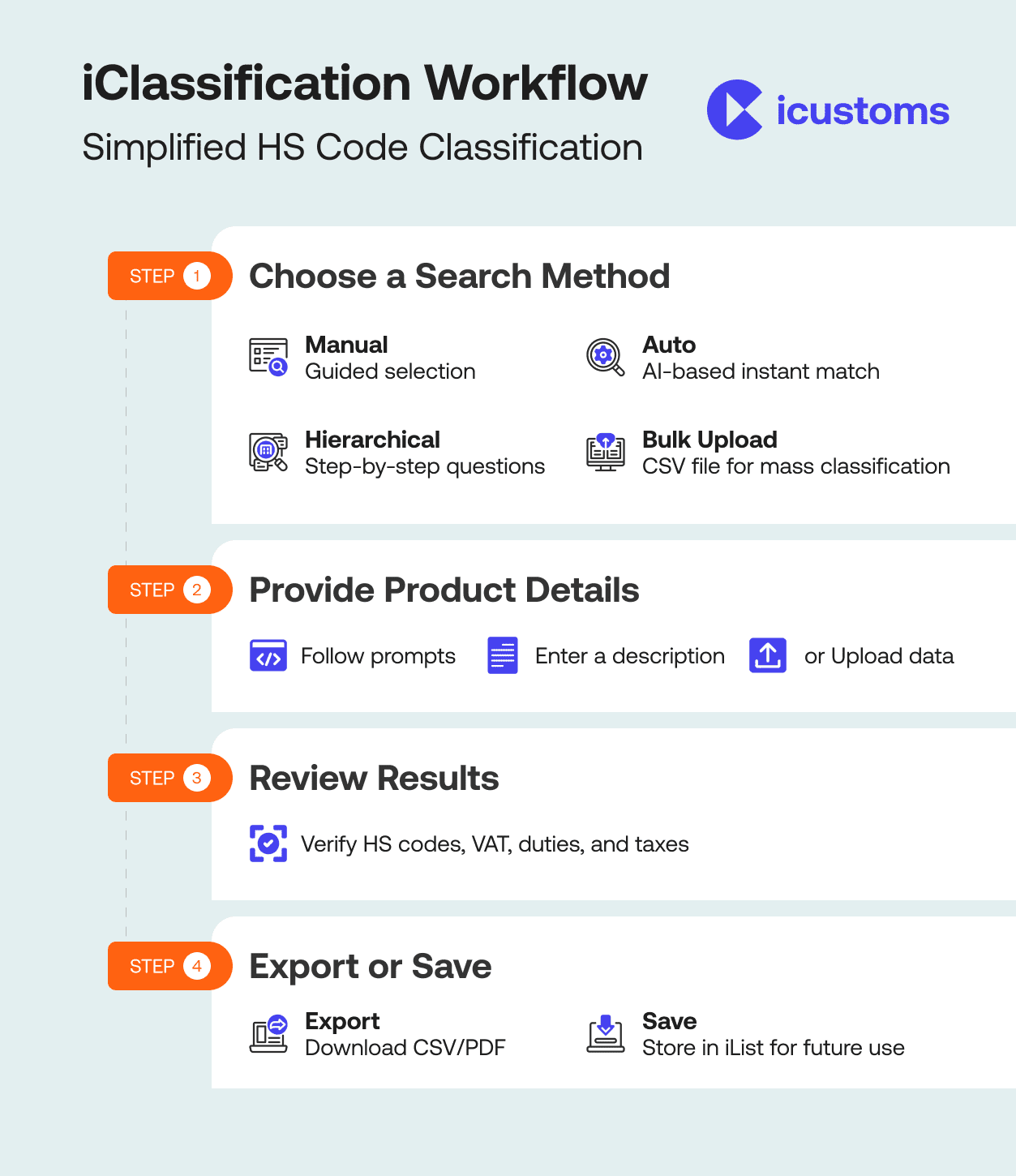
Step 1: Gather the required information
To get started, ask yourself, “What is the simplest way for me to describe my products?” Depending on your response, choose one of these four intuitive methods:
1. Manual search
This option is ideal if you like a methodical, guided approach. Our system will help you refine the classification by guiding you through a sequence of prompts and categories.
For example, you may begin by selecting the product type (e.g., “apparel”), then define features such as material (e.g., “leather”) and purpose (e.g., “footwear”). This method ensures accuracy and is suitable for those who are new to HS codes or wish to gain practical experience.
2. Auto search
In this option, simply enter a description of your products (e.g., men’s leather shoes) for quick and easy results. Our powerful AI engine will analyse your input and immediately recommend the most appropriate HS code. This strategy is quick, simple, and ideal for clients who require immediate answers without having to go through many steps.
3. Hierarchical search
Consider this procedure to be a chat with an expert who asks specific questions to help you find the correct HS code.
This feature will ask you a series of questions about your product. Each question adds to the preceding one, gradually improving the classification. This strategy is best suited for complex or speciality items that demand precision.
4. Bulk upload
Managing several products? Save time by uploading a CSV file with product names, descriptions, quantities, and other important information.
Our system will process all of your items at once and assign the appropriate HS codes in bulk. This strategy is particularly valuable for organisations with vast catalogues or regular shipments, as it ensures inventory efficiency and uniformity.
Step 2: Provide the product details
Once you’ve chosen your method, provide the following information:
- For manual search: Begin by selecting options based on prompts such as product type, material, purpose, etc. The system refines the search as you progress.
- For auto search: Enter a precise and brief description of your goods. The more exact the description is, the more accurate the match!
- For bulk upload: Create a CSV file with columns such as product name and description. Then simply upload the file and sit back while we handle the rest.
- For hierarchy search: Answer each question carefully. Each response gets you closer to the correct HS code.
Step 3: Review the results
After you provide your information, our system will provide the accurate HS codes, as well as the applicable VAT, duties, and taxes. Take a moment of your time to review the given HS codes.
Step 4: Export or save your data.
Now that you have your HS codes and related information, here’s how you can proceed:
Export: Download the results as a CSV or PDF file for easy documentation or sharing with stakeholders.
Save: Keep the data in your iCustoms account for future use or updates.
To save the data, you can use our iList product. It saves your goods, their descriptions, and any other relevant information, which can later be exported from iList with just one click.
Furthermore, iCustoms’ iClassification tool extends beyond just finding standard HS codes; it also gives HS codes for controlled and regulated items. With iClassification, you can confidently categorise any sort of product, including those subject to stringent regulatory controls.
Frequently Asked Questions
How are HS codes structured and what do the different digit groups represent?
An HS code consists of at least six digits organised into three groups. The first two digits identify the broad product chapter, the next two digits define the heading within that chapter, and the final two digits specify the subheading. Many countries add further digits beyond six for national tariff purposes. For example, HS code 6403.91 indicates footwear (64), made from leather (03), with a specific sole type and usage profile (91).
What are the four ways to find an HS code using iClassification?
iClassification offers four search methods to suit different needs. Manual search guides users through a series of prompts and category selections, which is suitable for those new to classification. Auto search analyses a text description and returns the best-matching code instantly. Hierarchical search asks progressive questions to narrow down complex or specialised products. Bulk upload accepts a CSV file containing multiple product names and descriptions, assigning HS codes to all items simultaneously.
How does iClassification's auto search work and what kind of product description produces the best results?
iClassification's auto search uses an AI engine to analyse a product description entered by the user and match it to the most appropriate HS code. The more precise and specific the description, the more accurate the result. For example, entering 'men's leather ankle boots with rubber sole' produces a more reliable match than entering 'shoes.' Auto search is the fastest method and is best suited to standard products with straightforward characteristics that are easy to describe in a single phrase.
When is the bulk CSV upload the most efficient option for HS code classification?
Bulk CSV upload is the most efficient option when a business needs to classify large numbers of products simultaneously, such as when building a new product catalogue, preparing for a high-volume shipment, or onboarding a new supplier's inventory. By uploading a CSV file containing product names, descriptions, and quantities, iClassification processes the entire list at once and returns HS codes for every item, removing the need to classify each product individually and reducing time significantly.
How does the hierarchical search method classify complex or specialised products?
The hierarchical search method works by asking users a progressive series of questions, with each answer refining the classification further. For example, a question about product type may be followed by questions about material composition, intended use, or technical specifications. This step-by-step approach is particularly effective for goods that are difficult to describe in a single phrase, including highly regulated, specialised, or multi-component products that require precise classification to avoid incorrect duty assessments or shipment holds.
What information does iClassification return alongside the HS code after a classification search?
After completing a classification search, iClassification returns the matched HS code alongside applicable VAT rates, import duties, and taxes for the relevant jurisdiction. Users can export this information as a CSV or PDF file for documentation, sharing with customs brokers, or inclusion in declarations. Results can also be saved to the user's iCustoms account via the iList product, which stores goods descriptions and related data so they can be retrieved and exported again with a single click.
Can iClassification find HS codes for controlled or regulated goods as well as standard products?
Yes. iClassification provides HS code classification for both standard goods and controlled or regulated items subject to specific trade restrictions, licensing requirements, or government approvals. This includes goods requiring additional documentation or permits before they can legally be imported or exported. By covering regulated product categories within the same four-step workflow, iClassification enables businesses to manage compliance for standard and restricted goods through a single AI-powered classification tool without switching between systems.
You may also like:
Simplify Customs with our Powerful Customs Management Software

Automate declarations, track shipments, & ensure compliance.
About iCustoms
iCustoms is an all-in-one solution helping businesses automate customs processes more efficiently. With AI-powered and machine-learning capabilities, iCustoms is designed to streamline your all customs procedures in a few minutes, cut additional costs and save time.
Simplify Customs with our Powerful Customs Management Software
Automate declarations, track shipments, & ensure compliance.