
IDP Software for Enterprises: How to Choose, Compare & Buy the Right Platform
- John Hall
- Customs Specialist at iCustoms.ai
IDP software for enterprises uses artificial intelligence to read, sort, and pull data from business documents at scale, then send that data straight into your other systems. To choose the right platform, most enterprises weigh six things: accuracy on their real documents, how well it fits existing systems, security and compliance cover, how the vendor prices the service, the quality of support, and how quickly the tool pays for itself. This guide to IDP software for enterprises walks through each step so you can compare vendors fairly and buy with confidence.
Large organisations trading across the UK, EU, and Northern Ireland handle thousands of invoices, packing lists, waybills, and customs documents every week. Doing that work by hand is slow, and small errors add up fast, especially where customs and trade compliance rules apply.
That is why more customs and trade compliance leaders, supply chain and logistics directors, and operations managers are turning to intelligent document processing software. Enterprise document automation is no longer a nice-to-have; it is how large teams in manufacturing, automotive, pharmaceuticals, food and beverage, retail, ecommerce, freight forwarding, and customs brokerage keep pace with rising document volumes. The hard part is not deciding whether to automate. It is picking a platform that suits how your business actually works.
What Is IDP Software for Enterprises?
IDP software for enterprises is a tool that captures a document, works out what type it is, extracts the key fields, checks the data, and passes it on. It combines several AI methods to do this: optical character recognition to read text, natural language processing to understand meaning, and machine learning to improve accuracy over time.
Also called enterprise intelligent document processing, this technology is built for scale. Good enterprise IDP software handles high document volumes, connects to core systems like ERP and CRM, meets strict security rules, and gives teams control over how documents are reviewed and approved. If you want the wider background first, our guide to intelligent document processing covers the basics, and this breakdown of OCR versus IDP explains why plain OCR is not enough for complex documents.
Signs Your Enterprise Needs IDP Software for Document Automation
A few clear signals tell you it is time to look at enterprise document automation by using the best IDP software:
- Your team re-keys the same data from documents into other systems every day.
- Manual entry causes errors that lead to delays, fines, or rework.
- Document volumes rise faster than you can hire people to process them.
- Staff spend hours on sorting and checking instead of higher-value work.
- You need a clear audit trail for compliance and cannot get one from spreadsheets.
If several of these sound familiar, AI document processing software will likely pay for itself quickly.
Who Should Be Involved in Choosing IDP Software for Enterprises
Buying IDP software for enterprises is rarely a one-person decision. Bringing the right people in early keeps the choice grounded and speeds up rollout.
- Customs and trade compliance leaders (Head of Customs, Compliance Manager, Global Trade Compliance Manager) confirm the tool handles customs documents and keeps you compliant across UK, EU, and Northern Ireland rules.
- Supply chain and operations leaders (Supply Chain Director, Head of Logistics, Operations Manager) judge the impact on throughput and staff workload.
- Daily users (customs brokers, declarants, documentation officers, trade compliance officers) test whether the review screen fits their real workflow.
- IT and technical buyers (CIO, CTO, solution architects, ERP and SAP consultants) check integration, security, and how the platform fits your systems.
- Executive buyers (CFO, COO, Managing Director) weigh the return on investment and the strategic case.
The EU import flow: TRACES NT, CHEDs and establishment codes
The EU side mirrors the logic with its own machinery. The operator submits the Common Health Entry Document through TRACES NT before arrival, officials at the border control post run the three checks, and the CHED reference flows into the customs declaration. One extra dependency sharpens the risk here: Part 1 of the CHED carries the establishment codes of every facility in the chain, and a single delisted supplier refuses the document before the container opens.
For exporters and importers on this route, validating codes in bulk before booking is the cheapest insurance available. iTraces checks every establishment code against the official TRACES EU database in seconds, with 99% accuracy, which is why customs agents run it as a standing pre-shipment gate.
Core Features to Look for in IDP Software for Enterprises
Not every tool marketed as intelligent document automation does the full job. Use this checklist to separate real platforms from basic capture tools.
IDP Software for Document capture and classification
Strong intelligent document processing software should accept many file types, including PDF, Word, Excel, CSV, JSON, and image formats such as JPEG and PNG. It should also sort documents automatically, telling an invoice from a packing list or a waybill without you setting up rules for each one.
IDP Software Accurate data extraction
Look for extraction that handles typed, scanned, and handwritten text, plus tables and line items. Ask each vendor for accuracy figures measured on documents like yours, not a general benchmark.
IDP Software Validation and confidence scoring
Good platforms check the data against rules, flag anything that looks wrong, and give each field a confidence score so staff only review what needs a human eye. This is the balance of AI speed and human certainty that keeps quality high.
IDP Software Human-in-the-loop review
A clear review screen lets staff correct fields, and the model should learn from those corrections so it improves with use.
IDP Software Integration
A true enterprise document processing software sends clean data into your systems through methods such as API, EDI, or CSV. Weak integration is one of the most common reasons projects stall, so read our note on connecting IDP to your ERP and workflow before you shortlist.
IDP Software Security and governance
Encryption, access control, and full audit logs are non-negotiable for enterprise data. More on this below.
How to Choose and Compare IDP Software Vendors
A structured process keeps the decision objective and easy to defend to your board.
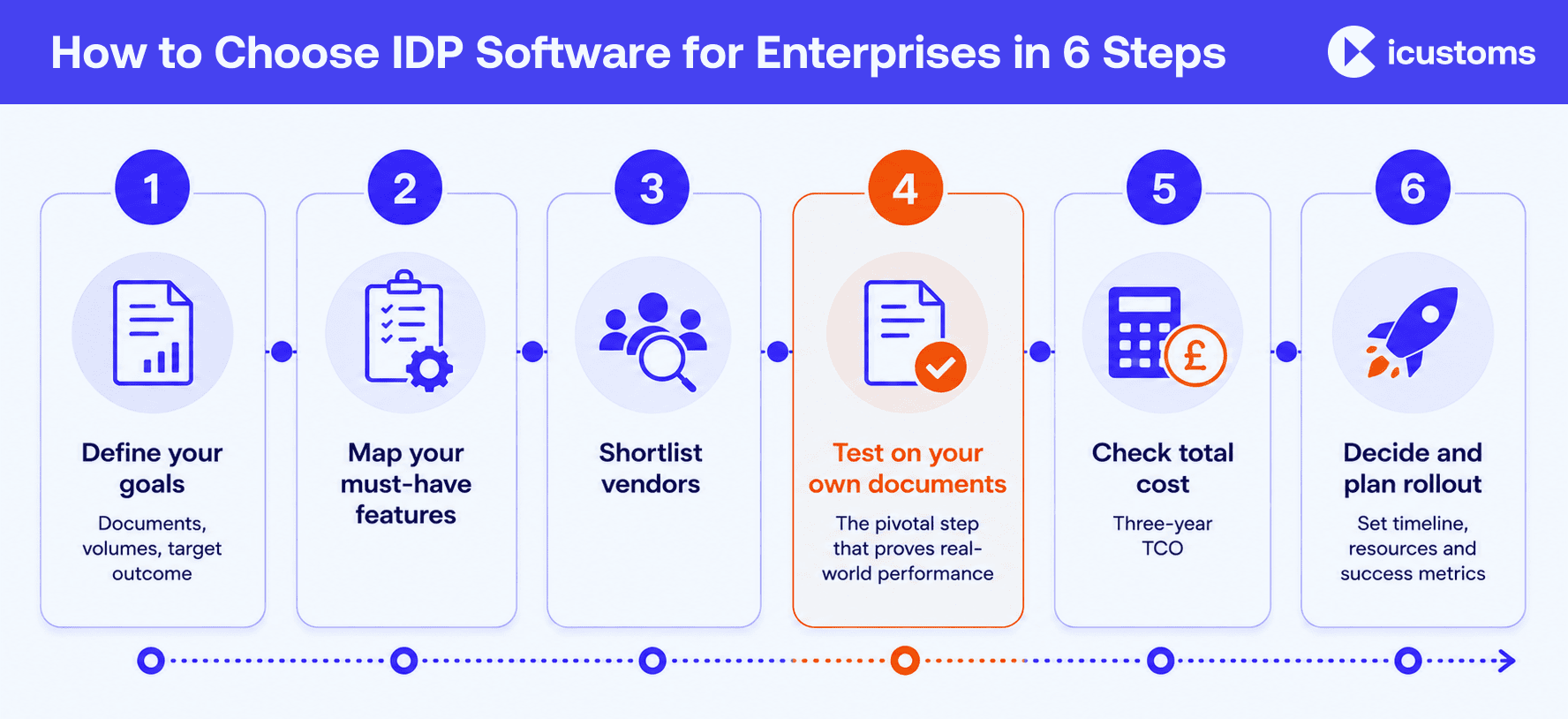
- Define your goals. List the documents you process, the volumes, and the result you want, such as faster clearance or fewer errors.
- Map your must-have features. Separate needs from nice-to-haves using the checklist above.
- Shortlist vendors. Compare features, support, and reviews. A ranked IDP software comparison is a useful starting point when you weigh IDP software vendors.
- Test on your own documents. Run a proof of concept with a real sample. Accuracy on your paperwork matters more than any demo.
- Check total cost. Include setup, training, integration, and ongoing fees, not just the headline price.
- Decide and plan rollout. Pick the platform that fits your goals, budget, and systems, then agree a clear onboarding plan.
For customs and trade teams specifically, our list of key factors when assessing IDP vendors adds detail on what to test in a trade setting.
Cloud, On-Premise, or Hybrid: Choosing Your Document Processing Platform
Where your document processing platform runs affects cost, control, and how fast you can go live.
| Model | Best For | Trade-off |
|---|---|---|
| Cloud (SaaS) | Fast setup, lower upfront costs, easy scalability, and automatic updates for cloud-based document processing platforms | Less direct control over infrastructure |
| On-premise | Organisations with strict data residency, compliance, or security requirements | Higher implementation costs and longer deployment times |
| Hybrid | Businesses that need to keep sensitive data on-site while using cloud AI capabilities | More complex to deploy, integrate, and manage |
Integration With Your Existing Systems
Enterprise IDP software delivers value only when the extracted data lands in the systems your teams already use, such as SAP, Oracle, Microsoft Dynamics, NetSuite, or a transport management system. This is the part your CIO, CTO, and solution or ERP architects will scrutinise, so ask each vendor how they connect, whether they offer a documented API, and how they handle mapping between document fields and your system fields. A platform that pushes clean data straight into your workflow behaves like enterprise automation software, not a standalone tool, and removes the manual step that causes most delays.
Security and Compliance Requirements
Because enterprise document AI often processes personal and commercial data, security cover is a core buying criterion for compliance and IT leaders, not an afterthought. For UK, EU, and Northern Ireland trade, data protection and audit requirements matter as much as speed. Check for:
- Encryption of data in transit and at rest.
- Role-based access control and detailed audit logs.
- Recognised certifications such as ISO 27001 for information security and ISO 9001 for quality management.
- Clear data residency options and GDPR alignment for personal data.
Ask vendors to show current certificates rather than take claims at face value.
Understanding IDP Pricing and Total Cost of Ownership
IDP pricing varies widely. Some vendors charge per document or per page, others by user or by module, and many combine models. To compare fairly, add up the full cost over three years:
- Licence or subscription fees.
- Setup, configuration, and integration work.
- Training and change management.
- Ongoing support and any volume overage charges.
This is where your CFO or COO will focus. The best IDP software is not always the cheapest, so judge an enterprise IDP platform on value over three years. Weigh the cost against the savings, such as staff hours returned, faster customs clearance, and errors avoided. Our note on the ROI of IDP technology shows how to build that business case.
Common Mistakes Enterprises Make When Buying IDP
- Choosing on headline accuracy alone, without testing on their own documents.
- Underestimating integration effort with core systems.
- Ignoring how staff will review and correct flagged data day to day.
- Forgetting to plan for rising document volumes.
- Comparing only price, not the full cost and the value returned.
How iCustoms Approaches IDP Software for Enterprises
iCustoms built its intelligent document processing platform for trade and customs teams that handle high volumes of complex paperwork. Its approach to intelligent document automation combines AI speed with a human review step, and it reports up to 99% accuracy in data extraction and validation while cutting processing time and costs by around 50%.
Several built-in tools support the enterprise features covered above:
- iCheck detects and classifies documents such as invoices, packing lists, and waybills using structure and context, not keyword search.
- iCombine merges data from several documents into one clean record.
- iTeach and iMarker let staff train the AI in real time and highlight key fields for it to remember.
- iList stores validated data so repeat shipments can reuse it, removing repeated entry.
- A validation engine checks completeness, removes duplicates, and flags any field scoring under 100% for a quick human check.
It accepts formats such as PDF, CSV, JSON, Word, and image files, connects through API, EDI, or CSV, and holds ISO 27001 and ISO 9001 certification. Where goods need tariff codes, it works alongside iClassification for HS code accuracy.

See how IDP software for enterprises works on your documents.
Watch a demo with the iCustoms team and test the platform on a real sample from your business
Frequently Asked Questions
What is IDP software for enterprises?
IDP software for enterprises is an AI tool that reads documents, works out their type, pulls out the key data, checks it, and passes it to your other systems at scale. Enterprise IDP software is built for high volumes, tight security, and integration with core platforms like ERP.
How is enterprise IDP different from OCR?
OCR only turns images of text into machine-readable text. IDP goes further: it understands the document, extracts specific fields, validates them, and routes the data. OCR is one part of a full intelligent document processing software platform.
How do I choose an IDP vendor?
Define your goals and must-have features, shortlist vendors, test each one on your own documents, compare the full cost, and check support and security before you decide.
How much does enterprise IDP software cost?
Pricing depends on document volume, users, and modules. Vendors may charge per document, per user, or per module. Compare the three-year total cost, including setup, integration, training, and support.
Can IDP integrate with ERP systems?
Yes. Enterprise platforms connect to systems such as SAP, Oracle, and NetSuite through methods like API, EDI, or CSV, so extracted data flows straight into your workflow.
How accurate is IDP data extraction?
Accuracy varies by document quality and platform. Leading tools report figures around 99% on suitable documents, but you should always test on a sample of your own paperwork.
What documents can IDP process?
Structured, semi-structured, and unstructured documents, including invoices, packing lists, waybills, contracts, and forms, across formats like PDF, Word, Excel, and image files.
You may also like:

Struggling to Extract, Catagorise & Validate Your Documents?

Capture & Upload Data in Seconds with AI & Machine Learning
Subscribe to our Newsletter
About iCustoms
iCustoms is an all-in-one solution helping businesses automate customs processes more efficiently. With AI-powered and machine-learning capabilities, iCustoms is designed to streamline your all customs procedures in a few minutes, cut additional costs and save time.
Struggling to Extract, Catagorise & Validate Your Documents?
Capture & Upload Data in Seconds with AI & Machine Learning