
iWarehouse to EMCS: Automating Excise Movements for Transfers and Re-Exports
- John Hall
- Customs Specialist at iCustoms.ai
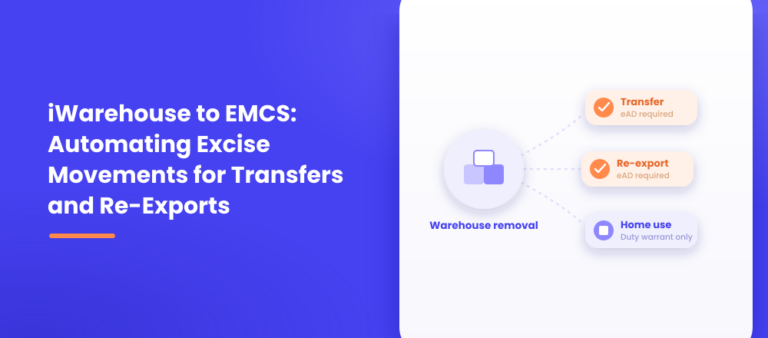
Removing goods from an excise warehouse is not one action. It is three different regulatory paths depending on where the goods are actually going, and only two of them need a new EMCS movement opened before the goods leave the building.
This guide covers that outbound handoff: what has to happen before a removal for transfer or re-export can go ahead, and where iWarehouse turns a warehouse pick into an outbound e-AD without someone rebuilding the same shipment data by hand. The customs side of an export, the CDS declaration itself, is covered separately in our guide to the EMCS export process; this article stays on the EMCS side of the removal.
Three Ways to Remove Goods, Only Two Need an e-AD
A duty-suspended transfer to another tax warehouse needs an eAD, submitted on EMCS before dispatch. A re-export, goods leaving the UK or the EU while still in duty suspension, also needs an eAD; HMRC’s guidance is direct that a GB-registered consignor can only dispatch goods in duty suspension “to a tax warehouse in the UK, or for export,” while an NI-registered consignor can dispatch to a place of exit from the EU, either directly or indirectly through another member state.
Releasing goods to home use is different. That removal is covered by a duty warrant, W5D or W6D for deferment, W5 or W6 for immediate payment, submitted before the goods leave. No eAD is involved, because duty is being accounted for rather than suspended into another movement. This article covers the first two paths, transfers and re-exports; the duty-paid route is a different process with its own documentation.
What Has to Happen Before the Goods Can Leave
For either a transfer or a re-export, the sequence is the same shape. The warehousekeeper has to account for the goods coming off the stock record, make sure a valid movement guarantee is in place and recorded on the eAD, and complete the eAD on EMCS before dispatch. The consignee, whether that is another warehousekeeper receiving a transfer or the party at the export destination, gets the ARC that travels with the goods. Dispatch itself has to happen on the date and time actually declared on the eAD, not whenever the vehicle happens to leave the yard.
Where the Handoff Actually Happens
Physically, a removal for transfer or re-export starts as a warehouse action: an operator picks or allocates stock against a specific order or onward movement. That stock already has a commodity code, a quantity, a lot, and a duty-suspended status sitting in the warehouse’s own record, because it arrived under a previous movement and has been sitting there ever since. If the warehouse system and EMCS are not connected, none of that detail carries over automatically. Someone has to translate the pick into a fresh eAD by hand, re-entering the commodity, quantity and party detail EMCS asks for as if the shipment had never been recorded anywhere before.
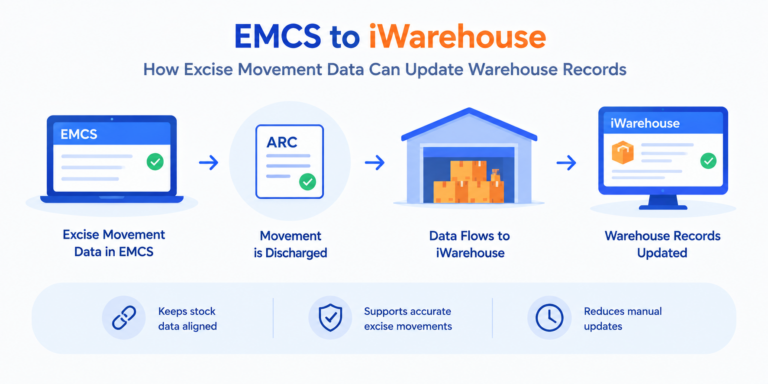
This is the reverse of what happens on arrival. An inbound movement updates the warehouse’s stock record once it is received; an outbound removal has to generate a new movement before the goods can leave. When a removal is recorded in iWarehouse as a transfer or a re-export, it triggers a pre-populated outbound e-AD in iEMCS, carrying the stock’s existing commodity, quantity, lot and duty-suspended detail forward automatically. What is left to confirm is the destination-specific detail, the receiving warehouse or the export route, and the guarantee reference, rather than the shipment description being rebuilt from nothing.
Transfers vs Re-Exports: What Changes
A transfer sends goods to another tax warehouse, and the consignee on that eAD is another warehousekeeper, who owes a report of receipt within five business days once the goods arrive, discharging the movement guarantee in the same way any inbound movement does.
A re-export sends goods out of the UK or the EU while duty is still suspended, and the destination logic is different: a GB-registered consignor dispatches for export, while an NI-registered consignor can route the movement directly out of the EU or indirectly through another member state first. Both start from the same removal action inside the warehouse, and both need an eAD before dispatch, but what the eAD actually has to say about where the goods are going is not the same.
A Brief Worked Example
A bonded warehouse holding a pallet of imported spirits for a client is asked to split it: half moving on to another bonded warehouse in Northern Ireland, half going out to a buyer outside the UK. Both halves are picked from the same lot, so both start from stock the warehouse already has fully recorded, commodity code, quantity, duty-suspended status. The transfer half generates an outbound eAD naming the Northern Ireland warehouse as consignee; the re-export half generates a separate eAD reflecting the export route instead. iWarehouse records both removals against the original lot and triggers a pre-populated eAD for each in iEMCS, so the two movements are built from the stock record that already existed rather than two fresh descriptions of the same pallet.
Common Myths
Any removal from a warehouse needs an eAD. It does not. Releasing goods to home use uses a duty warrant, W5D, W6D, W5 or W6, not an eAD, because duty is being paid rather than suspended into another movement.
The outbound eAD is a fresh, unrelated declaration. It should not be treated as one. The stock’s commodity, quantity, lot and duty status already exist in the warehouse record; the outbound eAD only needs the destination-specific detail added.
Transfers and re-exports are handled the same way. They start from the same removal action, but the destination logic differs: a transfer’s consignee is another warehousekeeper who owes a report of receipt, while a re-export’s routing depends on whether the consignor is GB-registered or NI-registered.
Important Factors to Take Away
- Not every warehouse removal needs an eAD; only duty-suspended transfers and re-exports do, while duty-paid home use uses a warrant instead.
- Before goods can leave under an outbound eAD, the warehousekeeper needs a valid movement guarantee, a completed eAD and an accurate stock account.
- Without connected systems, a warehouse pick for transfer or re-export becomes a second, manual entry into EMCS, rebuilding data that already exists in the warehouse’s own stock record.
- iWarehouse can trigger a pre-populated outbound e-AD in iEMCS directly from a removal action, carrying the commodity, quantity, lot and duty-suspended status forward automatically.
- A transfer and a re-export both start from the same removal action but differ in destination logic: one goes to another warehousekeeper, the other leaves the UK or EU.
Frequently Asked Questions
Does every warehouse removal need a new EMCS movement?
No. Only duty-suspended transfers to another warehouse and re-exports need an eAD. Releasing goods to home use uses a duty warrant instead.
What has to happen before goods can leave under an outbound eAD?
A valid movement guarantee has to be in place and recorded on the eAD, the eAD has to be completed on EMCS before dispatch, and the goods have to be accounted for out of the warehouse's stock record.
Can iWarehouse generate the outbound eAD automatically?
Yes. When a removal is recorded as a transfer or re-export, iWarehouse triggers a pre-populated outbound e-AD in iEMCS using the stock's existing commodity, quantity, lot and duty-suspended detail.
What is the difference between a transfer and a re-export?
A transfer moves goods to another tax warehouse, with a warehousekeeper as consignee who owes a report of receipt. A re-export moves goods out of the UK or EU under duty suspension, with the routing depending on whether the consignor is GB-registered or NI-registered.
Does removing goods for home use need an eAD?
No. That route uses a duty warrant, W5D or W6D for deferment, W5 or W6 for immediate payment, submitted before the goods leave the warehouse.
You may also like:

Turning Every Warehouse Removal Into a Second Data Entry Job?

iWarehouse can trigger a pre-populated outbound e-AD in iEMCS the moment a transfer or re-export is recorded.
Subscribe to our Newsletter
About iCustoms
iCustoms is an all-in-one solution helping businesses automate customs processes more efficiently. With AI-powered and machine-learning capabilities, iCustoms is designed to streamline your all customs procedures in a few minutes, cut additional costs and save time.
Rebuilding the Same Stock Record Every Time Goods Leave?
See how iWarehouse carries commodity, quantity and duty status straight into the outbound e-AD.