

IPAFFS vs TRACES NT: Which System Do GB Importers Use?
- John Hall
- Customs Specialist at iCustoms.ai
IPAFFS (the Import of Products, Animals, Food and Feed System) is the platform GB importers use to notify authorities about arriving consignments; TRACES NT is the EU’s equivalent. Since Brexit, the two systems split the job: goods entering Great Britain are notified on IPAFFS, whilst goods entering the EU or Northern Ireland run through TRACES NT. Plenty of guidance still blurs the line, and importers who learned the TRACES routine often assume it covers GB. It does not.
This guide sets out exactly what IPAFFS does, how it differs from TRACES NT, and where the two systems meet, including the clone-a-certificate function that pulls EU-issued health certificates straight into your GB notification.
What is IPAFFS?
IPAFFS is the notification system run by Defra and the Animal and Plant Health Agency (APHA) for imports into Great Britain. Before the goods arrive, you must raise an import notification on IPAFFS for the following categories:
- Live animals and germinal products (semen, ova and embryos)
- Products of animal origin (POAO) and composite food products
- Animal by-products (ABP)
- High-risk food and feed not of animal origin (HRFNAO)
- Medium and high risk plants and plant products
One point of accountability matters here: when you raise a notification in IPAFFS, you are responsible for the consignment from the moment it enters Great Britain until the authorities complete their checks. Under the Border Target Operating Model (BTOM), each commodity carries a risk category, and live animals and germinal products from the EU sit in the high-risk band.
IPAFFS vs TRACES NT: the split at a glance
| Aspect | IPAFFS | TRACES NT |
|---|---|---|
| Territory | Imports into Great Britain (England, Scotland and Wales) | Imports into the European Union and Northern Ireland, plus intra-EU movements |
| Run by | Defra and APHA | European Commission (DG SANTE) |
| Entry document | CHED notification (CHED-A, CHED-P, CHED-PP and CHED-D) | CHED in the same four types (CHED-A, CHED-P, CHED-PP and CHED-D) |
| Reference issued | UNN (Unique Notification Number), e.g. CHEDA.GB.YYYY.XXXXXXX |
CHED reference number |
| Sign-in | Defra account / GOV.UK One Login | EU Login with two-factor authentication |
| Legal framework | Border Target Operating Model (BTOM) | Official Controls Regulation (EU) 2017/625 |

Why both systems can touch one consignment
Picture a dairy consignment from France to England. The French exporter obtains the GB health certificate through their competent authority, often generated in TRACES NT. The English importer then notifies APHA through IPAFFS, attaching that certificate. One movement, two systems, and the data must match across both. The reverse applies too: a GB exporter’s consignment into the EU meets TRACES NT at the border control post, with the establishment lists and CHEDs we cover across this series.
How to register for IPAFFS
- Step 1: Sign in with your Defra account or GOV.UK One Login; if you have neither, create sign-in details through the IPAFFS start page.
- Step 2: Existing Defra service users register by selecting register for more services rather than creating a duplicate account.
- Step 3: Import agents acting for importers must register with their own business details. Do not select intermediaries on the Manage account screen; that option does not apply to IPAFFS users.
Registration is free, and unlike TRACES NT there is no competent-authority validation queue, so accounts activate quickly.
Creating an IPAFFS import notification
Prepare your documents electronically before you start, because uploads happen before submission, not after. Great Britain accepts verifiable PDF GB health certificates from the EU, Iceland, Liechtenstein and Norway for live animals, germinal products, POAO and ABP; where the exporter’s system is not approved for verifiable PDFs, the original paper certificate travels with the consignment and you attach an electronic copy instead.
- Timing: submit at least one working day before the consignment is expected at the point of entry.
- Notification type: CHEDA for live animals, CHEDP for animal products and germinal products, CHEDPP for plants, CHEDD for high-risk non-animal food and feed.
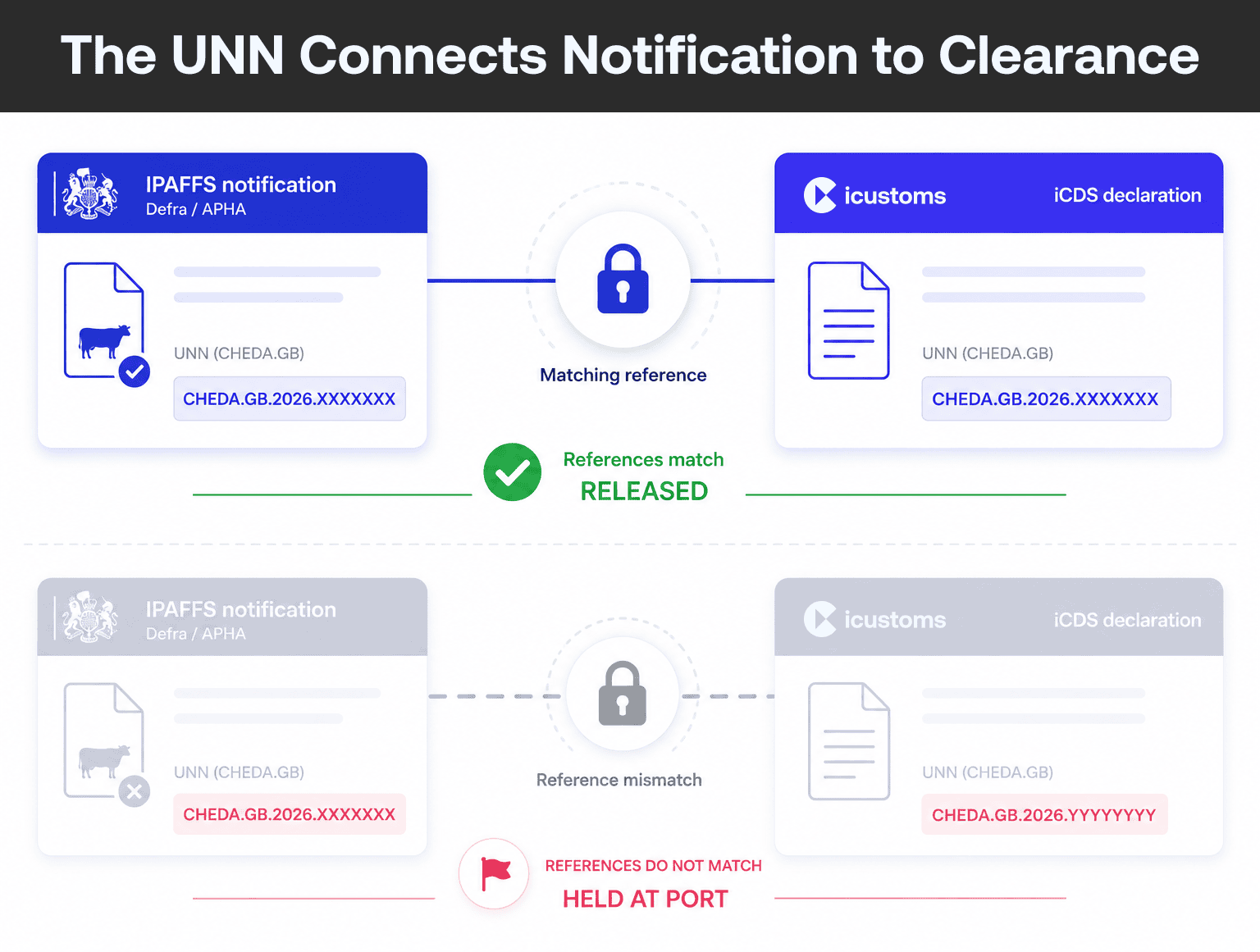
- Your reference: submission issues a unique notification number (UNN) in the format CHEDA.GB.YYYY.XXXXXXX, the number your clearance paperwork hangs on.
- Quirks to know: hatching eggs use CHEDP through a products BCP but CHEDA through a live-animals BCP, a detail that catches poultry importers.
The clone-a-certificate function: where TRACES meets IPAFFS
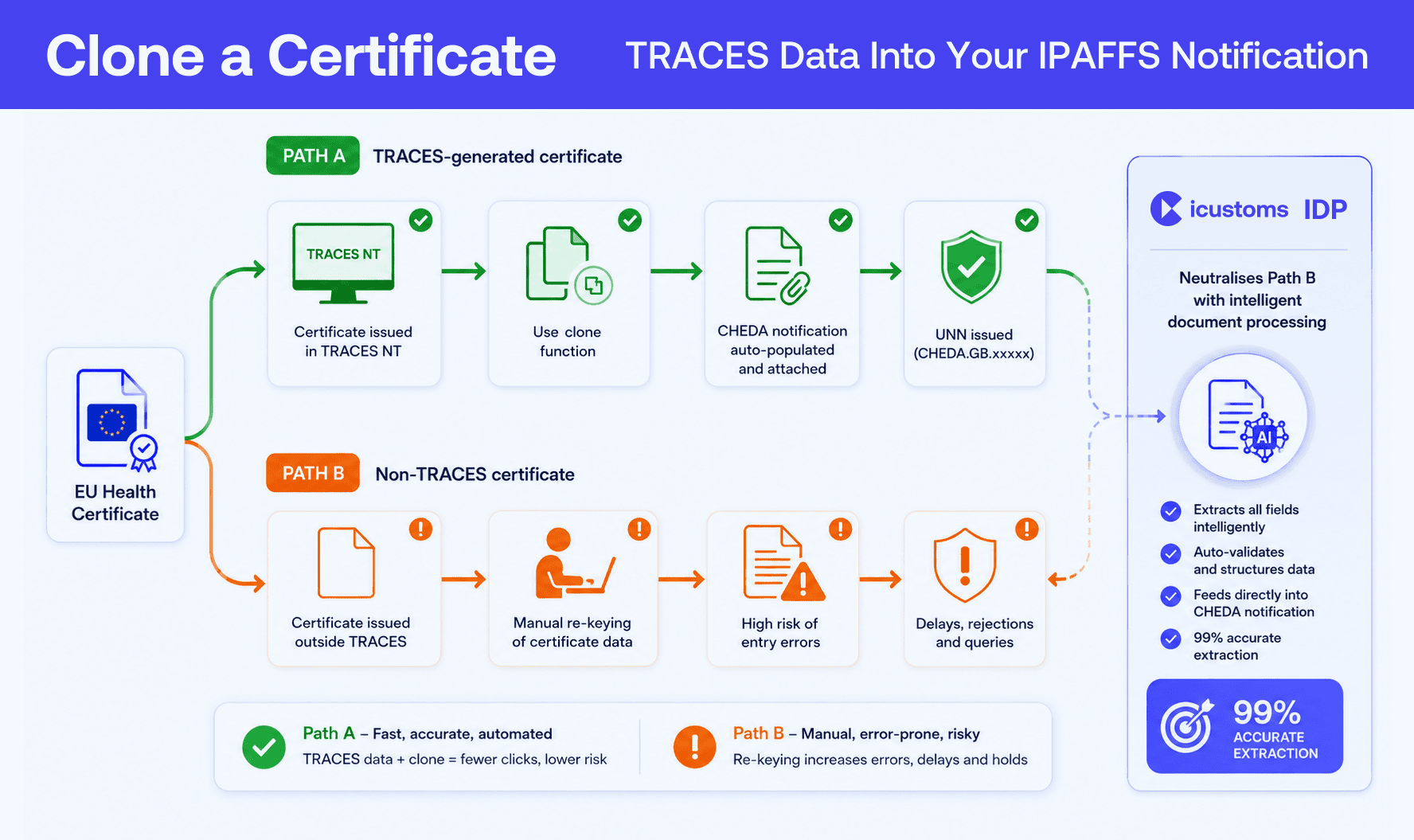
If the health certificate was generated in TRACES, IPAFFS can clone it: the function creates and populates your CHEDA notification with the certificate data and attaches the certificate automatically. Consequently, the EU vet’s TRACES entry becomes your GB notification without re-typing. When the certificate was not TRACES-generated, or cloning fails, you fall back to create a new notification or copy as new and key the data yourself, which is precisely where transcription errors creep in.
Still Re-Keying Certificate Data into Notifications?
iCustoms extracts document data with 99% accuracy and keeps notifications, certificates and declarations aligned.
Checks, GVMS and the two-hour warning
After submission, IPAFFS runs an initial risk assessment and tells you whether the consignment needs SPS checks. If your transporter uses the Goods Vehicle Movement Service (GVMS) to clear customs, the driver should use the check if you need to report for an inspection service. Without GVMS, IPAFFS itself sends a text and email roughly 2 hours before the estimated arrival if checks are required. Either way, keep watching messages until the consignment clears the port, because authorities can still call goods for checks on their final risk assessment.
Where the customs declaration meets IPAFFS
The import notification is only half the arrival story; the customs declaration is the other half, and the two must reconcile for release. Gov.uk’s own guidance ends with a telling line: if you need help with your customs declaration, contact HMRC. In practice, importers automate that side instead. iCDS from iCustoms files HMRC-recognised UK declarations, and our next guide covers the full journey from CHED reference to cleared consignment.
Why choose iCustoms around IPAFFS and TRACES
iCustoms sits on the customs side of both systems. Intelligent Document Processing extracts health certificate and invoice data with 99% accuracy, so cloned or keyed notifications match the paperwork character for character. iCDS files your UK customs declarations, keeping UNN references consistent, whilst the platform covers Ireland and 22 EU nations for the TRACES side of your trade. And if you also export animal-origin products to the EU, iTraces validates establishment codes against the official TRACES EU database before anything ships.
GB importing and EU exporting increasingly live in the same business. iCustoms customers run both flows from one AI platform, cut manual effort by 80%, and stop treating each new government system as a new spreadsheet.
Two Systems, One Data Discipline
Book a demo and see how iCustoms keeps IPAFFS notifications, certificates and declarations in step.
Frequently Asked Questions
What is IPAFFS?
The Import of Products, Animals, Food and Feed System: the Defra and APHA platform GB importers use to notify authorities before live animals, animal products, high-risk food and feed, or regulated plants arrive from the EU and non-EU countries.
Is IPAFFS the same as TRACES?
No. IPAFFS covers imports into Great Britain; TRACES NT covers the EU and Northern Ireland. They share concepts such as CHED types, and the clone-a-certificate function links them, but they are separate systems with separate logins.
Who must register for IPAFFS?
Importers and import agents bringing regulated goods into Great Britain. Agents register with their own business details, and everyone signs in through a Defra account or GOV.UK One Login. Registration is free.
What is a UNN in IPAFFS?
The unique notification number issued when you submit an import notification, formatted like CHEDA.GB.YYYY.XXXXXXX. It identifies the notification through checks and needs to reconcile with your customs declaration for release.
What does clone a certificate do?
For health certificates generated in TRACES, the function creates and populates your CHEDA notification from the certificate data and attaches the certificate automatically, removing manual re-keying. Otherwise you create the notification manually.
When must an IPAFFS notification be submitted?
At least one working day before the consignment is expected at the GB point of entry. For technical help, APHA's helpline is 0330 041 6999; live animal notification queries go to importsriskmanagement@apha.gov.uk.
Can TRACES establishment checks be automated?
Yes. Automated monitoring tools — such as iCustoms' iTraces module — maintain a watchlist of supplier establishment codes and monitor the TRACES establishment list for changes. When a watched establishment changes status, the system delivers an alert to the compliance team. This removes the reliance on manual, point-in-time checks and consequently eliminates a significant compliance gap.
How can importers monitor establishment list changes?
Overall, the most effective approach is a dedicated monitoring tool that connects to TRACES establishment data and maintains a supplier watchlist. iCustoms' iTraces integrates establishment status monitoring directly into the customs workflow, alerting teams before a problematic consignment is prepared rather than after it is refused at the BCP.
You may also like:
Struggling to Extract, Catagorise & Validate Your Documents?

Capture & Upload Data in Seconds with AI & Machine Learning
Subscribe to our Newsletter
About iCustoms
iCustoms is an all-in-one solution helping businesses automate customs processes more efficiently. With AI-powered and machine-learning capabilities, iCustoms is designed to streamline your all customs procedures in a few minutes, cut additional costs and save time.
Struggling to Extract, Catagorise & Validate Your Documents?
Capture & Upload Data in Seconds with AI & Machine Learning