
What Is EU TRACES and How Does It Work? A Guide for Importers and Exporters
- John Hall
- Customs Specialist at iCustoms.ai
Every agent fears the same thing: one costly slip on an entry. Knowing the main UK customs declaration errors how to avoid them is the best protection against HMRC penalties, delays, and seized goods. This guide takes a problem-solution approach. It walks through the ten most common customs declaration mistakes relevant to EU Traces UK agents make, explains why each one hurts, and shows how to stop it. Read it as a checklist you can apply to every declaration you file.
What is EU TRACES used for?
EU TRACES exists to prove compliance. EU law requires consignments of animals, animal products, certain food and feed of non-animal origin, and most plants to travel with official certificates. These certificates confirm that the goods meet EU health and safety rules.
Before TRACES, authorities exchanged paper certificates. As a result, checks were slow and fraud was difficult to detect. Today, the platform gives traders and authorities one shared digital workspace. Consequently, certification moves faster, stays transparent and becomes far harder to fake.
Who manages the EU TRACES system?
The European Commission runs TRACES through DG SANTE, its department for health and food safety. Two regulations provide the legal basis. First, Regulation (EU) 2017/625, the Official Controls Regulation, makes TRACES a core component of the EU’s Information Management System for Official Controls (IMSOC). Second, Implementing Regulation (EU) 2019/1715 sets the rules for how the system and its sister platforms (iRASFF, ADIS and EUROPHYT) operate.
EU TRACES key facts and figures
| Fact | Detail |
|---|---|
| Official documents issued in 2024 | Over 5.4 million |
| Registered users | More than 113,000 worldwide |
| Countries using the system | 90+ (EU and non-EU) |
| Cost | Free of charge; only an EU Login account is needed |
| Availability | 24/7, in all EU official languages plus several others |
| Analytics | Qlik Sense statistical tool for trade data |
EU TRACES short history: from swine fever to TRACES NT
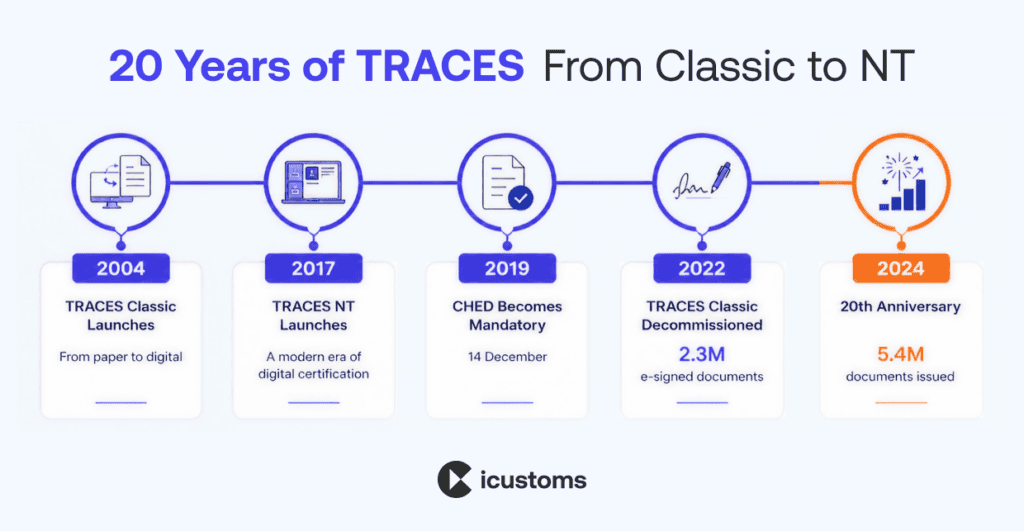
The story begins with a crisis. After the 1997 classical swine fever outbreak, the European Parliament urged the Commission to improve the traceability of animal movements (Resolution A5-396/2000). Therefore, the Commission merged the older ANIMO and SHIFT systems into one architecture under Decision 2003/24/EC. Shortly afterwards, Decision 2003/623/EC gave the new system its name: Traces.
Since then, the platform has grown from a veterinary tool into the backbone of EU agri-food trade certification. The milestones below show how.
| EU Traces in History | Milestone |
|---|---|
| 2004 | TRACES Classic launches for intra-EU animal movements and imports |
| 2006 | IMPORT module lets non-EU countries issue certificates to the EU |
| 2013 | Platform expands into plant health; QlikView analytics added |
| 2017 | TRACES NT launches with a modern, user-friendly interface |
| 2018 | PHYTO module adds phytosanitary certificates for plant imports |
| 2019 | Common Health Entry Document (CHED) becomes mandatory on 14 December |
| 2022 | TRACES Classic is decommissioned; over 2.3 million documents signed electronically that year |
| 2024 | TRACES turns 20; Qlik Sense replaces QlikView |
How does EU TRACES work?
The process follows a simple logic: certify, notify, control. Each consignment gets a digital certificate, every party sees the same record, and border officials check the goods against it.
EU TRACES Certification Process, step by step
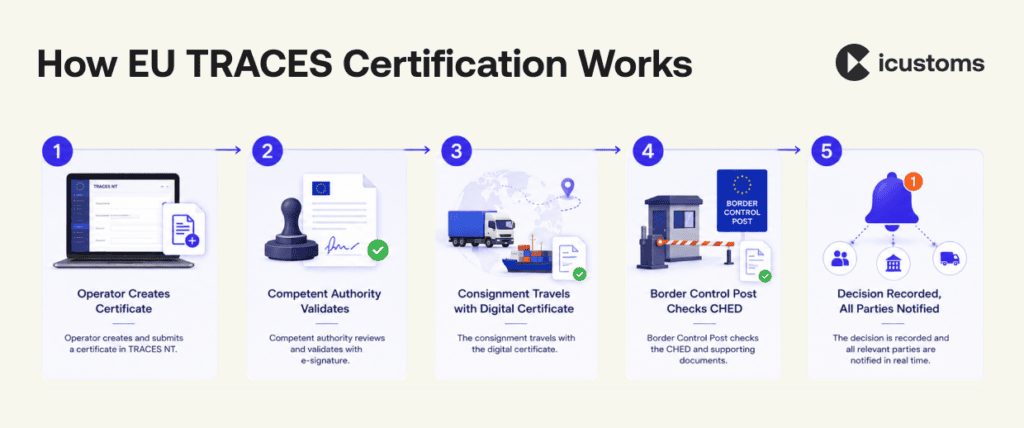
- Step 1: The operator or authority creates the certificate in TRACES NT for the consignment.
- Step 2: The competent authority validates it, often with a free electronic signature.
- Step 3: The consignment travels with its certificate, which authorities along the route can view instantly.
- Step 4: At an EU border control post, officials check the goods against the Common Health Entry Document (CHED).
- Step 5: The decision is recorded in the system, and every involved party receives a notification.
The documents you will meet in TRACES
- CHED: the Common Health Entry Document, required for animals and goods entering the EU since December 2019.
- INTRA (ITAHC): the Intra-Trade Animal Health Certificate for live animal movements between member states and Northern Ireland.
- EXPORT certificates: official health certificates for goods leaving the EU.
- PHYTO: phytosanitary certificates for plants and plant products.
- Establishment lists: the registers of non-EU facilities approved to export animal-origin products into the EU.
Who needs to use EU TRACES?
Anyone involved in moving regulated animals, plants or products touches the system at some point. In practice, the main users fall into five groups.
| User | How they use TRACES |
|---|---|
| Importers and exporters | Request certificates, track consignments and monitor decisions |
| Customs agents and brokers | Check certificates and establishment codes before filing declarations |
| Freight forwarders and carriers | Confirm consignments carry valid documents to avoid border holds |
| Competent authorities | Validate certificates, perform controls and record decisions |
| Veterinarians (including aPVPs) | Certify animal health for exports and intra-EU movements |
What are TRACES establishment codes?
Every non-EU facility that produces food of animal origin for the EU market needs an approval number, known as an establishment code. These codes come from Regulation (EC) 853/2004 for food of animal origin and Regulation (EU) 1069/2009 for animal by-products. The EU publishes them in the TRACES NT establishment lists.
Here is why they matter: if your supplier’s establishment does not appear on the current list, border officials can hold or reject the entire consignment. Moreover, authorities can delist a facility with little warning, so a code that was valid last month may fail today.
What happens if an EU Traces code is invalid?
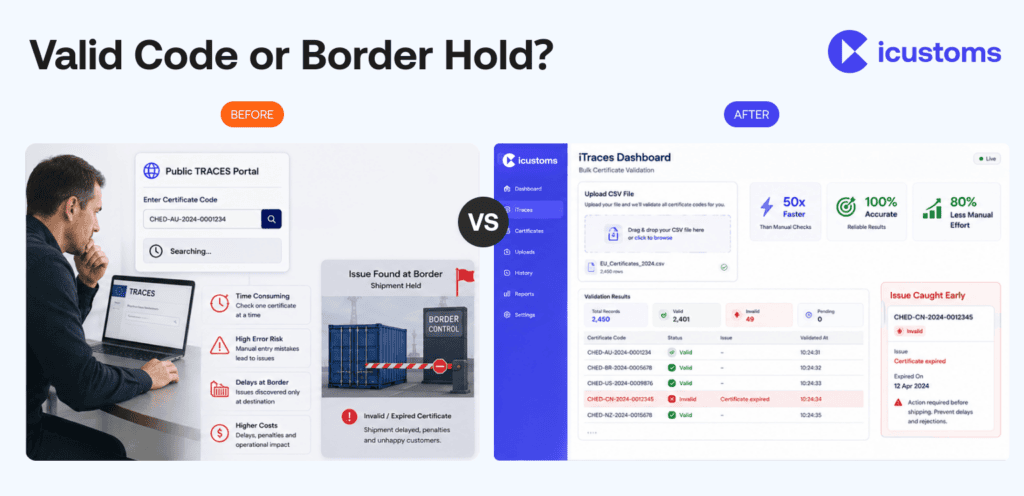
Rejected consignments, storage charges and clearance delays follow quickly. For this reason, many customs agents and food importers now validate codes automatically instead of checking the public portal one code at a time. Tools such as iTraces from iCustoms check every establishment code against the official TRACES EU database in seconds, whether you need one lookup or several thousand in bulk.
Still Checking TRACES Codes One by One?
See how iTraces validates thousands of establishment codes in seconds with 100% accuracy.
Is EU TRACES the same as EUDR?
No, and the distinction matters. TRACES NT also hosts the module for filing EUDR Due Diligence Statements under the EU Deforestation Regulation. However, that is a separate workflow built around geolocation data for commodities such as coffee, cocoa and timber. The classic TRACES function covered in this guide deals with sanitary and phytosanitary certification and establishment approval. In other words, one platform, two very different jobs. We will unpack the differences fully in a dedicated TRACES vs EUDR guide.
The benefits of TRACES for traders
- Faster administration, because businesses and authorities work on the same platform
- Access to the latest certificate models under current EU legislation
- Full visibility of the certification process, including border decisions
- Traceability that reduces the impact of disease outbreaks and food fraud
- Free access with nothing more than an internet connection and an EU Login account
Why choose iCustoms for TRACES establishment code validation?
TRACES gives you the certificates; keeping every detail accurate is still your job. Establishment codes change, certificate rules evolve, and one wrong number can stop a lorry at the border. Consequently, forward-thinking traders now automate the checks that used to eat hours of manual portal time.
This is exactly the problem iTraces solves. The iCustoms AI checks every establishment code against the official TRACES EU database, then flags anything invalid or unrecognised before your goods move. As a result, teams cut manual lookup effort by 80% and validate up to 50 times faster than portal searches.
Built for real trade volumes
- Bulk upload: validate your entire product catalogue at once from CSV or Excel
- Single code search: instant lookups for on-the-spot checks
- API integration: embed validation directly into your ERP, TMS or supply chain platform
- Smart error flags: incorrect or delisted codes surface automatically
Compliance you can evidence
Beyond speed, iCustoms gives you proof. The iTraces compliance dashboard shows the status of every product, supplier and code in one view. Meanwhile, a full audit trail records each validation, so regulatory reviews and internal checks take minutes rather than days.
iTraces: One AI platform for the whole compliance workflow
Establishment codes rarely travel alone. The same consignment usually needs accurate documents, correct HS codes and a compliant customs declaration. Therefore, it helps when one platform handles all of it.
iCustoms connects these steps: Intelligent Document Processing extracts and verifies data from trade documents, iTraces validates the establishment codes within them, and iClassification confirms your HS codes across 32+ countries. In addition, iCustoms files customs declarations across the UK, Ireland and 22 EU nations. Logistics leaders such as Kerry Logistics, Ziegler and Woodside Logistics Group already run their customs operations this way.
EU Traces Frequently Asked Questions
What does TRACES stand for?
TRACES stands for TRAde Control and Expert System. It is the European Commission's digital platform for sanitary and phytosanitary certification of animals, plants, food and feed.
Is TRACES mandatory?
Yes, for regulated goods. Since 14 December 2019, the Common Health Entry Document (CHED) must be issued through TRACES for animals and goods entering the EU under the Official Controls Regulation.
How much does TRACES cost?
The platform itself is free. The European Commission provides it with nothing more than an internet connection and an EU Login account required. The real cost is your team's time: manual portal lookups, re-keyed data and border delays add up quickly. That is where iCustoms helps, with iTraces automating establishment code checks so you cut manual effort by 80% and avoid costly holds.
Can I check TRACES establishment codes automatically?
Yes. The public TRACES portal only supports manual, single-code searches. However, iTraces from iCustoms validates entire product catalogues against the official TRACES EU database in seconds, with 99% accuracy, bulk upload, API integration and automatic flagging of invalid or delisted codes.
How do businesses reduce TRACES compliance errors?
Most errors come from manual checks: mistyped codes, outdated lists and missed delistings. Automating the process removes them at the source. iCustoms customers validate codes up to 50 times faster with iTraces, keep a full audit trail for regulatory reviews, and free their teams to focus on the business rather than portal searches.
What is the difference between TRACES Classic and TRACES NT?
TRACES NT is the current platform, launched in 2017 with a modern interface and wider scope. TRACES Classic, the original 2004 system, was decommissioned in 2022.
What is a TRACES establishment code?
It is the approval number of a facility authorised to export animal-origin products into the EU, published in the TRACES NT establishment lists under Regulation (EC) 853/2004.
Is TRACES the same as EUDR?
No. TRACES NT hosts the EUDR Due Diligence Statement module, but that is a separate workflow. Classic TRACES functions cover health certification and establishment approval.
You may also like:
Struggling to Extract, Catagorise & Validate Your Documents?

Capture & Upload Data in Seconds with AI & Machine Learning
Subscribe to our Newsletter
About iCustoms
iCustoms is an all-in-one solution helping businesses automate customs processes more efficiently. With AI-powered and machine-learning capabilities, iCustoms is designed to streamline your all customs procedures in a few minutes, cut additional costs and save time.
Struggling to Extract, Catagorise & Validate Your Documents?
Capture & Upload Data in Seconds with AI & Machine Learning