
TSS Manual Data Entry: Common Errors and How to Reduce Them
- John Hall
- Customs Specialist at iCustoms.ai
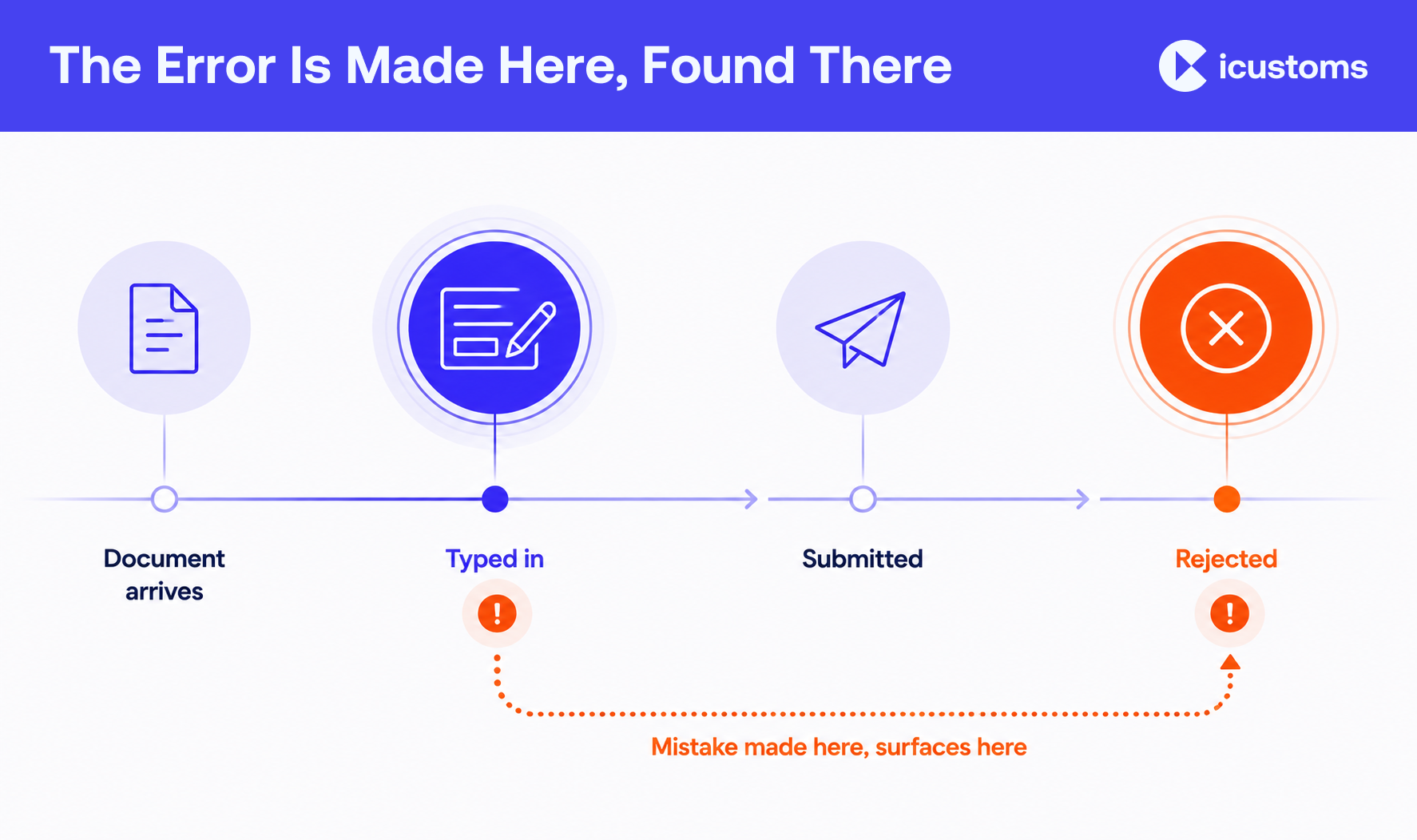
TSS declarations are rejected for one of two reasons: information was entered incorrectly, or information is missing. In practice that shows up as vague goods descriptions, out-of-date commodity codes, missing document codes, weights that do not reconcile and party details that do not match the records held. Almost all of it traces back to the same root cause, which is a person typing the same fact more than once.
This article covers the TSS rejection reasons that come up most, what the error messages mean, and the controls that reduce the rate. It assumes you are already filing and want fewer problems, not an introduction to the service.
Why manual entry creates risk
Look at one consignment and count how many times a single fact gets keyed.
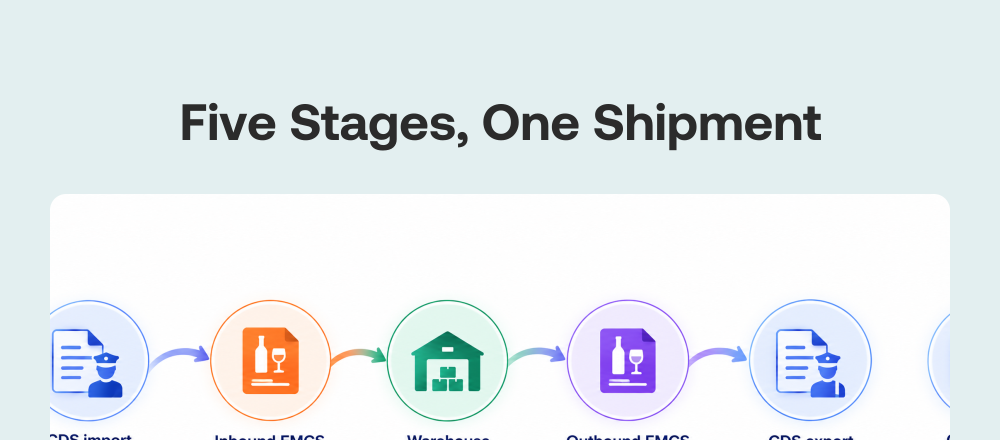
A net weight appears on the packing list. Somebody types it into the declaration. It appears again on the supplementary declaration later. If the vehicle needs a movement reference, related detail is entered again there. The same figure, transcribed repeatedly, by different people, at different times, under different amounts of time pressure.
Every transcription is an opportunity for a transcription error. That is not a comment on anyone’s competence. It is arithmetic. Re-keying customs data at volume produces a predictable error rate, and the only reliable way to reduce it is to reduce the keying.
Two things make it worse in Northern Ireland movements specifically. The data set is larger than a domestic sale needs, so there is more to get wrong. And the deadlines are unforgiving: goods that have already moved still need their supplementary declaration by the tenth calendar day of the following month, which concentrates the work at exactly the point when care is scarcest.
The errors that cause most TSS declaration rejections
Ten patterns account for the overwhelming majority of TSS declaration errors. Most are not exotic customs problems. They are ordinary customs declaration mistakes made at speed.
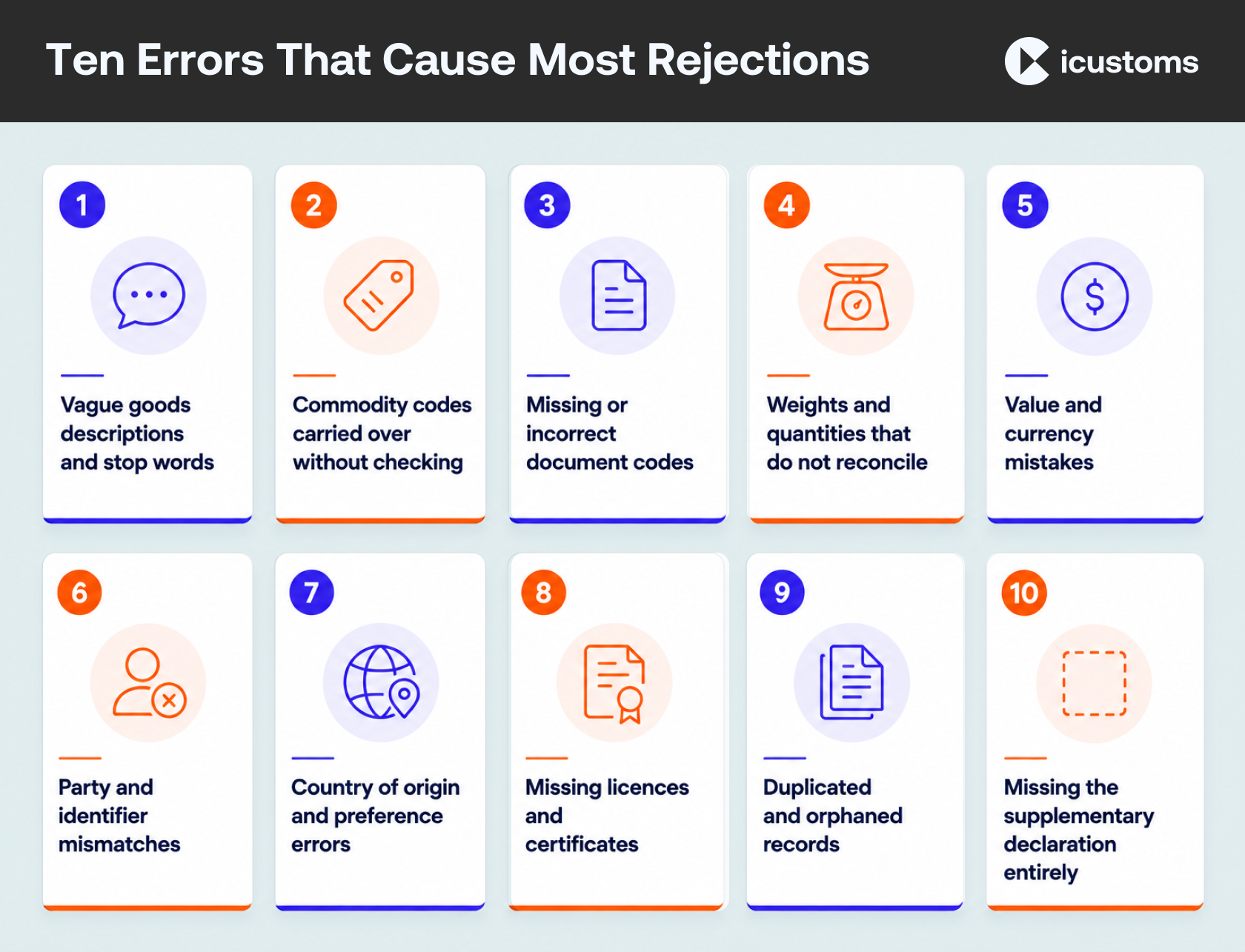
1. Vague goods descriptions, and stop words
The single most common cause, and the easiest to fix.
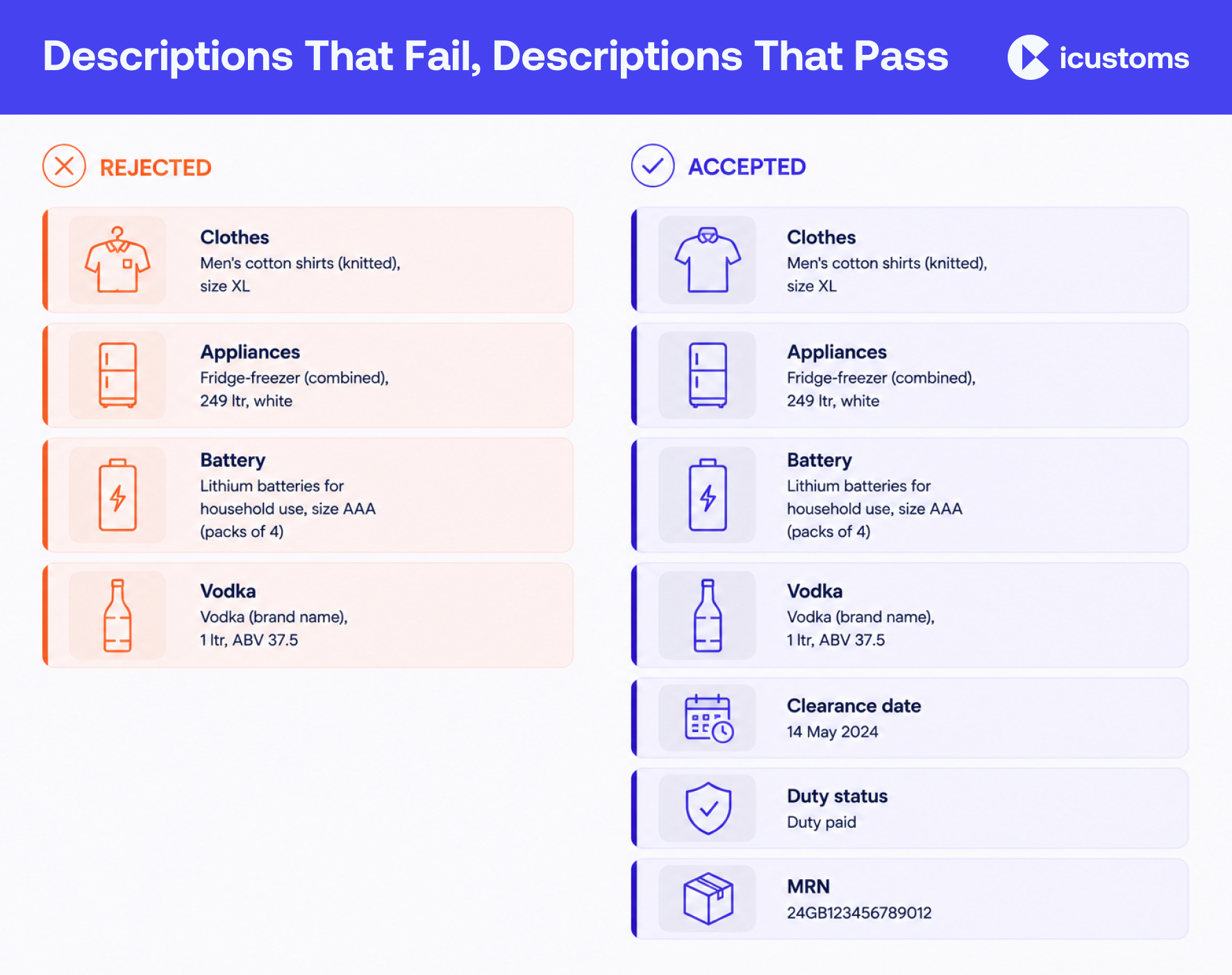
A description has to be in plain language and specific enough for authorities to identify, classify and examine the goods. Clothes is not a description. Men’s cotton shirts (knitted), size XL is. Appliances fails; Fridge-freezer (combined), 249 ltr, white passes. Battery fails; Lithium batteries for household use, size AAA (packs of 4) passes.
Terms such as goods or gifts cause delays before or after movement. There is a further trap on entry summary declarations: prohibited stop words will trigger a rejection at the point of submission. If your descriptions are generated from a product database that nobody has reviewed, this is worth auditing before it costs you a sailing.
Excise goods need volume and container detail. Alcohol needs the strength stated. Grouped items should say so.
2. Commodity codes carried over without checking
Codes change. A code that classified a product correctly last year may have been superseded, and the number of digits required depends on the goods category: Standard goods are declared at six digits, Category 2 goods at eight.
Copying last month’s declaration is efficient right up to the point where it is not.
3. Missing or incorrect document codes
This is the technical one, and it generates a lot of avoidable cases.
Document codes go in the Document Reference field, Data Element DE 2/3. They carry authorisation decision numbers for special procedures, veterinary and health certificates with quantities, licence references, preference certificates, commercial document references such as invoices and transport documents, and exemption declarations. Union codes are four digits starting with a letter; National codes are four digits starting with a number.
When a declaration is submitted, the system checks whether all import measures are satisfied. If a required document code is missing, an error message appears at consignment level and TSS raises a case telling you which item needs it.
Four mistakes recur:
- Not reading the Tariff Requirements section that appears after you save the commodity code details. It tells you what the goods need.
- Declaration information that does not match the supporting document. This matters most for health certificates, which are checked against CERTEX.
- Declaring the same document code more than once on a goods record. CERTEX accepts one occurrence per document code.
- Omitting the reference details, or using the wrong Document Status code.
4. Weights and quantities that do not reconcile
Gross mass, net mass, number of packages and supplementary units all have to agree with each other and with the paperwork. A net weight higher than the gross weight is an obvious fail. A quantity that disagrees with the packing list is not obvious, and it is far more common.
5. Value and currency mistakes
Invoice value entered in the wrong currency, or the invoice total used where the customs value is required. Both change the duty position, which makes them expensive errors rather than merely annoying ones.
6. Party and identifier mismatches
EORI numbers with a transposed digit. A consignor or consignee name spelled one way on the invoice and another on the declaration. The declarant recorded as the importer. Each of these is trivial to make and tedious to unpick, and each one breaks the match against the records held.
7. Country of origin and preference errors
Origin is not the country the goods were shipped from. Claiming a preference without holding the evidence to support it is a different category of problem again, and one that surfaces at audit rather than at submission.
8. Missing licences and certificates for controlled goods
Category 2 goods cover excise products and goods subject to EU import controls, and any licence or certificate has to be declared alongside an eight-digit commodity code. Discovering this at submission is late. Discovering it at the port is worse.
9. Duplicated and orphaned records
A declaration started twice because the first attempt seemed to fail. Consignment records with no goods items attached. Both waste time and both come from working at speed in a portal.
10. Missing the supplementary declaration entirely
Not a data entry error in the usual sense, but the same underlying cause: the movement felt finished when the goods arrived. The declaration is still due by the tenth of the following month.
What happens when a TSS declaration is rejected
Errors occur when information has been entered incorrectly, or when something is missing. The system tells you which.
An error message appears at consignment level, and TSS raises a case identifying the item that needs attention. Document code problems in particular can trigger errors that come back from the Customs Declaration Service rather than being caught earlier.
Two published guides cover the TSS error codes, split by declaration type:
- Common error codes for entry summary and simplified frontier declarations, updated 19 June 2026
- Common error codes for supplementary and full frontier declarations
Alongside those, the Data Guide sets out what each field requires and the Document Code Guide explains completion. The TSS Contact Centre is on 0800 060 8888 when the guidance does not resolve it.
Amendments, resubmissions and cancellations
Not every problem is fixed the same way. Correcting a declaration that has not yet been accepted is a different job from amending one that has, and cancelling a duplicate is different again.
Work out which situation you are in before you start clicking. The commonest waste of time in a rejection is a person amending the wrong record, or creating a second one because the first appeared not to work. Both leave you with more to unpick than you began with.
Where an amendment changes the duty position, treat it as a financial correction rather than an administrative tidy-up, and make sure whoever owns the duty account knows it happened.
Keep your own error log The published guides tell you what a code means. They cannot tell you which codes your operation hits most often. A simple log of every rejection, the cause and the fix will identify your own top three within a month, and those three will account for most of your rework. |
Where the errors actually come from
Fixing individual customs declaration mistakes is treating symptoms. The causes underneath are consistent, and they are organisational rather than technical:
| Root cause | How it shows up | What actually fixes it |
|---|---|---|
| The same fact keyed repeatedly | Transcription errors, figures that disagree between records | Enter once, reuse everywhere |
| No single source of truth | Two people use different commodity codes for one product | One authoritative product record |
| Deadline compression | A month of supplementary declarations filed in two days | File through the month, not at the end of it |
| Supplier document variation | Fields missed because this invoice looks different | Standardise what you ask suppliers for |
| Knowledge in one person’s head | Error rate spikes when they are on leave | Write the rules down; encode them where possible |
| No feedback loop | The same mistake repeats for months | Log rejections, review them, change the process |
How to reduce TSS data entry errors
Six controls, roughly in order of return on effort.
- Validate before you submit, not after. Completeness, format, internal consistency and the rules for the declaration type. Catching an error before submission costs minutes; catching it after costs a case.
- Build a standard description library. Write each product description once, to the plain-language standard, and reuse it. This removes your commonest rejection cause permanently.
- Read the Tariff Requirements section every time the commodity code changes. That is where the document codes you need are set out.
- Reconcile weights and quantities across the document set as a rule, not as a habit. Gross against net, packages against the packing list.
- Apply a second pair of eyes to high-value and controlled consignments only. Checking everything is unaffordable; checking nothing is worse. Target the checks.
- Log every rejection with its cause. Review monthly. Three months of data will tell you exactly where to spend your effort.
Where validation and automation help, and where they do not
Automated validation is very good at the mechanical errors: missing mandatory fields, formats, codes that do not exist, figures that contradict each other, document codes that the tariff requires but the declaration lacks. That is most of the list above.
It cannot decide whether a description is honest, whether a preference claim is supportable, or whether goods are at risk. Those stay with people. The full picture, including what should and should not be automated, is in our guide to the automated declaration workflow.
And because most of these failures are really data problems wearing an error code, customs data validation covers the groundwork that stops them arising. If you are looking at the wider picture rather than a single fix, our overview of Northern Ireland customs automation sets out how the pieces fit together.
Frequently Asked Questions
Why do TSS declarations get rejected?
Because information was entered incorrectly or is missing. The commonest specific causes are vague goods descriptions, invalid or outdated commodity codes, missing document codes, and weights or quantities that do not reconcile.
What are the most common TSS declaration mistakes?
Generic goods descriptions, reusing a commodity code without checking it, omitting a required document code, mismatched weights, wrong currency, transposed EORI digits and missing licences for controlled goods.
What are stop words on an entry summary declaration?
Prohibited terms in the goods description. Using one will trigger a rejection when you submit, so descriptions built from an unreviewed product database are worth auditing.
Why do document codes cause CDS errors?
Because the system validates whether every import measure is satisfied. If a required code is missing from Data Element DE 2/3, an error appears at consignment level and TSS raises a case telling you which item needs it.
What happens when a TSS declaration is rejected?
An error message appears at consignment level and a case is raised identifying the item. You correct the data and resubmit. Two published guides cover the common codes, split by declaration type.
Where do I find TSS error code guidance?
There are two guides: one for entry summary and simplified frontier declarations, one for supplementary and full frontier declarations. The Data Guide and Document Code Guide cover the underlying field requirements.
How do I contact TSS about an error?
The TSS Contact Centre is on 0800 060 8888.
How do I reduce customs data entry errors?
Validate before submission, standardise your goods descriptions, check the Tariff Requirements whenever a commodity code changes, reconcile weights, target second checks at high-risk consignments, and log every rejection so you can see your own pattern.
How do I stop re-keying the same customs data?
Enter each fact once in an authoritative record and reuse it across declarations, rather than retyping from documents each time. That is the core of what declaration automation does.
Does a rejection mean a penalty?
A rejection is a validation failure, not a penalty in itself. The risk sits in what an uncorrected or inaccurate declaration leads to, which is why the accuracy obligation matters more than the error count.
You may also like:

Tired of Fixing the Same TSS Errors?

Reduce manual rekeying with automated data extraction.
Subscribe to our Newsletter
About iCustoms
iCustoms is an all-in-one solution helping businesses automate customs processes more efficiently. With AI-powered and machine-learning capabilities, iCustoms is designed to streamline your all customs procedures in a few minutes, cut additional costs and save time.
Catch TSS Data Errors Before Submission
Validate customs information before avoidable errors become rejections.