
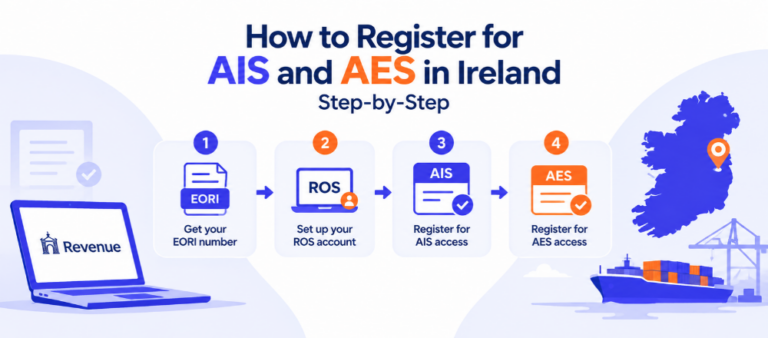
How to Register for AIS and AES in Ireland: Step-by-Step
- John Hall
- Customs Specialist at iCustoms.ai
Before you can file a single declaration through AIS or AES, you need to clear a registration sequence that trips up more businesses than the declarations themselves do. It isn’t complicated once you know the order, but doing it out of sequence, or missing a detail that has to match across systems, is the single most common reason a new trader’s first application stalls.
This guide walks through the exact sequence: what you need before you start, how EORI, ROS, AIS access, and AES access fit together, the specific errors that cause rejections, and what to do once you’re registered and ready to file.
Why Registration Is Worth Getting Right the First Time
Under the Union Customs Code, all communication between traders and customs authorities has to be electronic, which is exactly what AIS and AES exist to handle. Getting registration right the first time matters beyond simply avoiding a resubmission: proper AIS and AES access is what unlocks automatic risk analysis on your declarations, protection against document-forgery fraud, and the removal of manual re-keying errors that come from paper-based processes. Correctly registered traders also see the practical benefits of the underlying EU system design: fewer administrative costs, faster and more predictable clearance, and access to further facilitations such as centralised clearance and pre-lodged declarations once your access is confirmed. None of that is available until the registration sequence below is complete and correct.
What You Need Before Registering: EORI
Everything starts with an EORI number, the Economic Operators’ Registration and Identification number that identifies your business to customs authorities. You cannot register for AIS access, AES access, or file a single declaration without one. In Ireland, EORI is granted through Revenue’s eRegistration service, and once issued, an Irish EORI number is prefixed “IE” followed by your tax reference number.
If your business already trades with the UK or elsewhere in the EU, you may already hold an EORI number under a different country prefix, but that doesn’t substitute for an Irish one if you’re declaring goods into or out of Ireland specifically. We cover the full EORI application walkthrough, including common rejection reasons at that stage, in our EORI number guide; this article picks up immediately after you have your EORI in hand.
Step 1: Set Up Your Revenue Online Service (ROS) Account
Your EORI number links to a Revenue Online Service (ROS) account, which is the account you’ll use to access AIS, AES, and most of Revenue’s other digital services. If your business already files tax returns through ROS, you likely already have an account; if not, you’ll need to register for one before proceeding. ROS registration requires a digital certificate, which Revenue issues once your business details are verified, and this certificate is what authenticates every subsequent action you take in AIS and AES.
Step 2: Register for AIS Access
With EORI and ROS in place, you can apply for AIS access, the permission that lets you submit import declarations. AIS registration confirms your business details against Revenue’s records and links your AIS access to your EORI number and ROS account. Most businesses complete this step through their ROS account once the underlying EORI and ROS pieces are already correct, which is why getting those two steps right first matters as much as the AIS application itself.
Step 3: Register for AES Access
AES registration follows the same underlying logic as AIS but is a separate application specific to export declarations. If your business only ever imports, you may not need this step yet, but most freight forwarders and many trading businesses end up needing both AIS and AES access eventually, so it’s worth applying for both together if you already know you’ll need to export. Trying to add AES access later, after you’ve settled into an AIS-only workflow, just means repeating a version of this same process a second time.
Common Registration Errors
A handful of specific mistakes account for most of the delays businesses run into during this sequence:
- Mismatched business details. If the business name, address, or registration number on your AIS or AES application doesn’t exactly match what’s on file with the Companies Registration Office, the application gets held up for verification rather than approved outright.
- Incomplete ROS setup. Applying for AIS or AES access before your ROS account and digital certificate are fully active is one of the most common causes of a stalled application, since the systems depend on that ROS identity being confirmed first.
- Missing or expired digital certificate. Your ROS digital certificate has to be valid and correctly installed; an expired or missing certificate blocks access even if your underlying registration is otherwise correct.
- Applying for AES before AIS is confirmed. Because AES registration builds on the same underlying business verification as AIS, applying for both in the wrong order, or before the first application has fully cleared, can create confusion in the review process and slow both down.
- Assuming AIS requirements and AES requirements are identical. They’re closely related but separate applications with separate confirmations; treating AES as automatically included once AIS is approved is a common and avoidable assumption.
Getting the EORI and ROS steps genuinely correct before applying for AIS or AES access resolves most of these before they become a problem.
AIS Requirements and AES Requirements at a Glance
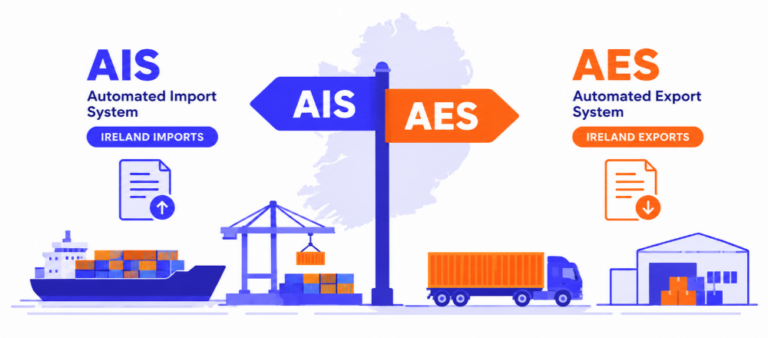
Both AIS and AES require a valid EORI number, an active ROS account with a current digital certificate, and business details that match your official registration records exactly. Beyond that shared foundation, AIS access is what you need to submit import declarations, and AES access is what you need to submit export declarations; neither one automatically grants the other. If your business handles both directions of trade, plan on completing both applications rather than assuming one covers the other.
| Aspect | AIS Access | AES Access |
|---|---|---|
| Prerequisite | Valid EORI number | Valid EORI number |
| Account foundation | Active ROS account, current digital certificate | Active ROS account, current digital certificate |
| What it unlocks | Submitting import declarations | Submitting export declarations |
| Applied for via | ROS, linked to your EORI | ROS, linked to your EORI |
| Common blocker | Mismatched business details, incomplete ROS setup | Same blockers, plus applying before AIS is confirmed |
Neither column substitutes for the other, and holding one doesn’t put the second application on autopilot. Businesses that already know they’ll need both should apply for AIS and AES access at the same time rather than treating the second application as an afterthought once the first is approved.
How Long Does Registration Realistically Take?
There’s no single fixed timeline, since it depends entirely on how cleanly your details match across EORI, ROS, and the Companies Registration Office. A business with consistent, up-to-date records across all three can move through EORI, ROS, and AIS or AES access in a matter of days. A business with a mismatch, an outdated address on one record, a slightly different trading name on another, should expect a review cycle while Revenue verifies the discrepancy manually. The single most effective thing you can do before starting is to check that your business name, address, and registration number are identical across your Companies Registration Office filing, your EORI application, and your ROS account, before you submit anything.
Registered. Now What?
Once your AIS and AES access is confirmed, you have two practical paths for actually filing declarations. The first is Revenue’s own Trader Portal, which works but requires manual data entry for every declaration, every field, every time. The second is automated declaration software that connects to your AIS and AES access and handles classification, validation, and submission without manual re-keying. Which path makes sense depends on your declaration volume: occasional filers can manage through the Trader Portal, while businesses filing regularly, or freight forwarders and clearing agents managing multiple clients, generally find the manual route becomes the bottleneck almost immediately.
How iCustoms Fits In
iCustoms’ iAIS and iAES platform connects directly to your confirmed AIS and AES access, so once registration is complete, you’re filing through an automated, validated workflow from day one rather than learning Revenue’s Trader Portal manually first and switching later. For freight forwarders and clearing agents in particular, that means one platform handling both AIS and AES filings across an entire client book, with the same validation checks catching the kind of detail mismatches that cause registration headaches in the first place.
Frequently Asked Questions
Do I need to register for AIS and AES separately?
Yes. They’re two separate applications, both built on your EORI number and ROS account, but neither one automatically grants access to the other.
How long does AIS or AES registration take?
This depends on how quickly your business details can be verified against your EORI and Companies Registration Office records. Applications with matching, complete details generally move faster than ones needing manual verification.
Do I need an EORI number before I can register for ROS?
The two are closely linked, but the practical order is to secure your EORI first, since both AIS and AES access depend on it, then confirm your ROS account and digital certificate before applying for system access.
Can I register for AES later if I only need AIS right now?
Yes, though you’ll go through a version of the same process again later. If you already know you’ll need both eventually, applying for both at once avoids a second round of setup.
What’s the most common reason an AIS or AES application gets delayed?
Mismatched business details between your application and your Companies Registration Office record, followed closely by applying before your ROS account and digital certificate are fully active.
Once I’m registered, do I have to use Revenue’s Trader Portal?
No. The Trader Portal is one option, but automated declaration software that connects to your confirmed AIS and AES access is available and, for most regular filers, considerably faster.
You may also like:
Just Got AIS/AES Access?

Skip the manual Trader Portal learning curve. iCustoms is ready to file from day one.
Subscribe to our Newsletter
About iCustoms
iCustoms is an all-in-one solution helping businesses automate customs processes more efficiently. With AI-powered and machine-learning capabilities, iCustoms is designed to streamline your all customs procedures in a few minutes, cut additional costs and save time.
Avoid the Registration Mistakes Above
iCustoms validates your setup before you file your first declaration.