
Freight Invoice Processing Automation: Eliminating Manual Entry in Logistics Billing
- John Hall
- Customs Specialist at iCustoms.ai
Freight invoice processing automation uses AI to read, validate, and route carrier invoices, so no one has to key logistics bills by hand. The software extracts the charges from each freight invoice, checks them against the agreed rates and the shipment, and passes clean data into your finance system for payment. This guide explains what freight invoice processing is, why doing it manually is so painful, and how automation removes the errors and cost from logistics billing.
For finance and accounts payable teams, logistics managers, and CFOs, freight billing is uniquely messy: high invoice volumes, complex charges, many carriers, and rates that change. Automating it protects both the AP team’s time and the business from overpaying on freight.
Understanding Freight Invoice Processing
A freight invoice, or carrier invoice, is the bill a carrier or forwarder sends for moving goods. It is rarely simple. A single freight invoice can carry a base rate plus a fuel surcharge, accessorial charges, taxes, and multiple line items across different shipments and routes. Typical fields include:
- Invoice number, carrier name, and shipment reference.
- Freight charges, fuel surcharge, and accessorial charges.
- Tax amount, currency, and payment terms.
- Line items linked to specific shipments and routes.
Because those charges have to be checked against a contract rate and the actual shipment before payment, logistics billing is far more complex than a standard supplier invoice. That complexity is why manual processing struggles.
The Problems With Manual Freight Invoice Processing
Processing carrier invoices by hand creates predictable, costly problems:
- Line-by-line entry into spreadsheets or the finance system takes hours.
- Duplicate invoices slip through and get paid twice.
- Incorrect or unexpected charges are missed, so the business overpays.
- Missing data and approval delays hold up carrier payments.
- Reconciliation against contracts and shipments is slow and inconsistent.
The result is overpayment, late-payment friction with carriers, and an AP team stuck on data entry. This is the gap freight invoice automation closes.
Still keying and checking carrier invoices by hand?
Watch a demo and see AI extract and validate a freight invoice in seconds.
How AI Freight Invoice Automation Works
Freight invoice automation is built on intelligent document processing. Rather than reading and typing, your team lets the software do the extraction, validation, and routing.
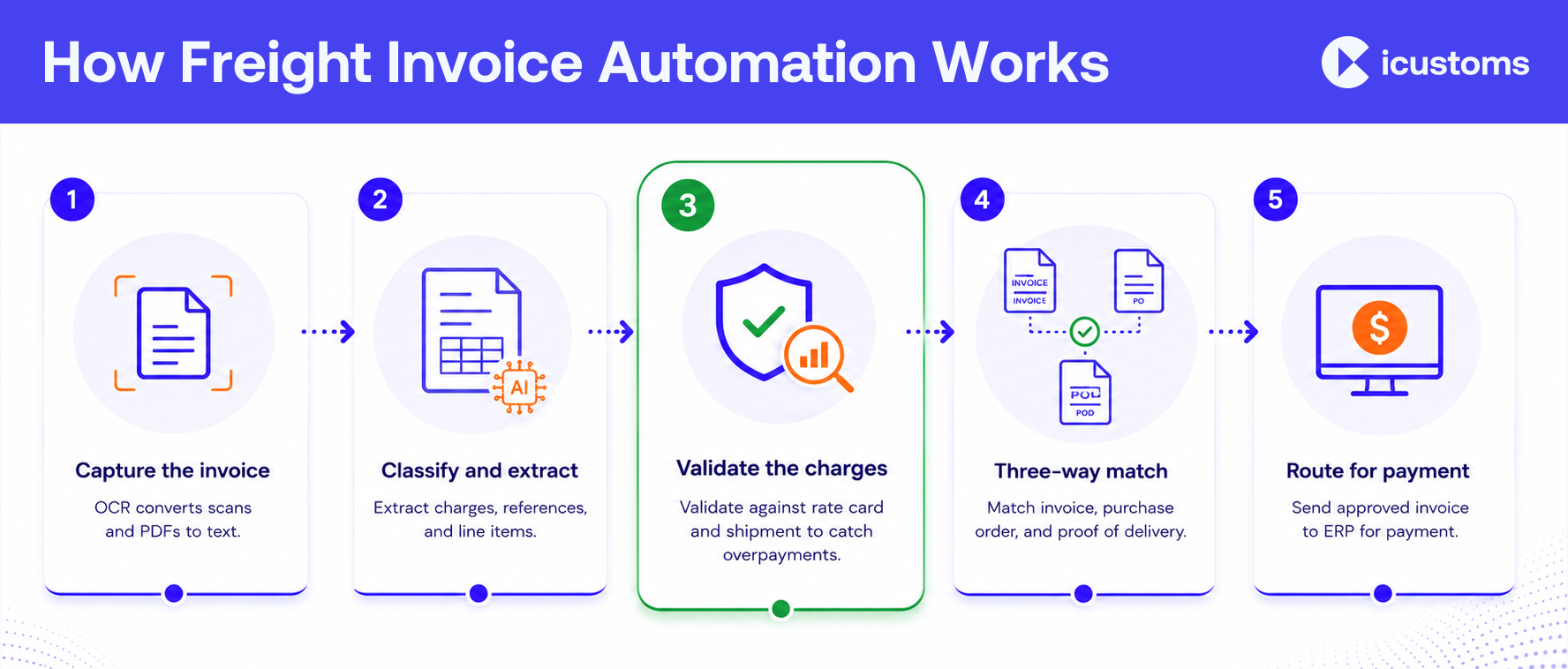
- Capture the invoice. Upload or forward the carrier invoice in any format. Invoice OCR software converts scans and PDFs into machine-readable text.
- Classify and extract. The tool recognises it as a freight invoice and performs invoice line item extraction on the charges, references, and totals.
- Validate the charges. Freight invoice validation checks the charges against agreed rates and the shipment, and flags discrepancies.
- Match. Three way matching links the invoice to the purchase order and proof of delivery, so only correct invoices proceed.
- Route for payment. Clean, approved data flows into your ERP or finance system, with a full audit trail.
Freight Invoice Validation and Audit
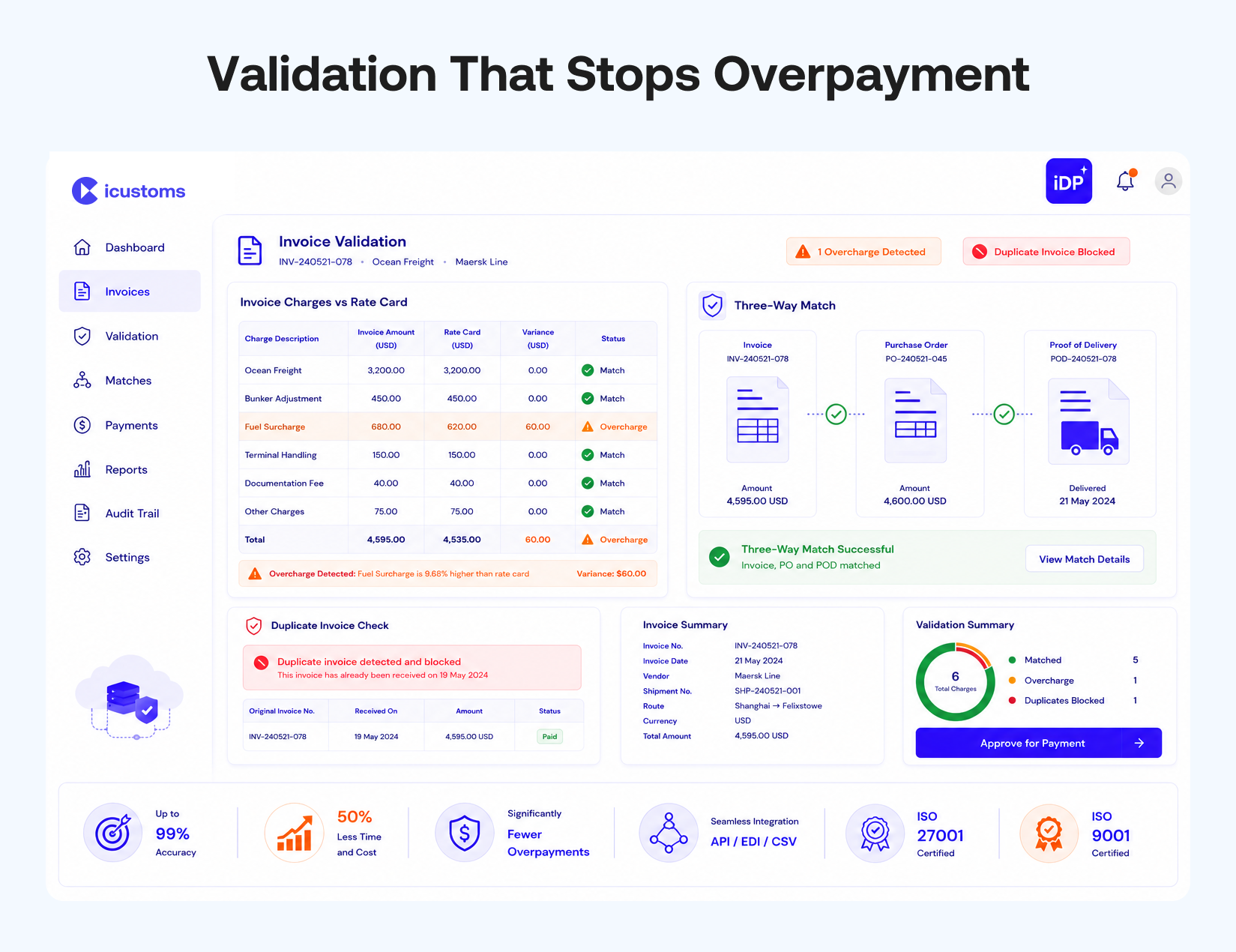
Extraction is only half the value. The bigger win for finance is validation, because that is what stops overpayment. Strong freight invoice reconciliation performs:
- Carrier charge verification against the contract or rate card.
- Shipment matching, so charges relate to a real, delivered movement.
- Duplicate and discrepancy detection before payment is made.
- An audit trail that records every check for compliance and freight audit.
Done consistently, this is a genuine freight audit at the point of processing, not a costly review months later.
Integration and Business Benefits
The value multiplies when clean invoice data flows straight into your systems. Good automation integrates with your ERP and transportation management system (TMS) so approved invoices post without re-entry. The benefits for the business are clear:
- Faster accounts payable, with invoices processed in minutes not days.
- Fewer errors and less overpayment, protecting freight spend.
- Lower operational cost, freeing AP and logistics staff for higher-value work.
- Better visibility of freight cost across carriers and routes.
- Scalable processing as invoice volumes grow.
How iCustoms Automates Freight Invoice Processing
iCustoms uses its intelligent document processing to capture and validate freight and commercial invoices as part of the trade-document workflow. Its iCheck feature classifies the document and the validation engine checks the data.
- Extraction: captures the full invoice, including line items, charges, and references, from any format.
- Accuracy and validation: up to 99% accuracy, with a validation engine that removes duplicates and flags any field under full confidence for review.
- Speed and savings: around 50% less time and cost, with data reused across repeat shipments.
- Integration and security: connects to your ERP and finance systems through API, EDI, or CSV, and holds ISO 27001 and ISO 9001 certification.
Because freight invoices sit alongside customs paperwork, it also supports wider invoice processing for trade compliance and connects to your ERP and workflow.
Frequently Asked Questions
What is freight invoice processing automation?
It is the use of AI and OCR to read, validate, and route carrier invoices automatically, removing manual entry and checking charges against agreed rates and shipments before payment.
How does freight invoice automation work?
The software captures the invoice, extracts the charges and line items, validates them against contract rates and the shipment, matches the invoice to the purchase order and delivery, then routes clean data to finance.
What information can AI extract from freight invoices?
Invoice number, carrier name, shipment reference, freight charges, fuel surcharge, accessorial charges, tax, currency, payment terms, and line items.
How does AI validate freight charges?
It compares the invoiced charges against the contract or rate card and the actual shipment, and flags any discrepancy, duplicate, or unexpected charge before payment is approved.
How does freight invoice automation improve accounts payable?
It cuts manual entry, speeds approvals, prevents duplicate and incorrect payments, and posts clean data to the ERP, so AP processes more invoices with fewer errors.
Can freight invoice automation integrate with ERP systems?
Yes. It connects to ERP and TMS platforms through methods like API, EDI, or CSV, so approved invoice data posts without re-entry.
You may also like:

Struggling to Extract, Catagorise & Validate Your Documents?

Capture & Upload Data in Seconds with AI & Machine Learning
Subscribe to our Newsletter
About iCustoms
iCustoms is an all-in-one solution helping businesses automate customs processes more efficiently. With AI-powered and machine-learning capabilities, iCustoms is designed to streamline your all customs procedures in a few minutes, cut additional costs and save time.
Struggling to Extract, Catagorise & Validate Your Documents?
Capture & Upload Data in Seconds with AI & Machine Learning