
TSS Data Validation: How Better Customs Data Can Reduce Declaration Errors
- John Hall
- Customs Specialist at iCustoms.ai
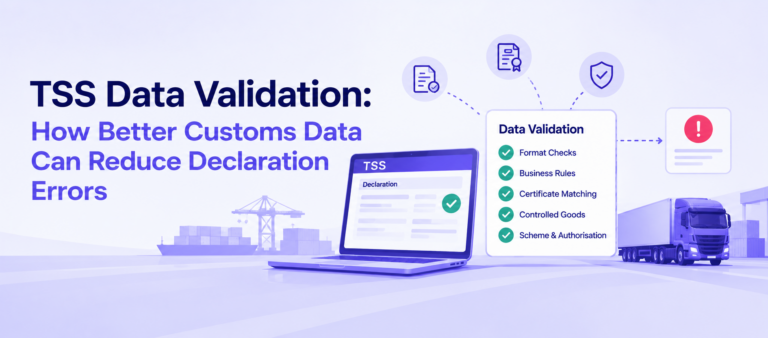
TSS data validation is the automated and manual checks performed within the Trader Support Service Portal to make sure a customs declaration is accurate, complete and compliant before it’s submitted. Most of what stops a declaration going wrong happens here, at the validation layer, not after a rejection.
This guide looks at what TSS Portal’s own validation actually checks, how that validation has expanded over recent years, where it still falls short, and what AI-powered validation adds on top. It isn’t the manual checklist for preparing your data, that’s covered in full in Prepare Customs Data for TSS, and it isn’t the list of error patterns manual entry causes, covered in TSS Manual Data Entry Errors. This is about the checking layer itself.
What TSS Portal validation actually checks
TSS runs validation at several levels, not as one single check. Some of it fires the moment you fill in a field; some of it runs across the whole declaration before submission.
TSS Portal validation, by type
| Validation type | What it catches |
|---|---|
| Format and completeness | Mandatory fields left blank, codes that don’t exist, values in the wrong format |
| Goods-line business rules | A commodity code that’s missing a document code the Tariff Requirements section calls for |
| Consignment-level checks | Buyer and seller data elements, National Additional Code, Destination Country |
| Controlled goods, item level | Missing certificate or licence data for goods flagged as controlled |
| Certificate matching (CERTEX) | A declaration that doesn’t match the health certificate or licence behind it |
| Scheme and authorisation checks | A UKIMS or other scheme number that isn’t validly formatted or isn’t held |
How TSS Portal validation has been built up over time
This isn’t a static set of rules. TSS publishes an ongoing changelog of Portal and policy updates through NICTA, and a good share of it is validation being added or tightened, not just new fields.
- January 2022: item-level validation for controlled goods introduced on entry summary declarations.
- July 2023: goods-line validation added to catch failed Document Code requirements, alongside new validation checks on the National Additional Code field.
- September 2023: UKIMS Authorisation Document Records format validation updated.
- January 2024: changes made ahead of CDS UKIMS Validation, introduced in March 2024.
- May 2025 to May 2026: the Certificates Exchange System (CERTEX) introduced and then aligned, automating the certificate-matching check covered in TSS for Licensed and Regulated Goods.
The pattern is worth noticing on its own: validation has consistently been the area TSS invests in between major releases, which tells you how much of the error problem sits here rather than in the declaration form itself.
Where TSS's built-in validation stops
Everything above is rule-based: it checks that a field is present, that a code exists, that a format matches, that a reference number is there. It’s genuinely good at catching that category of problem, and it has got better at it release by release.
What it can’t do is judge whether the data is actually right. A commodity code that’s correctly formatted and currently valid can still be the wrong code for the goods being moved. A certificate reference can match the format TSS expects without the certificate actually covering what’s in the consignment. A description can pass every completeness check and still not describe the product accurately enough for a customs officer to classify it. None of that is a formatting failure, so none of it gets caught here.
How AI-powered validation closes the gap before you reach TSS
This is where iCustoms sits, ahead of the TSS Portal rather than inside it. Instead of waiting for a rule-based check to catch a missing field, AI-powered customs data validation reads the actual content: it checks whether a commodity code is consistent with the goods description you’ve entered, cross-references certificate and licence references against the certificate data itself rather than just the reference format, and flags a preference claim that the evidence on file doesn’t actually support.
If your business is already searching for customs data validation software, or comparing tools for AI-powered customs data validation, that’s precisely the layer TSS’s own rules don’t reach. iCustoms is built to catch it before submission, not after a rejection turns it into a case.
Common misconceptions
If a declaration submits without an error, the data was correct. It wasn’t necessarily. TSS validation confirms the declaration is structurally valid, not that every fact in it is true.
TSS data validation and preparing customs data are the same thing. They’re related but distinct. Preparing the data is the human groundwork, covered in Prepare Customs Data for TSS; validation is the checking layer, built into the Portal and extendable with software ahead of it.
More automation always means fewer errors. Only if the automation understands the data rather than just moving it faster. Automating submission without validating first produces the same wrong declarations, just quicker.
TSS’s built-in validation hasn’t changed much. It has, steadily: item-level controlled goods checks, National Additional Code validation, UKIMS document format validation and CERTEX have all been added within the last few years.
Things to take away
- TSS data validation covers both the Portal’s own automated rule checks and the manual review a person still needs to do.
- Built-in validation covers format, completeness, goods-line rules, controlled goods, certificate matching and scheme authorisation.
- That validation has expanded steadily since 2022, not stayed still.
- Built-in validation confirms structure, not truth; it can’t tell you a correctly formatted code is the wrong one.
- AI-powered validation ahead of the Portal checks consistency between code, description and certificate, which rule-based checks don’t reach.
- Validating before submission is cheaper than fixing a rejection after the fact, whichever layer catches the problem.
Frequently Asked Questions
What is TSS data validation?
The automated and manual checks performed within the TSS Portal to make sure a customs declaration is accurate, complete and compliant before it's submitted.
What does the TSS Portal validate automatically?
Mandatory fields and formats, goods-line business rules such as required document codes, consignment-level data like the National Additional Code, item-level checks for controlled goods, certificate matching through CERTEX, and scheme authorisation numbers.
Has TSS Portal validation changed recently?
Yes. Item-level controlled goods validation, National Additional Code validation, UKIMS Authorisation Document Records format validation, CDS UKIMS Validation and CERTEX have all been introduced or updated since 2022.
What can't TSS's built-in validation catch?
Whether the data is actually correct rather than correctly formatted: a commodity code that doesn't match the goods, a certificate that doesn't cover the consignment, or a description too vague to classify accurately.
How is TSS data validation different from preparing customs data?
Preparing the data is the groundwork, gathering and structuring it correctly in the first place, covered in Prepare Customs Data for TSS. Validation is the checking layer applied to that data, whether by TSS Portal's own rules or by software ahead of it.
How is TSS data validation different from fixing data entry errors?
Data entry errors are the failure pattern; validation is what's meant to catch them before they become a rejection. TSS Manual Data Entry Errors covers the patterns and how to reduce them.
What is CERTEX and how does it validate certificates?
CERTEX is the system TSS checks certificates and licences against; it confirms the reference and details on your declaration match the certificate itself, not just that a reference has been entered.
What is CDS UKIMS Validation?
A validation alignment introduced around March 2024 covering how UKIMS content and logic are checked on the Customs Declaration Service.
Can AI improve TSS data validation?
Yes, ahead of the Portal rather than inside it: AI can check whether a code, description and certificate are actually consistent with each other, which rule-based format checks aren't built to do.
How does iCustoms help with TSS data validation?
iCustoms validates your data before it reaches the TSS Portal, checking commodity codes against goods descriptions, matching certificate references against certificate content, and flagging unsupported preference claims, so fewer declarations rely on TSS's own checks to catch a problem.
You may also like:
How Much Is Bad Data Costing Your Declarations?

iCustoms validates your customs data before it ever reaches the TSS Portal.
Subscribe to our Newsletter
About iCustoms
iCustoms is an all-in-one solution helping businesses automate customs processes more efficiently. With AI-powered and machine-learning capabilities, iCustoms is designed to streamline your all customs procedures in a few minutes, cut additional costs and save time.
See AI-Powered Data Validation in Action
iCustoms catches the errors format checks can’t, before you submit.