Customs Document Automation: End-to-End AI Workflow
- John Hall
- Customs Specialist at iCustoms.ai
Shipments are moving faster than ever, but customs documentation has not kept pace. For customs brokers and freight forwarders handling hundreds of consignments daily, manual data entry, fragmented systems, and paper-based processes create delays that hold goods at borders and expose businesses to compliance risk. The solution is not simply faster typing. It is removing manual intervention from the workflow entirely.
Why Manual Customs Documentation Fails at Scale
Manual customs documentation may be manageable at low volumes. At scale, it becomes a structural liability. Data must be re-entered across multiple systems, each step introduces error risk, and compliance checks depend entirely on individual operators working under time pressure. When one declaration fails, the entire shipment waits.
High-Volume Processing Bottlenecks
As shipment volumes grow, manual workflows create compounding delays. A team that processes 50 declarations per day using manual data entry is unlikely to scale to 200 without proportional headcount growth. Customs document processing at high volume requires automation to maintain throughput and clearance speed.
Data Inconsistency Across Documents
A single import shipment may involve a commercial invoice, packing list, air waybill, and certificate of origin from different sources. When data is entered manually from each document independently, inconsistencies between them are common and frequently trigger compliance that delay clearance by hours or days.
Compliance Errors and Rejections
Incorrect HS codes, mismatched declared values, and incomplete party data are the most common causes of customs declaration rejection. Each rejection requires investigation, correction, and resubmission, at a cost in both time and credibility with customs authorities. Repeated rejections increase scrutiny on future shipments.
The consequences of manual processing at scale include:
- Delayed clearance due to incomplete or inconsistent data across documents
- Duplicate data entry across customs, logistics, and finance systems
- Incorrect HS codes assigned from incomplete product descriptions
- Mismatched invoice values triggering customs valuation queries
- Missed filing deadlines for entry summary declarations
Manual customs processing slowing down clearance?
Watch a Demo
What Is End-to-End Document Automation in Customs?
End-to-end customs and logistics document automation is the complete replacement of manual document handling with an automated pipeline. This begins the moment a document is received and ends when validated data is submitted to the relevant customs system. No manual re-entry, no siloed processing, and no human dependency for routine data handling.
Beyond OCR: Full Workflow Automation
OCR converts images to text. That is where basic tools stop. Full workflow automation in customs also classifies the document type, extracts specific data fields relevant to the customs context, validates the extracted data against compliance rules, and routes the output to declaration systems. OCR is one step in a six-stage process, not the process itself.
Intelligent Data Capture in Customs
Intelligent data capture in customs goes beyond optical recognition. It uses trained AI models to understand the context of each data field, whether a number is a declared value, a package count, or a commodity code, and maps it to the correct field in the customs declaration. Accuracy improves with each document the system processes through machine learning feedback loops.
The Complete Workflow: From Document Upload to Customs Submission

The following IDP workflow shows how an automated supply chain document automation platform handles a shipment from first document receipt through to customs declaration submission. Each stage replaces a manual step that would otherwise require operator time, introduce error risk, or delay the process.
Step 1: Document Intake
Documents arrive from multiple sources: email attachments from suppliers, API connections from freight management systems, direct uploads from logistics operators, or EDI data feeds from carrier systems. The automation platform ingests all formats including PDF, image scans, structured electronic files, and CSV data, without requiring manual sorting or routing by the operator.
Step 2: Classification
Each ingested document is automatically identified and classified. The system determines whether the file is a commercial invoice, packing list, air waybill, certificate of origin, bill of lading, or another trade document type. Correct classification ensures the right extraction model is applied to each document, as the relevant data fields differ by document type.
Step 3: Data Extraction
Once classified, the system extracts the specific data fields required for customs purposes. For a commercial invoice, this includes the consignor and consignee details, declared value, currency, item descriptions, and quantity. For an air waybill, it captures the HAWB and MAWB references, routing, and cargo description. Each extracted field carries a confidence score indicating extraction certainty. Low-confidence fields are flagged for review.
Step 4: Validation
Extracted data is validated across two dimensions. Cross-document validation confirms that data is consistent between the invoice, packing list, and transport document before proceeding. Compliance validation checks the data against customs rules: are HS codes valid at the required digit level, are EORI numbers registered, do declared values match freight charges within expected parameters, and are goods descriptions sufficiently specific to pass customs scrutiny?
Step 5: Output to Customs Systems
Validated data is formatted and routed to the appropriate customs filing system. For UK imports, this is the HMRC Customs Declaration Service (CDS). For goods entering the EU, the output feeds ICS2 ENS filing via a certified connection. For transit movements, NCTS-compatible output is generated. Declaration data is submitted in the correct format for each system, with confirmation and MRN retrieval handled automatically.
From document upload to CDS and ICS2 filing, automate the entire workflow.
Reduce compliance risk with AI validated customs data. See the Automation
Manual vs Automated: How Customs Document Processing Compares at Each Stage
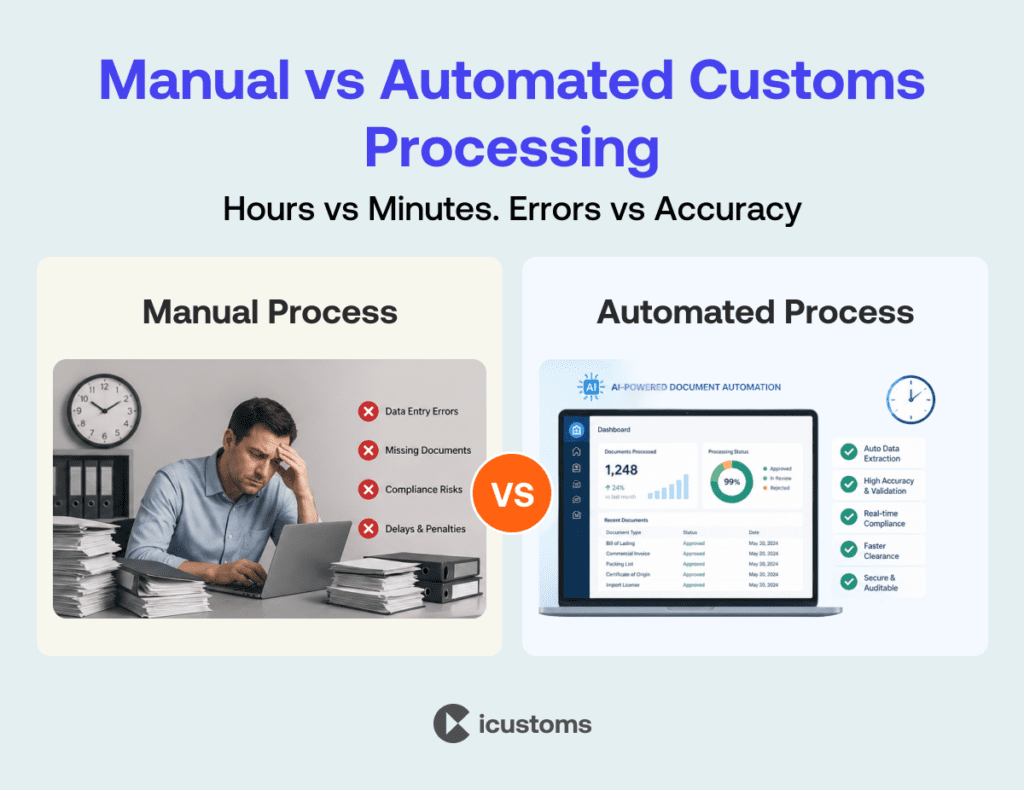
| Stage | Manual Process | Automated Process |
| Document Intake | Operator sorts and opens each file manually | All formats ingested automatically via email, API, upload |
| Classification | Operator identifies document type visually | AI classification in under 2 seconds per document |
| Data Extraction | Manual typing from source document into customs system | Structured data extracted with field level confidence scoring |
| Validation | Human checks for consistency across documents | Automated cross document and compliance validation |
| Processing Time | Hours per shipment for complex multi document sets | Minutes from document receipt to declaration ready data |
| Error Rate | High: 5 to 8% per data field under manual entry | Low: 99% accuracy on high quality documents |
| Output | Manual entry into CDS, ENS, or declaration portal | Direct API output to CDS, ICS2 ENS, and NCTS systems |
Real-World Use Cases in Customs and Logistics
The following use cases demonstrate where logistics document automation software delivers measurable impact for customs brokers, freight forwarders, and logistics operators in day-to-day trade operations.
Commercial Invoice Processing
Commercial invoices are the primary data source for customs valuation and commodity classification. Automation extracts line-item descriptions, declared values, quantities, and party details, then maps each to the corresponding CDS declaration field. For a shipment with 50 invoice line items, this takes seconds rather than the 20 to 30 minutes required for manual entry.
Packing List Automation
Packing lists are cross-referenced against the commercial invoice automatically. Where quantities, weights, or descriptions do not match, the discrepancy is flagged before the declaration is submitted. This prevents customs valuation disputes and reduces the risk of examination requests at the border.
Waybill Data Extraction
Air waybills and bills of lading contain routing, consignee, and cargo data required for Entry Summary Declaration filings. Automated extraction reads both HAWBs and MAWBs, identifies the relevant fields, and populates S&S GB ENS or ICS2 declarations without manual transcription, meeting pre-arrival filing deadlines consistently.
Certificate of Origin Handling
Certificates of origin and EUR.1 movement certificates determine preferential duty rate eligibility. Automation reads origin declarations, exporter certification details, and product descriptions, routing the data to the relevant CDS procedure code fields and flagging any certificate that does not meet the rules of origin criteria for the declared commodity code.
Key Benefits of Document Automation in Trade Operations
The operational benefits of customs and logistics document automation extend across speed, accuracy, scalability, and compliance. For trade operations teams managing high-volume shipments, these benefits compound over time.
- Reduce processing time by up to 50% across high-volume customs declaration workflows
- Improve extraction accuracy to 99% on clearly structured documents, reducing rejection rates
- Handle high-volume customs document processing without scaling headcount proportionally
- Reduce customs rejection rates by validating data against compliance rules before submission
- Maintain audit-ready documentation with a full processing history for every declaration
- Meet pre-arrival filing deadlines consistently through automated workflow triggers
Where Traditional Tools Fail: OCR, RPA, and Manual Systems
Businesses that have invested in basic OCR, robotic process automation, or manual data entry systems often assume they have a document processing solution. In practice, each of these approaches has fundamental limitations that become visible under the demands of real customs operations at scale.
OCR Limitations
OCR converts document images to machine-readable text but does not understand context. It cannot distinguish a declared value from a unit price, or a commodity code from a reference number. Without contextual understanding, OCR output requires manual review for every field before it can be used in a customs declaration.
RPA Without Intelligence
Robotic process automation executes fixed rules. It works when documents are consistent and structured. When a supplier changes their invoice template, or a new carrier uses a different waybill format, RPA breaks and requires manual reconfiguration. In customs, where document formats vary by supplier, carrier, and country, RPA without AI intelligence fails regularly.
Manual Dependency
Manual data entry is accurate only at low volume with experienced staff who are not under time pressure. As volume increases, error rates rise. As staff turn over, knowledge gaps appear. Manual processes also create compliance risk: when a customs declaration contains a classification error, the operator who made the error is difficult to identify, and the audit trail is incomplete.
Automate invoices, packing lists, and waybills in one AI powered workflow. Watch Your iCustoms Demo
How iCustoms Delivers End-to-End Automation
iCustoms provides a complete workflow automation document processing platform built specifically for customs and logistics operations. Each component of the platform handles a specific stage of the document-to-declaration workflow, and all components operate as an integrated system rather than separate tools.
- iCheck classifies incoming documents automatically, identifying document type and routing each to the correct extraction model
- iCombine merges data from multiple documents across a single shipment, matching invoice, packing list, and transport document data before extraction
- iTeach enables the platform to learn from operator corrections, improving extraction accuracy over time using real customs document data from your operation
- iMarker applies extraction accuracy scoring to every data field, flagging low-confidence outputs for review and passing high-confidence fields directly to validation
The platform connects to customs systems via API, EDI, and CSV integration. For UK customs, iCustoms outputs CDS-compatible declaration data directly. For EU ENS filings, it connects via AS4 access point to the ICS2 system. A complete declaration can be generated from document receipt in under two minutes, at 99% accuracy, at any volume without additional operator resource.
Why Automation Is Becoming Mandatory in Trade Compliance
According to the World Trade Organization, trade facilitation reforms including digital customs processes have the potential to reduce global trade costs by up to 14.3 percent. McKinsey estimates that logistics and supply chain operations are among the sectors with the highest automation potential, with 45 percent of current manual tasks automatable using existing technology. As regulatory frameworks such as ICS2, NCTS Phase 5, and HMRC CDS enforcement tighten, manual documentation processes are not just inefficient. They are becoming a compliance liability.
Conclusion
Customs and logistics document automation is not a future investment. It is an operational requirement for any business handling consistent cross-border shipment volumes in 2025 and beyond. The gap between what manual processes can deliver and what modern customs compliance demands has closed. The question is not whether to automate but how quickly the transition can be completed.
What end-to-end automation delivers for customs and logistics operations:
- Automation replaces manual document workflows from intake through to declaration submission
- Errors and clearance delays are reduced through pre-submission validation and cross-document consistency checks
- Operations scale to handle high-volume customs document processing without headcount growth
- Compliance is maintained through AI-validated data and a complete audit trail for every declaration
iCustoms is not a document viewer or an OCR tool. It is the compliance infrastructure that sits between your incoming trade documents and your customs declaration systems, processing every document accurately, at speed, and at scale. It is the automation layer that removes the manual dependency from your customs operation permanently.

Ready to Eliminate Manual Customs Documentation?
Automate extraction, validation, and customs filing workflows in one AI powered platform.
You may also like:


Struggling to Extract, Catagorise & Validate Your Documents?

Capture & Upload Data in Seconds with AI & Machine Learning
Subscribe to our Newsletter
About iCustoms
iCustoms is an all-in-one solution helping businesses automate customs processes more efficiently. With AI-powered and machine-learning capabilities, iCustoms is designed to streamline your all customs procedures in a few minutes, cut additional costs and save time.
Struggling to Extract, Catagorise & Validate Your Documents?
Capture & Upload Data in Seconds with AI & Machine Learning