Destin8 Port Community System Explained, Login, Codes and Cargo Tracking Guide
- John Hall
- Customs Specialist at iCustoms.ai
If you work in UK freight and you have ever waited for a container release that should have happened hours ago, there is a good chance Destin8 was somewhere in that chain. It is the invisible layer connecting your shipping line, your terminal, your haulier and your customs broker. When it is working well, cargo flows. When something breaks in that chain, understanding how Destin8 actually works is what separates a two-hour fix from a two-day hold.
This guide is written for logistics professionals who use Destin8 day to day, or who need to understand how it fits into UK port operations. We cover what the system does, how the login and badge code system works, the transaction codes that experienced operators rely on, how tracking functions across Destin8-linked ports, and where Destin8 ends and customs declaration software begins.
What Is Destin8? An Inventory Linking Platform
Destin8 is a Port Community System (PCS) operated across the UK maritime sector. Its core function is inventory linking. It acts as a shared data layer between every organisation that touches a shipment as it moves through a UK port, from the moment the vessel manifests cargo, through terminal discharge and customs clearance, to the point a haulier physically collects the container.
How Destin8 Controls Cargo Gates
What makes Destin8 different from a simple tracking tool is that it does not just show you where cargo is. It coordinates the sequence of permissions needed to move it. A container cannot be released from a terminal until three things align in the system:
- The shipping line has confirmed discharge
- The customs declaration has been cleared by HMRC
- The freight forwarder or importer has authorised release
Destin8 holds those gates and only opens them when all conditions are met.
Who Uses Destin8 and What They See
The organisations that use Destin8 daily include:
- Shipping lines submitting vessel manifests
- Freight forwarders managing container nominations and release instructions
- Terminal operators recording discharge and gate activity
- Customs brokers monitoring clearance status against declared MRNs
- Hauliers collecting containers under driver console permissions
Each party sees only the data relevant to their role. A haulier using the DRV driver console does not see invoice or duty details. A customs broker monitoring INQ03 does not see the haulier’s vehicle assignment.
How Destin8 Supports Cargo Movement
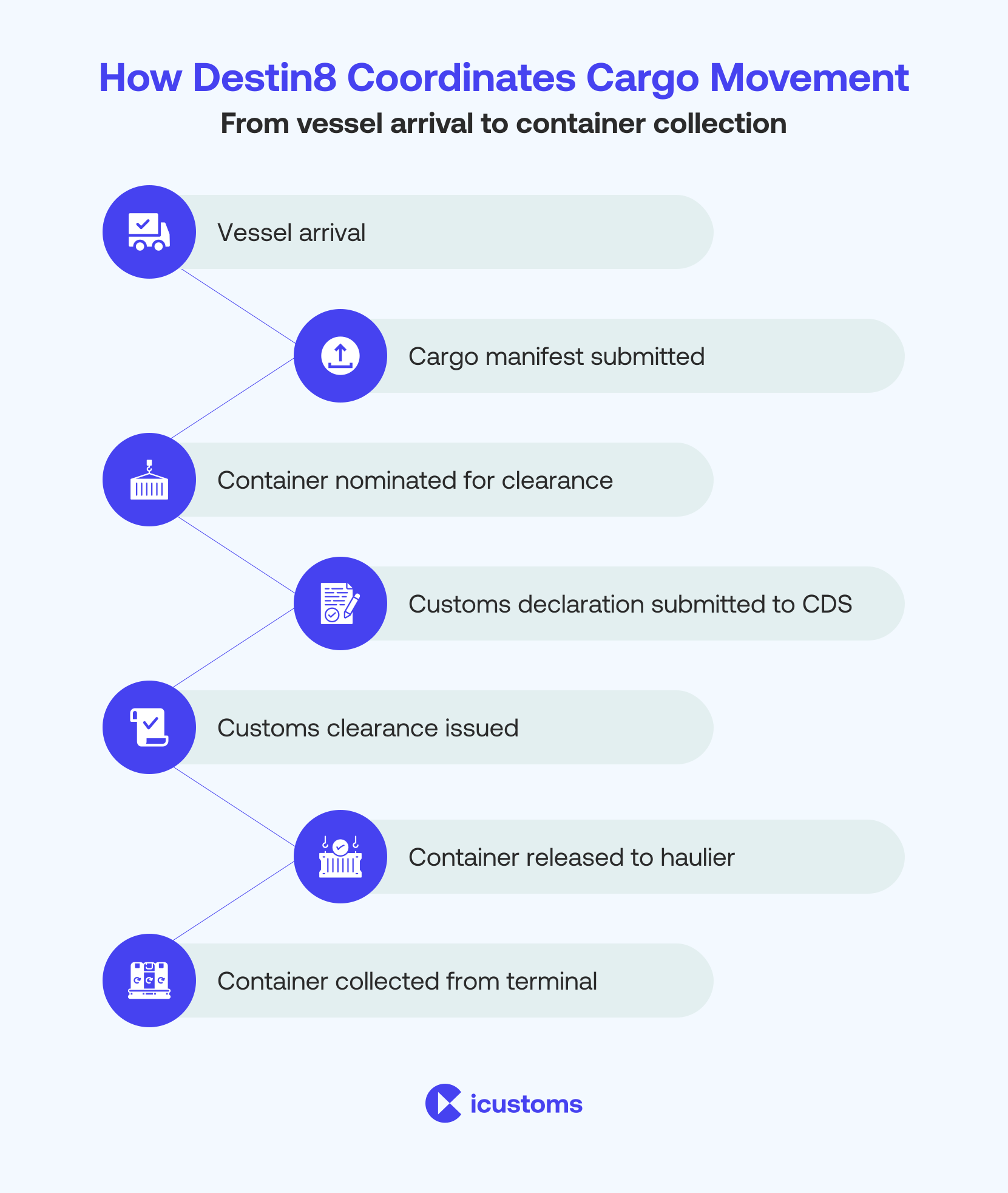
Destin8 plays a key role in coordinating cargo movement from vessel arrival through to container collection. Logistics teams use the system to monitor cargo milestones and coordinate shipment handling between ports and customs authorities.
Typical cargo workflow managed through Destin8 ports includes:
- Shipping line manifests cargo in the system
- Freight forwarder nominates the container
- Customs declaration submitted to CDS
- Terminal operator discharges cargo
- Customs clearance returned by HMRC
- Container released to a haulier
- Container collected from the terminal
This workflow allows logistics operators to track shipment progress and coordinate port activities efficiently.
The Cargo Lifecycle in Destin8: From Manifest to Collection - The Seven Steps From Manifest to Collection
Understanding Destin8 is easiest if you follow a single container through the process. Here is what actually happens in the system:
- The shipping line manifests the container against the vessel voyage in Destin8, creating the inventory record that all subsequent activity attaches to
- The freight forwarder nominates the container using the CSN function, linking it to their company badge code
- A customs declaration is submitted to HMRC’s Customs Declaration Service (CDS)
- CDS issues a Movement Reference Number (MRN) and returns a clearance decision
- That clearance status flows into Destin8, releasing the inventory hold
- The terminal operator records the container as available after discharge
The freight forwarder issues a release instruction, the haulier collects, and the terminal records gate-out
What Causes Release Holds
If any step in this sequence is missing or delayed, Destin8 holds the release. The most common cause of unexpected holds is a mismatch between the commodity code or consignee details on the customs declaration and the manifest data in Destin8. When these do not reconcile, the clearance status does not propagate and the release gate stays closed, even when the haulier is physically at the terminal.
Destin8 Login: How Access Works - The Badge Code System
Destin8 runs as a secure web platform at destin8.co.uk. Access is not open. Organisations must register with Destin8 and be approved before any user within that company can log in.
Once registered, each company receives a unique three-letter badge code. This is your company’s identity within the entire Destin8 ecosystem. Every transaction, nomination, release instruction and tracking query your team submits is associated with that badge code. If you are onboarding a new member of staff or setting up a second office, the badge code stays the same for the company. Individual user credentials within that company are issued separately.
Browser and Network Requirements
The Destin8 login system is browser-based and works with:
- Microsoft Edge
- Google Chrome
- Mozilla Firefox
Destin8 does not support older browsers. Some organisations with stricter network policies may need to whitelist the destin8.co.uk domain. If your team is accessing the system from a new network or location and experiencing login failures, IP restriction is the first thing to check with your Destin8 account administrator, not a password reset.
Destin8 Credentials vs Customs Platform Credentials
If your organisation uses both Destin8 directly and a customs declaration platform that integrates with Destin8 via API or EDI, your Destin8 credentials and your customs platform credentials are entirely separate. They do not share authentication, and losing access to one does not affect the other.
Which UK Ports Use Destin8? Major UK Ports on the Destin8 Network
Destin8 operates across the majority of the UK’s major container and ro-ro ports. The core network includes:
- Port of Felixstowe: The UK’s largest container port by volume, handling around 40% of UK container traffic. Familiarity with Destin8 is effectively mandatory for any freight operator working Felixstowe import cargo
- Tilbury and London Thamesport: Both critical for London and South East distribution, fully integrated with Destin8 for container release and terminal gate management
- Liverpool (Port of Liverpool / Seaforth): The dominant Destin8 port for North West England and Ireland trade lanes, with significant ro-ro and container volumes
- Hull, Immingham and Grimsby: The Humber ports collectively handle substantial volumes of unitised and bulk cargo for the Midlands and North, all using Destin8 for container coordination
- Teesport: North East England’s primary deep-water port, used extensively for energy sector and chemical cargo alongside general container traffic
- Harwich: Primarily a passenger and ro-ro port, with Destin8 used for freight coordination alongside the Felixstowe corridor
Aberdeen, Cardiff and Swansea: Regional ports serving specific trade lanes, all connected to the Destin8 network
External Temporary Storage Facilities
Beyond the ports themselves, Destin8 also links to more than 200 external temporary storage facilities (ETSFs) across the UK. These are bonded warehouses and inland container depots where cargo can be held under customs supervision pending clearance.
If your cargo is moving to an ETSF before delivery, which is common for controlled goods, groupage, or cargo with declaration queries, the Destin8 inventory record moves with it. Clearance status is tracked at the ETSF rather than the port.
Destin8 Transaction Codes: What They Actually Do - Why Transaction Codes Matter
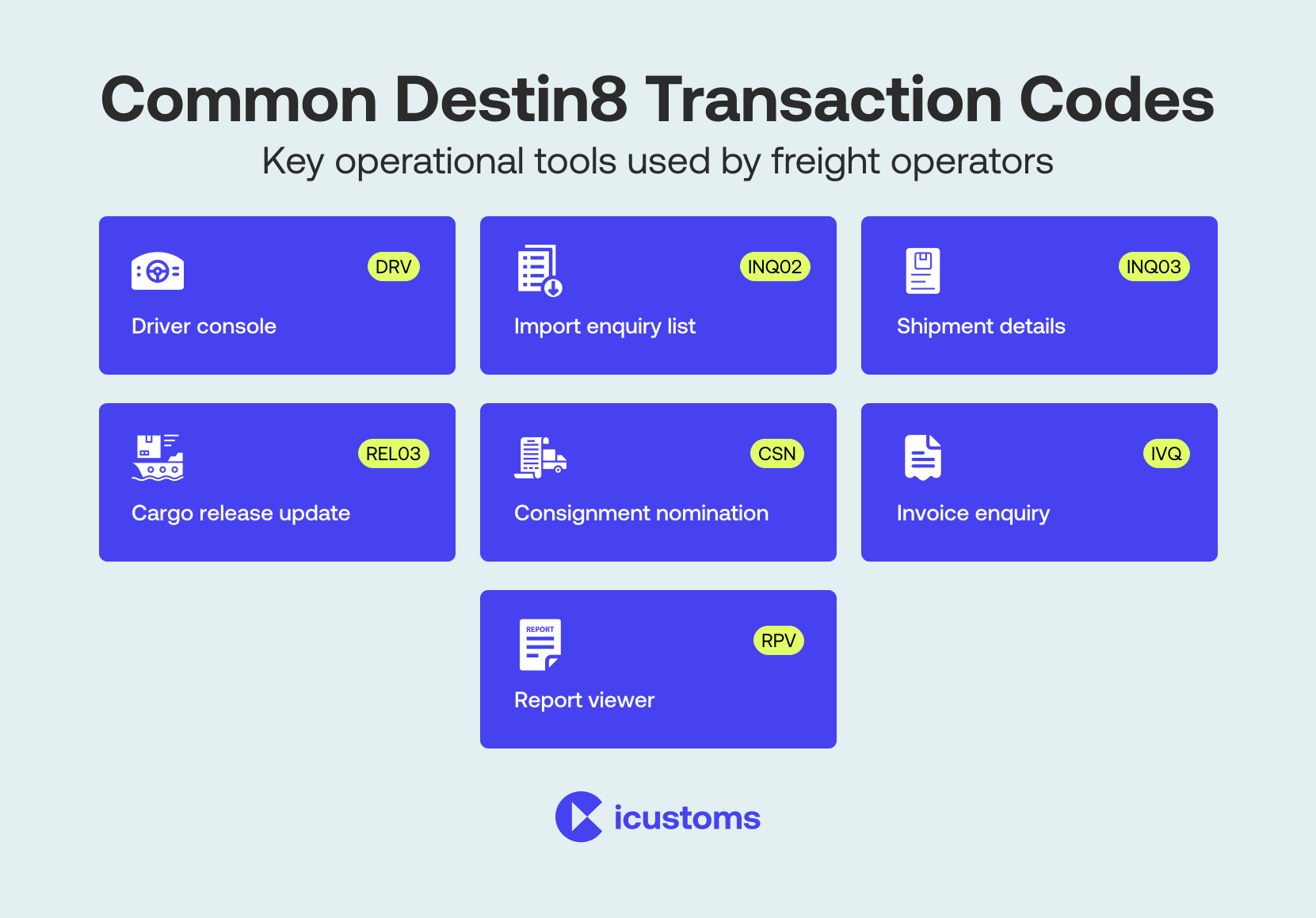
This is where most new Destin8 users hit a wall. The system is built around short transaction codes that call up specific functions, and there is no intuitive menu system to guide you. Experienced operators have these memorised. Knowing the right code at the right moment is the difference between resolving a hold in minutes or spending hours contacting the wrong party.
Import Enquiry and Shipment Detail Codes
INQ02 (Import Enquiry, Shipment List) This is your starting point for checking the status of incoming cargo. INQ02 returns a list of shipments associated with your badge code, including vessel, voyage, container number, and current status flags. If you are expecting a container and want to confirm it has been manifested against your company, INQ02 is where you look first.
INQ03 (Detailed Shipment Enquiry) Once you have a specific shipment from INQ02, INQ03 gives you the full record: cargo description, gross weight, number of packages, the linked customs entry reference, clearance status, and any holds applied. If customs clearance shows as pending in INQ03 when you believe your declaration has been accepted, the issue is usually either a timing delay in the CDS-to-Destin8 status update (typically under 30 minutes), or a mismatch between the declaration and the manifest record.
Release and Nomination Codes
REL03 (Cargo Release Management) This is the function that actually releases cargo to a haulier. REL03 requires the cargo to have a green customs status in the system before it will accept a release instruction. Attempting to release before clearance is confirmed will return an error. If you are using REL03 and seeing unexpected rejections on cargo you believe is clear, check the INQ03 status first before contacting the terminal.
CSN (Consignment Self Nomination) CSN is how freight forwarders associate themselves with a container. When a shipping line manifests cargo, it sits unattributed until a freight forwarder nominates it to their badge code using CSN. Without this step, you cannot submit release instructions or see detailed shipment data for that container. If you are trying to work a container in Destin8 and finding it invisible, this is usually what is missing.
Haulier, Invoice and Reporting Codes
DRV (Driver Console) DRV is the haulier-facing function. It is about collection authority, not container data. The terminal operator checks DRV to confirm that release has been authorised and the vehicle is registered for collection. If a driver arrives at the terminal and is turned away, the problem is almost always that REL03 has not been completed or the vehicle registration was not submitted correctly.
IVQ (Invoice Enquiry) IVQ gives access to the invoice records linked to a shipment, useful for verifying charge references against your own records or resolving billing queries with the shipping line.
RPV (Report Viewer) RPV is used to access structured operational reports including movement summaries and historical cargo records. Useful for end-of-month reconciliation and audit purposes.
Tracking Interfaces
TRC and TRX (Cargo Tracking) TRC is the original tracking interface, still in use at many ports. TRX is the updated version offering better filtering and shipment visibility. Both show real-time container status:
- Whether the container has been discharged from the vessel
- Whether it is in the terminal stack
- Whether a release instruction has been processed
- Whether gate-out has been recorded
For freight forwarders managing multiple containers across a vessel call, TRX is the more efficient tool.
Destin8 and UK Customs Declarations: Where the Handoff Happens - How CDS Clearance Feeds Into Destin8
Destin8 coordinates cargo movement. It does not process customs declarations. These are two entirely separate systems, and the handoff between them is the point where most delays occur.
When you submit a customs declaration to HMRC through the Customs Declaration Service (CDS), CDS generates a Movement Reference Number (MRN). This MRN is the link between your customs declaration and the Destin8 inventory record. Once HMRC returns a cleared status, that clearance signal is sent to Destin8 and the inventory hold is lifted. The gap between HMRC clearing your declaration and Destin8 reflecting that clearance is usually under 30 minutes, but can extend during peak periods or when there are data validation issues between the two systems.
The UCR Mismatch Problem
The most common reason a container stays on hold in Destin8 despite a cleared declaration is a UCR (Unique Consignment Reference) mismatch. The reference on your CDS declaration does not match the reference the shipping line submitted in the manifest. When this happens, Destin8 cannot automatically reconcile the clearance to the correct inventory record.
To resolve it:
- Check INQ03 for the reference held against the shipment
- Compare it with the UCR on your customs declaration
Correct whichever side is wrong, either by amending the declaration or asking the shipping line to update the manifest
When HMRC Has Routed to Examination
A second, less common but more serious cause of holds: if HMRC’s risk system has routed the declaration to documentary check or physical examination, clearance will not be returned until that examination is complete. This shows in Destin8 as an unresolved hold. No amount of chasing the terminal will change it. The hold lifts when HMRC releases it, not before.
What Destin8 Cannot Do: The Case for Customs Declaration Software The Visibility Trap
Because Destin8 is doing its job visibly, you can see your cargo and you can see the status, it is easy to assume it is handling everything. It is not. Destin8 tells you where your cargo is and whether it has been cleared. It does not prepare the declaration that gets it cleared.
The customs declaration that feeds clearance status into Destin8 needs to be prepared, validated and submitted to HMRC’s CDS separately. That means:
- Commodity code classification at 10-digit level for UK import declarations
- Duty and VAT calculations
- Country of origin documentation
- Compliance with HMRC’s full declaration requirements
- Separate declaration processes for NCTS transit movements
| Function | Destin8 | Customs Declaration Software |
| Container tracking and status | Yes | No |
| Release instruction management | Yes | No |
| EDI integration with terminals | Yes | Yes |
| Customs declaration preparation | No | Yes |
| HS/commodity code classification | No | Yes |
| Duty and VAT calculation | No | Yes |
| HMRC CDS submission | No | Yes |
| MRN generation | No | Yes |
The Synchronisation Advantage
The businesses that run the smoothest Destin8 operations are those where the customs declaration software and Destin8 are effectively synchronised. The declaration is submitted and cleared before the vessel berths, so that by the time the terminal records discharge, the Destin8 inventory hold is already lifted and the freight forwarder can issue the REL03 immediately.
EDI Integration in Destin8: How Data Flows Between Systems - Why EDI Matters for High-Volume Operators
For logistics operators running higher volumes, manually logging into Destin8 for each container is not practical. Destin8 supports Electronic Data Interchange (EDI) messaging, which allows your internal TMS (Transport Management System) or customs platform to exchange data with Destin8 automatically.
The Six EDI Message Types
- CUSCAR (Customs Cargo Report) is used by shipping lines to submit vessel manifests to customs authorities. This is the upstream source of the cargo data that appears in Destin8 when you run INQ02.
- COPARN (Container Pre-Arrival/Departure Advice) is the shipping line’s instruction to the terminal operator to expect a specific container for discharge or loading. Destin8 uses this to create the inventory record before the vessel arrives.
- COPINO (Container Pick-Up/Delivery Order) is the authorisation message that tells the terminal a specific party is approved to pick up a container. This is the EDI equivalent of completing REL03 manually.
- CODECO (Container Gate-In/Gate-Out Report) is the terminal’s confirmation that a container has physically passed through the gate. This is the message that records collection in Destin8 and closes the shipment record.
- COARRI (Container Discharge/Loading Report) is the terminal’s confirmation that cargo has been discharged from the vessel or loaded for export. This is what triggers the “discharged” status you see in TRC/TRX tracking.
- IFTDGN (Dangerous Goods Notification) is used for shipments carrying dangerous goods under IMDG classification. This message carries the hazmat detail that the terminal needs before handling.
What to Prioritise When Integrating
If you are integrating your customs platform or TMS with Destin8, COPINO is typically the most operationally significant message type for freight forwarders, as it is the automated equivalent of the manual release instruction. CODECO is equally important for closing shipment records accurately. Map these two first before moving to the others.
How Customs Automation Connects With Destin8 Workflows - The Connected Workflow in Practice
The most efficient UK customs operations treat the customs declaration and the Destin8 release process as a single connected workflow, even though they use separate systems. Here is how that looks in practice.
An importer’s ERP or WMS generates a commercial invoice when a shipment is confirmed. An Intelligent Document Processing (IDP) tool extracts the relevant fields, including consignee, commodity, value and country of origin, and feeds them directly into the customs declaration platform. The platform classifies the goods, calculates duty and VAT, validates the declaration data, and submits to CDS. The MRN is returned from CDS and logged against the shipment record. When HMRC clears the declaration, the status feeds into Destin8, the hold is lifted, and the freight forwarder is notified to issue the release instruction.
What This Eliminates
In a manual process, each of these steps involves a handoff between people, systems and inboxes. Each handoff is a potential delay. Automation eliminates the most common ones:
- No manual re-keying of invoice data into the declaration platform
- No missed notifications when clearance is returned
- No forgotten REL03 because someone was away from their desk
No UCR mismatches caused by typing errors between systems
iCustoms Products That Support This Workflow
iCustoms provides the tools that connect each stage of this process:
- iDP for automatic document data extraction
- iClassification for AI-assisted commodity code assignment
- iCDS for HMRC-recognised UK customs filing
- iZap for duty and tariff calculations
- iNCTS for transit declarations
- GVMS integration for goods vehicle movement tracking
Each of these connects to the CDS submission that ultimately drives the clearance status Destin8 is waiting for.
How Customs Automation Improves Destin8 Workflows
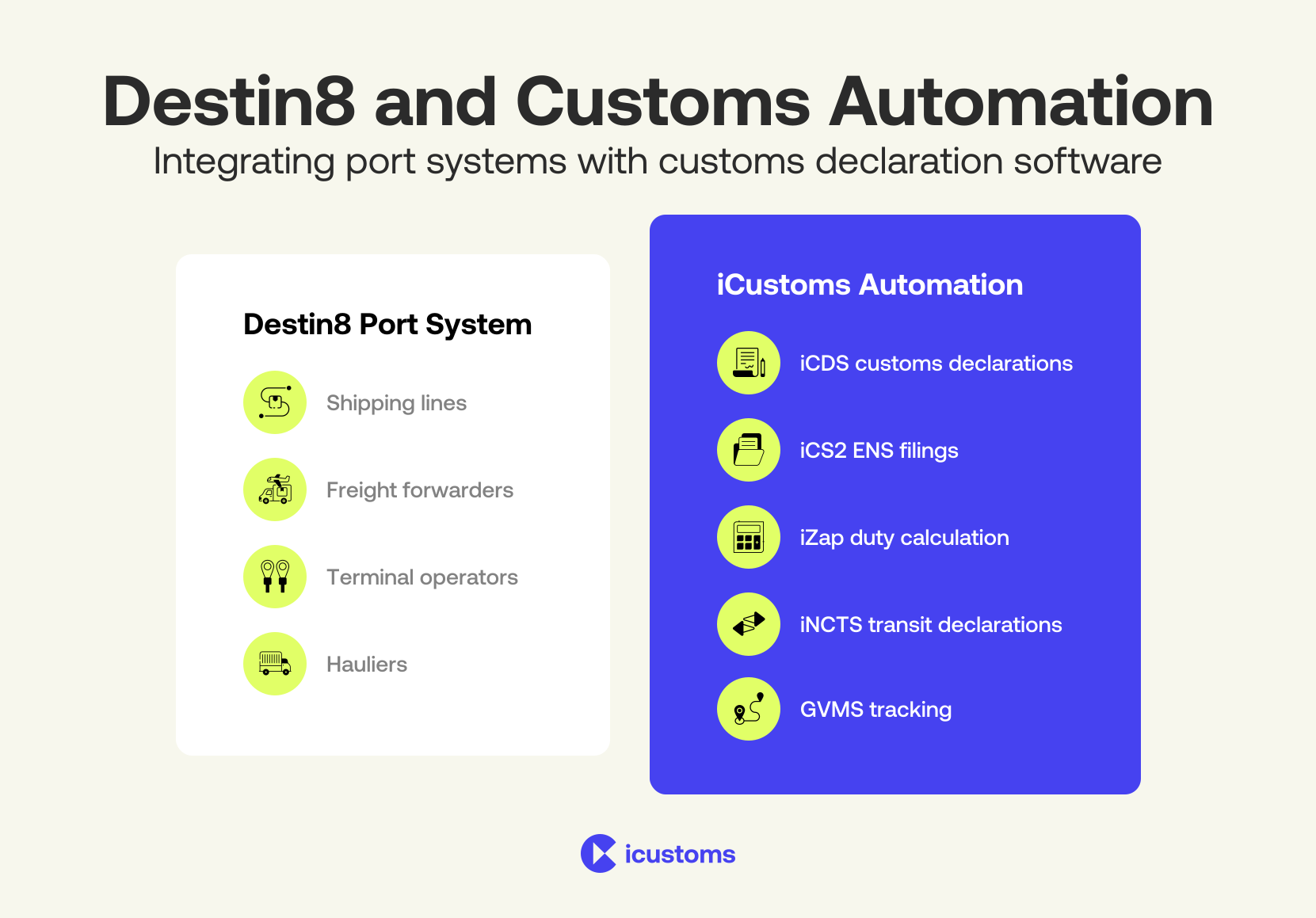
Port community systems provide operational visibility but often rely on manual processes for customs compliance tasks. Automation platforms help integrate customs processes with logistics systems.
Automating Customs Processes Linked to Port Systems
Automation tools can streamline several processes including:
- extracting invoice data using Intelligent Document Processing
- identifying tariff codes through automated product classification
- calculating import duties and VAT
- validating declaration data before submission
- submitting declarations electronically to customs systems
These capabilities improve accuracy and accelerate cargo clearance.
Conclusion
Destin8 is one of the UK’s most important logistics coordination tools, but it works best when the customs declaration side of the operation is running cleanly in parallel. The delays that frustrate logistics teams, containers sitting on hold despite apparent clearance, hauliers turned away at the gate, release instructions rejected without explanation, almost always trace back to one of three things:
- A data mismatch between the declaration and the manifest
- A clearance that has not propagated yet from CDS
- A Destin8 process step that was not completed in the right sequence
Understanding the transaction codes, knowing how the clearance handoff works, and having customs declaration software that keeps pace with the Destin8 workflow makes the whole chain faster and more predictable.
Destin8 FAQs:
What is Destin8 and how does it work?
Destin8 is a Port Community System that acts as a shared data layer between shipping lines, freight forwarders, terminal operators, hauliers and customs brokers across UK ports. It coordinates the sequence of approvals, including manifest confirmation, customs clearance and release authorisation, that must all be complete before a container can leave a terminal. Each party interacts with the system through their own function set, and the system only opens the release gate when all conditions are met.
How do I access the Destin8 login portal?
Access is via the official Destin8 web portal at destin8.co.uk. Your organisation must be registered with Destin8 before any user can log in. Once registered, your company is assigned a unique three-letter badge code that identifies you across the system. Individual user credentials are issued within that company account. Supported browsers are Microsoft Edge, Google Chrome and Mozilla Firefox. If you are accessing from a new network and experiencing login failures, check whether your organisation's IT team needs to whitelist the destin8.co.uk domain before assuming it is a credential issue.
Does Destin8 handle customs declarations?
No. Destin8 tracks whether a customs declaration has been cleared but does not prepare, validate or submit declarations to HMRC. Customs declarations must be submitted to HMRC's Customs Declaration Service (CDS) through a separate customs declaration platform. The clearance outcome from CDS then feeds back into Destin8 to lift the inventory hold.
Why is my cargo showing as on hold in Destin8 when my declaration has been accepted?
The most common cause is a UCR (Unique Consignment Reference) mismatch. The reference on your CDS declaration does not match the reference the shipping line used in the Destin8 manifest, so Destin8 cannot reconcile the clearance to the right inventory record. Check INQ03 for the reference held against the shipment, compare it with your MRN details, and correct whichever side is wrong. If the references match, it may simply be a propagation delay. CDS-to-Destin8 clearance updates typically take up to 30 minutes.
What role does MRN play in Destin8 cargo release?
The Movement Reference Number (MRN) is generated by CDS when your customs declaration is submitted. It is the unique identifier that links your declaration to the Destin8 inventory record. When HMRC clears the declaration, the clearance signal is sent to Destin8 against that MRN. If the MRN is not correctly associated with the right Destin8 shipment record due to a UCR mismatch or data entry error, the clearance will not register and the hold will not lift.
What are the limitations of Destin8 in customs compliance?
Destin8 shows you the outcome of customs clearance but plays no role in producing that outcome. It cannot classify goods, calculate duty, identify restricted or controlled items, or submit declarations to HMRC. For any of those tasks, you need a customs declaration platform. Destin8 is also limited to UK port operations and has no visibility of pre-shipment compliance, country-of-origin documentation, or export declaration status.
How can customs automation improve Destin8 workflows?
The main benefit is timing. When customs declaration software is connected to the same shipment data your freight team is working with, declarations can be prepared and submitted earlier, ideally before the vessel arrives. That means by the time cargo is discharged and Destin8 records it as available, the clearance status is already green and the release instruction can go immediately. Manual processes introduce gaps at every handoff. Automation eliminates most of them.
Can Destin8 integrate with customs automation platforms?
Yes, through EDI messaging. The key message types for integration are COPINO, which is the container pick-up authority equivalent to a release instruction, and CODECO, which is the gate-out confirmation. If your customs or logistics platform supports these EDI formats, you can automate the release instruction and collection confirmation steps that most operators still do manually in Destin8.
Why do logistics teams use both Destin8 and customs declaration software?
Because they do fundamentally different jobs. Destin8 manages the physical and operational side of cargo movement through a port, covering who can touch a container, when it can leave, and where it is in the terminal. Customs declaration software manages the regulatory side, covering what is in the container, what duty is owed, and whether HMRC has authorised its release into the UK. You need both, and you need them to stay synchronised. When one runs ahead of the other, delays follow.
How does iCustoms work alongside Destin8?
iCustoms handles the customs declaration workflow that produces the clearance status Destin8 is waiting for. iCDS prepares and submits HMRC-recognised UK import and export declarations. iDP extracts data from trade documents automatically so declarations can be prepared without manual re-keying. iClassification assigns the correct commodity codes. iZap calculates duties and tariffs. The MRN generated by a successful CDS submission is what ultimately lifts the hold in Destin8 and allows the freight forwarder to issue a release instruction.
How does iCustoms enhance Destin8-based operations?
iCustoms automates customs declarations, product classification, and document processing, enabling seamless integration with Destin8 workflows and improving speed, accuracy, and compliance.

Connect Destin8 with Customs Automation
Eliminate manual work and streamline clearance with integrated workflows
You may also like:
How TARIC Codes Influence Import Duties
Struggling to Extract, Catagorise & Validate Your Documents?

Capture & Upload Data in Seconds with AI & Machine Learning
Subscribe to our Newsletter
About iCustoms
iCustoms is an all-in-one solution helping businesses automate customs processes more efficiently. With AI-powered and machine-learning capabilities, iCustoms is designed to streamline your all customs procedures in a few minutes, cut additional costs and save time.
Struggling to Extract, Catagorise & Validate Your Documents?
Capture & Upload Data in Seconds with AI & Machine Learning