
- Freya Jane
- Director of Customer's Success
What Is Multiple ENS Filing? A Complete Guide for UK and EU Importers (2026)
Key Takeaways
Multiple ENS Filing refers to submitting two or more Entry Summary Declarations simultaneously: for multiple shipments, for the same goods across UK and EU customs territories, or as amendments to previously submitted declarations.
Freight forwarders, customs brokers, and shipping agents routinely need to file ENS declarations in bulk. Manual filing through HMRC CDS is slow and error-prone at volume.
iCustoms iZap module automates batch ENS filing through direct HMRC CDS API integration, eliminating manual data entry and reducing rejection rates.
For goods entering the EU, EU ICS2 (Import Control System 2) obligations may apply alongside UK ENS requirements for the same cargo movement.
Missing ENS filing deadlines across multiple shipments exposes operators to civil penalties of up to GBP 2,500 per declaration under UK law.
If you are managing customs declarations for more than one shipment at a time, you will already know that filing Entry Summary Declarations individually through HMRC CDS is time-consuming, repetitive, and carries a high risk of errors as volumes increase. Multiple ENS filing solves this problem, but understanding when it applies, who is responsible, and how to do it efficiently is essential for any importer, freight forwarder, or customs broker operating in the UK and EU market.
This guide explains exactly what multiple ENS filing means, the three main scenarios that trigger it, which countries require ENS pre-arrival notifications, how importers and freight forwarders share responsibility, and how customs software like iZap and iWiz from iCustoms.ai automates the entire process.
What Is ENS Filing and Why Does It Matter?
ENS filing is the process of submitting an Entry Summary Declaration to customs authorities before goods physically arrive in a customs territory. The ENS is a safety and security notification that gives customs agencies the information they need to conduct risk assessments and identify potential threats before the goods are unloaded.
In the United Kingdom, ENS filing is managed through HMRC’s Customs Declaration Service (CDS). Every ENS submission generates a Movement Reference Number (MRN), which must be provided to the carrier and presented at the port of entry. In the European Union, the equivalent obligation is handled through the Import Control System 2 (ICS2), which reached its final implementation phase in March 2024 covering all transport modes including road, rail, and maritime.
ENS filing is not optional. It is a legal requirement for most goods entering the UK or EU, and failure to file before the required deadline attracts civil penalties and can result in goods being held at the border. For businesses filing declarations at volume, the risks of manual errors multiply with every shipment, making automated ENS filing software an essential operational tool rather than a luxury.
What Is Multiple ENS Filing? The Three Key Scenarios
Multiple ENS filing occurs in any situation where more than one Entry Summary Declaration must be submitted for the same operator, the same journey, or related goods movements. There are three distinct scenarios that trigger the need for multiple ENS filings:
Scenario 1 (Freight Forwarder ENS obligations): Batch Filing Multiple ENS Declarations for Multiple Shipments
The most common multiple ENS filing scenario is a freight forwarder or customs broker submitting ENS declarations for several different clients’ shipments at the same time. Each shipment is a separate cargo movement with its own consignor, consignee, commodity type, and transport details. Each requires a separate ENS declaration and generates a separate MRN.
When volumes are high, filing each ENS individually through the HMRC CDS web interface is neither practical nor scalable. A freight forwarder handling 50 shipments per day would need to complete 50 separate ENS submissions, each requiring the same data fields filled in from scratch. Batch filing software like iZap addresses this by allowing operators to upload structured data once and generate all 50 ENS submissions simultaneously through a direct CDS API connection.
Scenario 2: Multi-Territory Filing for the Same Goods
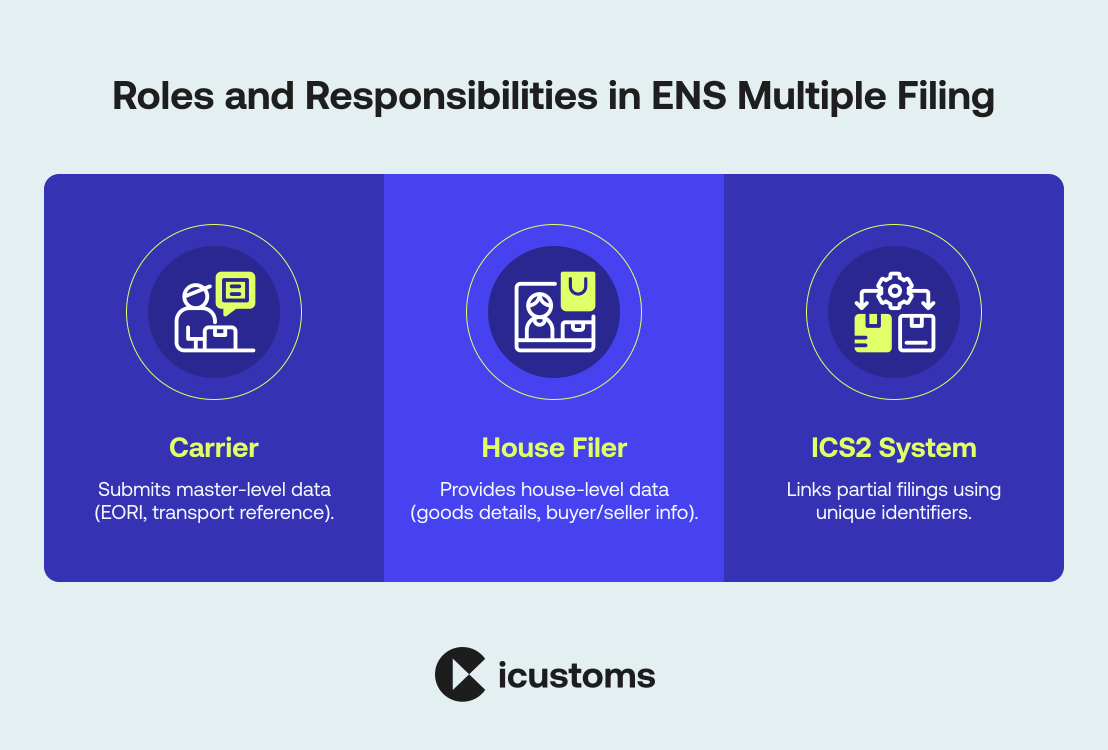
The second scenario arises when the same goods movement triggers ENS obligations in more than one customs territory. The most common example is goods originating from outside the UK and EU that arrive at a UK port before continuing to an EU destination. In this case, the carrier may need to file a UK ENS with HMRC CDS for the UK leg of the journey and an EU ICS2 declaration with the relevant EU member state customs authority for the EU leg.
Post-Brexit, the UK and EU operate entirely separate pre-arrival notification systems. There is no data sharing agreement between HMRC CDS and EU ICS2, so each filing must be completed independently with the correct data for each customs territory. Software platforms that integrate with both CDS and ICS2 filing systems allow operators to manage both obligations from a single interface, preventing the duplication of effort that manual filing would require.
Scenario 3: ENS Amendments and Corrections
The third scenario involves amending or correcting an ENS that has already been submitted. If the original ENS contains an error, such as an incorrect HS code, wrong container number, or updated arrival time, an amendment must be filed before the goods arrive. Under HMRC rules, amendments are treated as new submissions and generate a new or updated MRN. For operators managing multiple shipments, the need to track and amend individual ENS declarations while simultaneously filing new ones adds a further layer of complexity that manual processes struggle to handle reliably.
ENS Filing in Shipping
ENS filing in shipping refers to the submission of an Entry Summary Declaration to customs authorities before goods arrive at their destination port or border. It is a mandatory safety and security requirement across the United Kingdom and the European Union, designed to allow authorities to assess risk, identify potential threats, and ensure compliant cargo movement. In practical shipping operations, ENS filing sits upstream of physical arrival, meaning carriers, freight forwarders, or their representatives must submit accurate shipment data within strict pre-arrival timelines depending on the transport mode.
Each filing generates a Movement Reference Number, which becomes a critical identifier throughout the import process, linking cargo to customs systems such as CDS in the UK or ICS2 in the EU. Failure to submit ENS correctly or on time can lead to delays, cargo holds, or financial penalties, making it a core compliance function in modern international shipping workflows.
ENS Filing Countries: Where Multiple ENS Obligations Apply
Understanding which countries require ENS filing, and under which system, is essential for any operator moving goods across international borders. The table below provides a summary of ENS filing requirements across key markets for UK and EU-based importers and freight forwarders:
| Territory | Filing System | Governing Authority | Notes for UK Operators |
| United Kingdom (Great Britain) | HMRC CDS (ENS) | HMRC | Required for all goods entering GB by sea, air, rail, or road from outside the UK. Filed via CDS API or CDS web portal. |
| European Union (all 27 member states) | ICS2 (EU Import Control System 2) | EU customs authorities via national portals | Required for all goods entering the EU customs territory. ICS2 R3 (March 2024) extended to road and rail. UK operators exporting to EU must comply. |
| Northern Ireland | HMRC CDS (Windsor Framework) | HMRC | Goods moving from GB to NI follow different rules under the Windsor Framework. ENS obligations are modified. Seek specific advice for GB-NI movements. |
| Switzerland (CTC member) | NCTS for transit; ENS at country of entry | Swiss Federal Customs Administration | Switzerland is a Common Transit Convention country. Transit movements may require separate ENS at EU border of entry before onward movement to Switzerland. |
| Republic of Ireland | ICS2 (as EU member state) | Revenue Commissioners (Ireland) | Ireland uses the EU ICS2 system. Goods entering the Republic from GB or non-EU countries require ICS2 pre-arrival notification. |
| Norway (CTC member) | NCTS for transit; national ENS system | Norwegian Customs (Tolletaten) | Norway is not in the EU but participates in CTC. ENS-equivalent obligations apply under Norwegian customs law. |
Who is Responsible for Filing ENS Declaration? Multiple ENS Filing Responsibilities Explained
The biggest question is “who is responsible for filing ENS declaration”? For importers, the ENS obligation primarily rests with the carrier, meaning the company operating the vessel, aircraft, or vehicle bringing the goods into the UK. However, importers can find themselves directly responsible for ENS filing in several circumstances, and understanding this distinction is critical when managing multiple shipments.
If you are importing goods on a DDP (Delivered Duty Paid) Incoterms basis, where you control the freight arrangement end to end, you or your appointed customs agent may effectively be acting as the carrier’s representative for ENS purposes. In these cases, multiple ENS filing becomes your direct responsibility rather than the carrier’s.
When managing multiple concurrent import shipments, importers working without a customs broker or freight forwarder need to ensure that each shipment has a valid ENS filed before the applicable deadline. Missing a single ENS across a batch of simultaneous shipments can delay your entire cargo, not just the affected consignment, particularly where GVMS (Goods Vehicle Movement Service) links multiple declaration MRNs to a single vehicle movement.
For importers handling regular high-volume trade lanes, the practical solution is to use dedicated ENS filing software that can monitor upcoming shipment arrivals and automatically trigger ENS submission at the correct time for each transport mode. iCustoms.ai’s iWiz platform provides this capability with deadline alerts, automated submission, and a full audit trail for each declaration.
ENS SSD: What Is the Relationship Between ENS and the Safety and Security Declaration?
ENS SSD refers to the Entry Summary Declaration in its capacity as a Safety and Security Declaration. The two terms describe the same filing from different perspectives: the ENS is the declaration’s administrative name, while ‘Safety and Security Declaration’ describes its regulatory purpose.
Under both UK customs law and the EU Union Customs Code, all Entry Summary Declarations serve a dual function. First, they provide customs authorities with the data needed for security risk analysis, allowing HMRC or EU customs to flag high-risk consignments before they arrive. Second, they provide the information needed for statistical and trade compliance purposes. The ‘S&S’ or ‘SSD’ label is commonly used in customs software documentation and HMRC guidance to refer specifically to the safety and security data element within a broader customs declaration.
When operating in a multiple ENS filing environment, each ENS SSD filed for a different shipment must contain complete and accurate safety and security data. If the safety and security data is missing or inaccurate across multiple filed declarations, HMRC or EU customs can issue ‘do not load’ instructions across all affected consignments simultaneously, creating compounding delays for operators with multiple active shipments.
ENS late submission consequences UK
ENS late submission consequences UK can include border delays, customs interventions, additional security checks, and disruption to inbound supply chains. Under the UK Safety and Security GB regime, carriers must submit Entry Summary Declarations within the required timeframe before goods arrive in Great Britain, as late filings may trigger compliance action and increased customs scrutiny.
ENS EDI Integration Hauliers
ENS EDI integration hauliers use enables road freight operators to automate Safety and Security declaration submissions directly from transport management and logistics systems. By integrating ENS workflows through EDI and API connectivity, hauliers can reduce manual data entry, improve filing accuracy, and manage high volume cross border movements more efficiently.
EU ENS pre-arrival filing requirements
EU ENS pre-arrival filing requirements require Economic Operators to submit Entry Summary Declaration data before goods arrive in EU customs territory. Filing deadlines vary by transport mode, with road, air, ocean, and rail operators all required to provide shipment, routing, HS code, and party information in advance to support EU safety and security risk analysis.
Multiple ENS Filing Software: How iZap and iWiz Automate the Process

Managing multiple ENS filings manually through the HMRC CDS web interface is feasible for occasional filers but unsustainable at volume. iCustoms.ai has developed two purpose-built tools for multiple ENS filing: iZap for high-volume automated batch filing and iWiz for guided step-by-step filing for smaller operators.
iZap: Automated Batch ENS Filing for High-Volume Operators
iZap is iCustoms.ai’s automated ENS batch filing module, built for freight forwarders, shipping agents, customs brokers, and logistics providers who need to submit multiple ENS declarations simultaneously.
iZap connects directly to HMRC’s Customs Declaration Service via the official government API, meaning declarations are submitted programmatically without any manual web portal interaction. Operators can upload shipment data in bulk, from a structured spreadsheet, a TMS feed, or a direct API integration with their own freight management system, and iZap validates all data against HMRC CDS rules before submission.
Key features of iZap for multiple ENS filing:
- Batch submission of 10 to 1,000 ENS declarations in a single operation
- Pre-submission validation that flags errors before they reach HMRC, preventing rejections
- Automatic MRN retrieval for each submitted declaration, with MRNs displayed in the iZap dashboard
- Automatic GVMS GMR population using the retrieved MRNs for road freight movements
- Multi-client management: separate dashboards, EORI management, and audit trails for each client
- Deadline alerts by transport mode: iZap calculates the required submission time for each shipment based on its transport mode and alerts operators before the window closes
- Amendment and correction filing: iZap handles ENS amendments as part of the same batch workflow
iWiz: Guided Step-by-Step ENS Filing for Smaller Teams
iWiz is iCustoms.ai’s guided ENS filing wizard, designed for importers, smaller freight forwarders, and businesses filing ENS declarations for the first time or at lower volumes. Where iZap prioritises speed and automation, iWiz prioritises accuracy and ease of use.
iWiz walks the user through each data field in sequence, validating input at every step and explaining what each field requires. Common errors, such as incorrect HS code format, missing EORI number, or invalid container reference, are flagged in real time before the user proceeds. The result is a completed ENS declaration that passes HMRC CDS validation on the first submission, eliminating the costly cycle of rejection and resubmission that affects inexperienced manual filers.
iWiz is particularly well suited to importers managing multiple shipments that arrive irregularly, where the volume does not justify full batch automation but where the compliance risk of manual errors is still significant.
iNCTS: Connecting Transit Declarations to Your ENS Filing Workflow
iNCTS is iCustoms.ai’s New Computerised Transit System (NCTS) filing module. For goods moving under a transit procedure, such as a T1 Common Transit declaration, the ENS obligation may be modified or replaced by the transit declaration itself. iNCTS integrates with the ENS filing workflow in iCustoms.ai, ensuring that operators who need to file both transit declarations and ENS declarations for the same or related goods movements can manage both from a single platform.
This is particularly relevant for operators moving goods from non-EU, non-UK countries through the UK to an EU destination, or from the EU through a UK port to a non-EU destination, where the sequence of transit and safety and security obligations must be carefully coordinated to avoid delays.
Ready to automate your Multiple ENS Filing?
iZap handles batch ENS submissions directly through HMRC CDS. Start your free trial today, no credit card required, and file your first batch of ENS declarations in minutes.
Manual vs Automated Multiple ENS Filing: A Direct Comparison
| Factor | Manual Filing via HMRC CDS | iZap Automated Filing |
| Time per ENS declaration | 15 to 30 minutes per declaration | Under 60 seconds per declaration (batch) |
| Error rate | High: manual entry errors are common, especially at volume | Very low: pre-submission validation catches errors before HMRC sees them |
| MRN retrieval | Manual: must check CDS portal for each MRN | Automatic: MRNs returned to dashboard for all submitted declarations |
| GVMS GMR population | Manual: copy each MRN into the GVMS GMR separately | Automatic: iZap populates GVMS GMR with all relevant MRNs |
| Multi-client management | Impossible at scale: separate logins, manual tracking | Built-in: separate client dashboards, EORI management, audit trails |
| Deadline management | Manual: operator must track deadlines per transport mode | Automatic: deadline alerts calculated per shipment by transport mode |
| Amendment handling | Separate manual process for each amendment | Handled within the same batch workflow as new submissions |
| Audit trail for HMRC review | Limited: relies on individual records kept by the operator | Complete: full submission history, MRN log, and amendment record per client |
Common Errors in Multiple ENS Filing and How to Avoid Them
When filing ENS declarations for multiple shipments, certain errors appear repeatedly across operators of all sizes. Understanding these common mistakes and how automated validation prevents them is one of the strongest arguments for using dedicated ENS filing software.
- Incorrect or missing HS codes: The Harmonised System (HS) commodity code is a mandatory data element in every ENS declaration. Submitting an incorrect HS code, even by a single digit, will cause the declaration to be rejected by HMRC CDS. Across a batch of 50 declarations, even a 5% error rate means 2 to 3 rejections per filing session, each requiring manual correction and resubmission.
- Wrong EORI number format: The EORI (Economic Operators Registration and Identification) number must be in the correct format for the customs territory where it is registered. UK EORIs follow the GB followed by a 12-digit number format. EU EORIs use country code plus alphanumeric identifiers. Mixing up formats across multiple filings is a common batch error.
- Filing after the deadline: The most serious error. Missing the pre-arrival filing window for even one shipment in a batch can cause all related declarations to be flagged if they share a GVMS GMR. Automated deadline calculation and alerts by transport mode are the only reliable way to prevent this at scale.
- Duplicate MRN usage: Attempting to use the same MRN for multiple shipments or reusing an MRN from a previous declaration in a new submission will cause an immediate rejection. iZap prevents this through automatic MRN tracking across all submitted declarations.
- Missing or inconsistent container data: For sea freight, container numbers and seal numbers must match the carrier’s manifest exactly. Inconsistencies between the ENS and the shipping manifest are a common trigger for HMRC holds and border inspections.
Frequently Asked Questions About Multiple ENS Filing
What is ENS filing?
ENS filing is the process of submitting an Entry Summary Declaration to customs authorities before goods arrive in a customs territory. In the UK, this is done through HMRC's Customs Declaration Service and is a legal requirement for most goods entering Great Britain by sea, air, road, or rail from outside the UK. Each ENS generates a Movement Reference Number (MRN) that must be presented at the border.
What is multiple ENS filing?
Multiple ENS filing refers to submitting two or more Entry Summary Declarations simultaneously or in sequence for related goods movements. This applies in three main scenarios: batch filing for multiple separate shipments, filing ENS for the same goods under both UK CDS and EU ICS2 systems when goods pass through both territories, and filing amendments or corrections to previously submitted ENS declarations.
Which countries require ENS filing?
The United Kingdom requires ENS filing via HMRC CDS for all goods entering Great Britain from outside the UK. All 27 EU member states require pre-arrival notifications under the EU ICS2 system for goods entering the EU customs territory. Northern Ireland follows different rules under the Windsor Framework. Norway and Switzerland, as CTC members, have equivalent national ENS obligations. Specific requirements vary by country and transport mode.
What is iZap and how does it handle multiple ENS filing?
iZap is iCustoms.ai's automated ENS batch filing module. It connects directly to HMRC's Customs Declaration Service via the official API and allows operators to submit multiple ENS declarations simultaneously from a single bulk data upload or system integration. iZap validates all declarations before submission, automatically retrieves MRNs, populates GVMS GMRs, and provides a full audit trail. It is designed for freight forwarders, shipping agents, and customs brokers filing 10 or more ENS declarations per day.
What is the difference between iZap and iWiz?
iZap and iWiz are both iCustoms.ai products for ENS filing, but they serve different user needs. iZap is designed for high-volume automated batch filing, where the operator uploads structured data and iZap submits all declarations simultaneously. iWiz is a guided step-by-step wizard for smaller volumes or less experienced users, walking through each data field with built-in validation and explanations. Most freight forwarders use iZap; direct importers and smaller brokers typically use iWiz.
What is ENS SSD?
ENS SSD stands for Entry Summary Declaration Safety and Security Declaration. The two terms refer to the same filing: the ENS is the administrative label while 'Safety and Security Declaration' describes its regulatory purpose. Every ENS filed with HMRC serves as a safety and security notification, giving customs authorities the data needed to assess risk before goods arrive. The S&S or SSD label is commonly used in customs software and HMRC guidance to distinguish the safety and security data elements from the commercial data in a full customs declaration.
What are the penalties for missing ENS filings across multiple shipments?
Under Schedule 41 of the Finance Act 2008, HMRC can issue civil penalties of up to GBP 2,500 per missing or inaccurate ENS declaration. For operators missing ENS across multiple simultaneous shipments, penalties can accumulate rapidly: ten missed declarations could result in penalties of up to GBP 25,000. Beyond financial penalties, goods can be held at the border pending ENS submission, incurring storage charges that often exceed the penalty itself.
How does iNCTS connect to ENS filing?
iNCTS is iCustoms.ai's New Computerised Transit System (NCTS) filing module for goods moving under transit procedures (such as T1 Common Transit declarations). For certain goods movements under transit, the ENS obligation is modified or replaced by the transit declaration. iNCTS integrates within the iCustoms.ai platform alongside iZap and iWiz, allowing operators to manage both ENS and transit filing obligations from a single system, ensuring that the correct declaration type is filed for each movement.
Does importer need to file ENS UK
Under the UK Safety and Security GB regime, the carrier is normally responsible for submitting the Entry Summary Declaration (ENS), although they can authorise a third party to file on their behalf.

See how iCustoms’ automated iENS tool helps you submit Multiple ENS Filing effortlessly.
You may also like:
Simplify Customs with our Powerful Customs Management Software

Automate declarations, track shipments, & ensure compliance.
About iCustoms
iCustoms is an all-in-one solution helping businesses automate customs processes more efficiently. With AI-powered and machine-learning capabilities, iCustoms is designed to streamline your all customs procedures in a few minutes, cut additional costs and save time.
Simplify Customs with our Powerful Customs Management Software
Automate declarations, track shipments, & ensure compliance.