
ENS Workflow: Step-by-Step Guide to Filing Entry Summary Declarations for UK and EU Shipments
Quick answer: An ENS workflow is the sequence of steps required to prepare, validate, and submit an Entry Summary Declaration to UK or EU customs authorities before goods arrive at the border. The workflow ends when customs issues a Movement Reference Number (MRN), also called the ENS Number, confirming your declaration has been accepted. Missing any step, or submitting after the filing deadline for your transport mode, can result in goods being held at the border and penalties of up to GBP 2,500 per declaration.
Every shipment entering Great Britain or the European Union must be notified to customs authorities before it arrives. That notification is the Entry Summary Declaration, or ENS. The rules requiring it are not new in principle. Advance cargo information requirements have been part of international trade compliance for decades, rooted in the World Customs Organization’s SAFE Framework of Standards, which established the principle that customs authorities should receive cargo information in advance of arrival to enable risk assessment.
What has changed significantly since 2021 is the technical standard for that information. The EU’s Import Control System 2 (ICS2) introduced stricter data requirements, earlier filing windows for air cargo, and a new submission platform that replaced the original ICS1 system. In the UK, the end of the Brexit transition period brought a standalone Safety and Security Great Britain (S&S GB) regime, administered by HMRC and processed through the Customs Declaration Service. Understanding the ENS workflow for each system is essential for any business moving goods across these borders.
This guide explains the full ENS workflow step by step, covers all 37 ENS data fields, sets out the filing deadlines by transport mode, explains what an ENS Number is, and describes how software automation can reduce the risk of errors and border delays.
Who Must File an ENS
Under both UK and EU law, the primary responsibility for filing the ENS rests with the carrier. The carrier is the operator of the means of transport: the shipping line, the airline, the road haulage operator, or the rail freight operator. In practice, carriers frequently delegate this obligation to their authorised agents, customs brokers, or freight forwarders.
In the UK under HMRC rules, a representative can act on a direct basis (in the carrier’s name and on their behalf) or on an indirect basis (in their own name but on behalf of the carrier). Indirect representation makes the agent jointly liable for the accuracy of the declaration. If you are an importer arranging your own shipments, confirm in writing with your freight forwarder or broker who will be responsible for filing the ENS and ensure their EORI number is correctly authorised with HMRC.
Learn more about ENS with our comprehensive guide: Click here!
The ENS Dataset: All 37 Data Fields
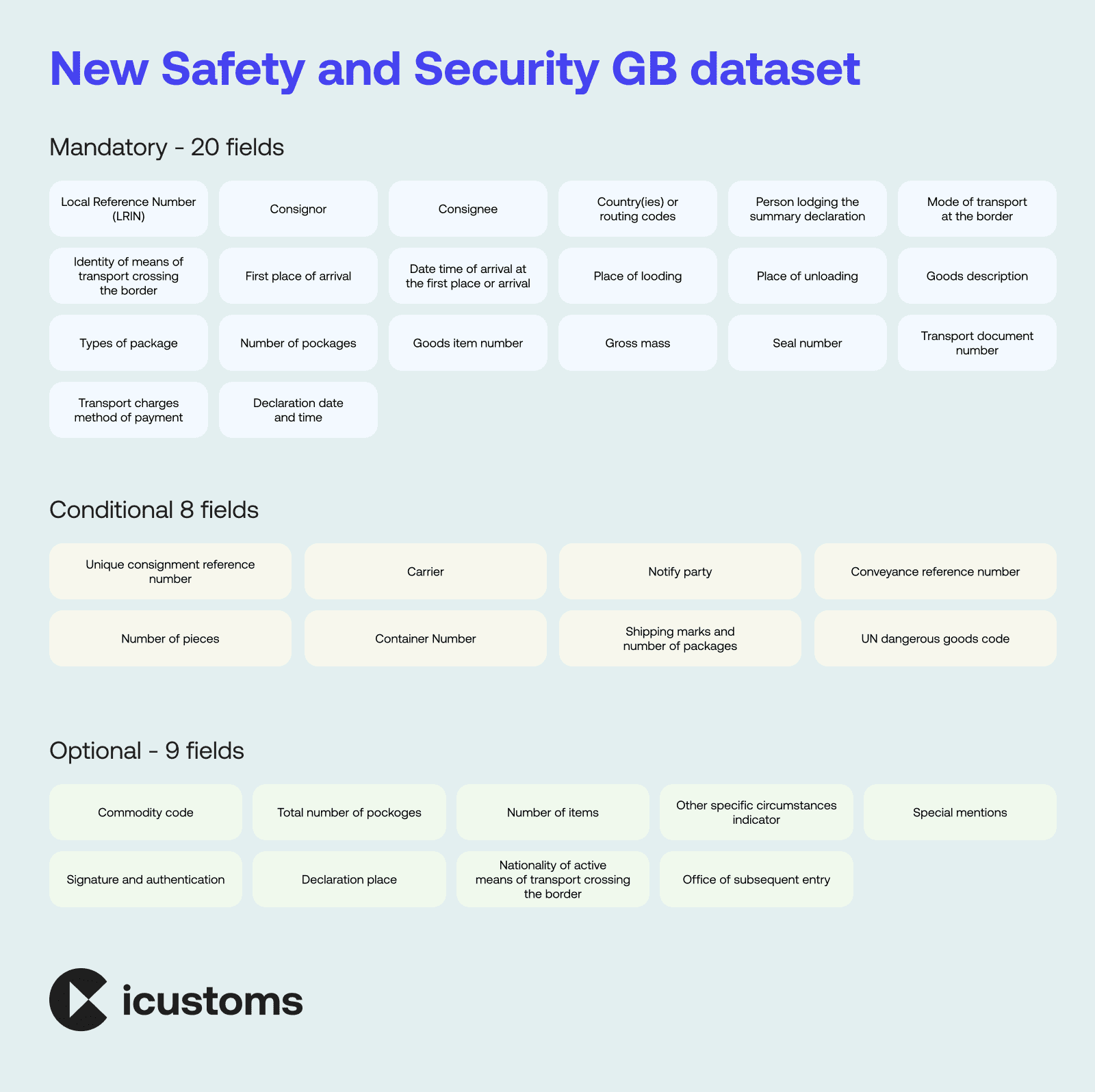
The ENS contains 37 data elements under the ICS2 and S&S GB frameworks. Twenty of these are mandatory and must be included in every ENS filing regardless of transport mode or goods type. Eight are conditional, meaning they are required only when specific conditions apply such as the type of goods or mode of transport. Nine are optional and can be included to provide additional information.
The mandatory fields cover four categories. Goods information includes the description of goods, commodity (HS) code, gross mass in kilograms, number and type of packages, marks and numbers, country of origin, and any applicable UN dangerous goods code. Party information includes the consignor name, address, and EORI number; the consignee name, address, and EORI number; and the carrier’s EORI number. Transport information includes the mode of transport at the border, the means of transport identity and nationality (vessel IMO number, flight number, vehicle registration, or rail wagon ID), the place of loading, the expected arrival date and time, and the conveyance reference number (bill of lading, air waybill, or CMR waybill). Declaration information includes the Local Reference Number (LRN), which is a unique reference assigned by the filing party for tracking purposes.
Missing or incorrectly completed mandatory fields will cause the ENS to be rejected by HMRC CDS (for UK filings) or by ICS2 (for EU filings). A rejected ENS means goods cannot clear the border until the error is corrected and a new MRN is issued, potentially causing significant delays and incurring storage charges at the port.
The EU ENS Workflow: Filing Under ICS2
For goods entering the EU, the ENS is submitted through ICS2’s Shared Trader Interface (STI) rather than HMRC CDS. The process is similar in structure to the UK workflow but uses different message formats and is processed by the customs authority of the first EU port or airport of entry.
The ICS2 message format for lodging an ENS is IE315. If the ENS needs to be amended after acceptance, the amendment message is IE313. If the ENS needs to be cancelled or invalidated, the message is IE319. Operators using customs software must ensure their platform handles all three message types correctly, as manual cancellation or amendment of an accepted ENS through the STI portal is time-consuming and error-prone.
For air cargo specifically, ICS2 introduced PLACI: Pre-Loading Advance Cargo Information. Under PLACI, a minimum data set must be submitted to ICS2 before the goods are loaded onto the aircraft, not merely before departure. This applies to postal operators and express couriers since ICS2 Release 1 (March 2021) and to all air cargo operators since ICS2 Release 2 (March 2023). The minimum PLACI data set is a subset of the full ENS and must be supplemented with the complete data set before the aircraft departs.
The UK ENS Workflow: Step by Step Under S&S GB
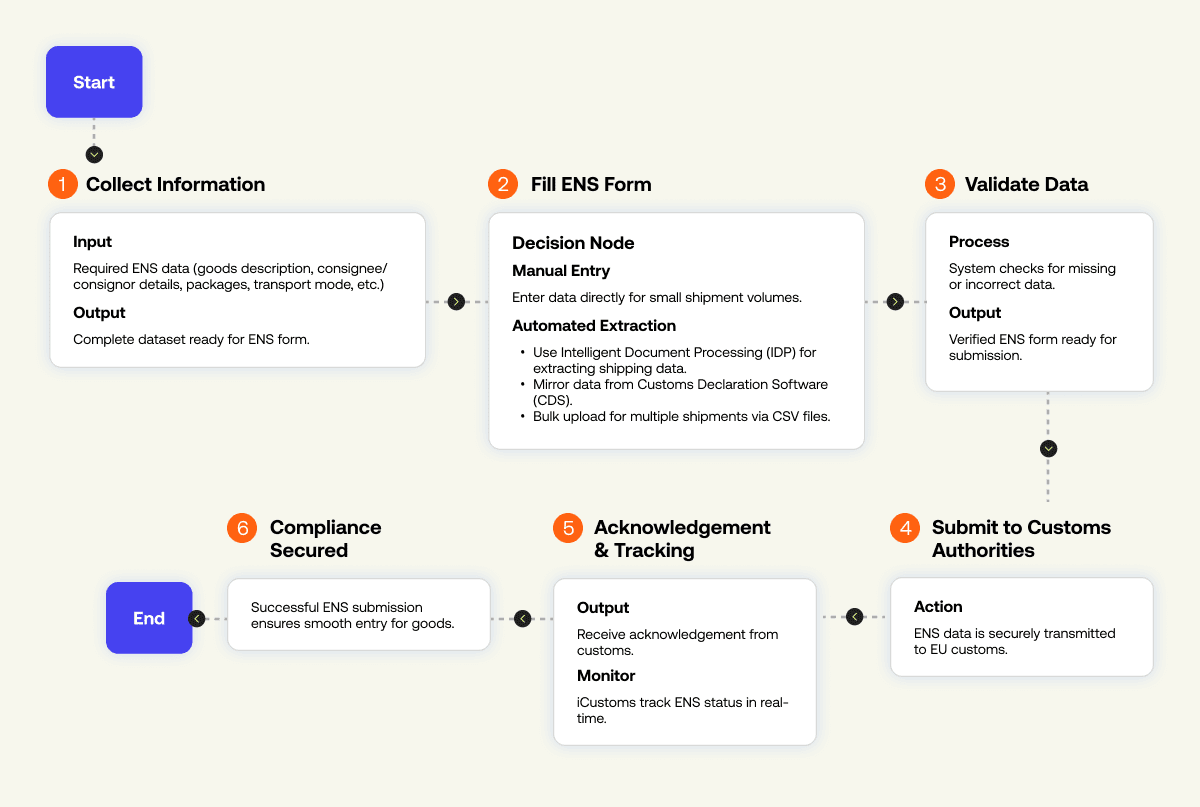
The UK ENS workflow under S&S GB defines how safety and security data must be prepared, validated, and submitted before goods arrive at the border. Each step is time-sensitive and directly linked to HMRC compliance requirements, making accuracy and timing critical. A structured workflow ensures faster clearance, reduced rejection risk, and full regulatory alignment.
Step 1: Gather Required ENS Data Fields
Gather the required ENS data. Collect all 20 mandatory fields for your shipment: full goods description, HS commodity code, gross mass, package count and type, consignor and consignee EORI numbers and addresses, carrier EORI, mode of transport, means of transport identity, place of loading, expected arrival time and date, and conveyance reference number. For hazardous goods, include the UN dangerous goods code. Assign a Local Reference Number to identify this filing in your records.
Step 2: Complete ENS Form via HMRC CDS or Software
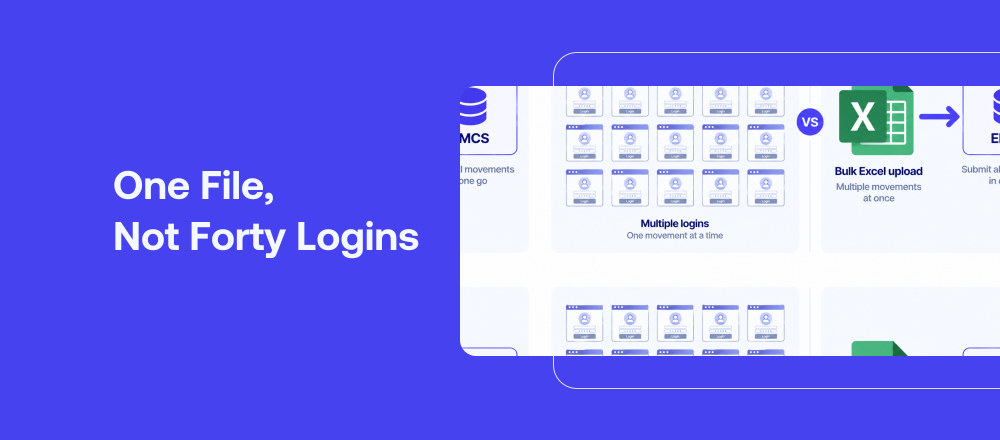
Complete the ENS form via HMRC CDS. Log into the Customs Declaration Service or use customs software integrated with the HMRC CDS API. Enter data manually for smaller volumes, or use automated extraction for higher volumes. Software platforms such as iCustoms offer three automated data population options: Intelligent Document Processing (IDP), which extracts data directly from shipping documents including bills of lading, air waybills, and commercial invoices; CDS mirroring, which automatically populates the ENS from an existing export declaration for the same consignment; and bulk upload, which processes multiple ENS filings simultaneously from a single CSV file.
Step 3: Validate ENS Data Before Submission
Data validation. Before submission, all ENS data should be validated against HMRC CDS rules. Key validation checks include EORI number format verification, commodity code format check (10-digit for UK CDS where required), mandatory field completeness, consignor and consignee address format, and transport data consistency. Pre-submission validation catches errors that would otherwise cause HMRC to reject the declaration after filing, triggering a correction process that takes additional time.
Step 4: Submit ENS and Receive ENS Number (MRN)
Submit to HMRC CDS and receive your ENS Number. Upon successful submission, HMRC CDS issues a Movement Reference Number, known as the ENS Number. This MRN is the unique identifier for your declaration and must be communicated to the carrier immediately. For road and RoRo freight, the ENS Number must be added to the GVMS Goods Movement Reference before the vehicle departs for the port. For air and sea freight, the ENS Number is presented at the port of entry alongside the transport document.
Step 5: Monitor and Respond to HMRC Risk Checks
Respond to HMRC. If HMRC’s automated risk assessment flags your consignment, you may receive a ‘do not load’ instruction before the goods depart, or a hold notification upon arrival. Respond promptly to any HMRC query with the additional information requested. iCustoms displays HMRC query notifications directly in the platform dashboard, alongside the submission audit trail.
The EU ENS Workflow: Filing Under ICS2
For goods entering the EU, the ENS is submitted through ICS2’s Shared Trader Interface (STI) rather than HMRC CDS. The process is similar in structure to the UK workflow but uses different message formats and is processed by the customs authority of the first EU port or airport of entry.
The ICS2 message format for lodging an ENS is IE315. If the ENS needs to be amended after acceptance, the amendment message is IE313. If the ENS needs to be cancelled or invalidated, the message is IE319. Operators using customs software must ensure their platform handles all three message types correctly, as manual cancellation or amendment of an accepted ENS through the STI portal is time-consuming and error-prone.
For air cargo specifically, ICS2 introduced PLACI: Pre-Loading Advance Cargo Information. Under PLACI, a minimum data set must be submitted to ICS2 before the goods are loaded onto the aircraft, not merely before departure. This applies to postal operators and express couriers since ICS2 Release 1 (March 2021) and to all air cargo operators since ICS2 Release 2 (March 2023). The minimum PLACI data set is a subset of the full ENS and must be supplemented with the complete data set before the aircraft departs.
What Is an ENS Number?
An ENS Number is the Movement Reference Number (MRN) issued by customs authorities upon successful acceptance of an Entry Summary Declaration. In the UK, the ENS Number is generated by HMRC CDS immediately after the declaration passes validation checks. In the EU, the MRN is generated by the customs authority of the destination Member State via ICS2.
The ENS Number consists of 18 characters in a standardised format that identifies the year, the country of submission, the customs office, and a unique sequence number. You must share the ENS Number with your carrier immediately after receipt. For road and RoRo freight entering Great Britain, the ENS Number must be loaded into the GVMS Goods Movement Reference before the vehicle boards. For sea freight, it is presented to the ship’s agent or port authority. For air freight, it accompanies the air waybill documentation.
How iCustoms Automates the ENS Workflow
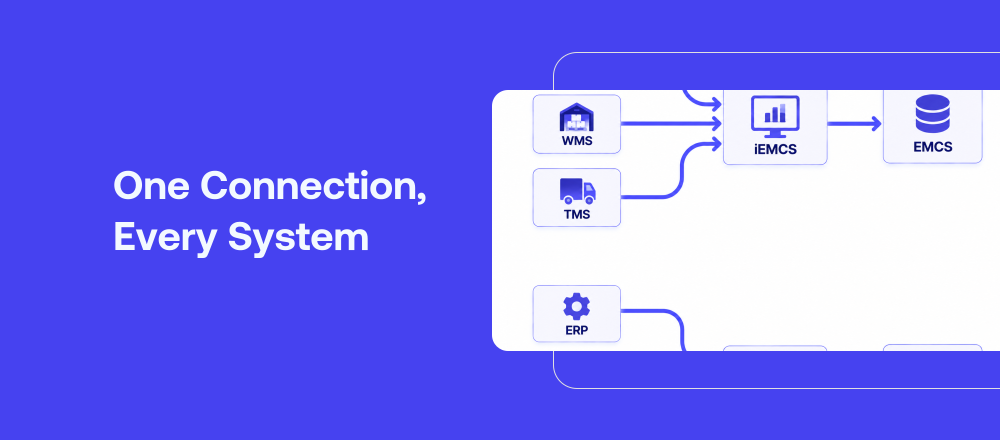
iCustoms integrates directly with HMRC’s CDS API for S&S GB ENS filings and with the ICS2 Shared Trader Interface through iAIS for EU declarations. The platform automates the most time-consuming and error-prone parts of the ENS workflow: data extraction from shipping documents (via IDP), mandatory field validation before submission, MRN management across all active declarations, and GVMS GMR population for road freight movements.
For freight forwarders and customs brokers managing multiple clients, iCustoms provides a multi-client dashboard that separates filing histories, audit trails, and HMRC correspondence by client. For high-volume operators, bulk upload processes hundreds of ENS filings from a single CSV file. For enterprise businesses with ERP systems, the iCustoms REST API connects directly with SAP, WMS, and TMS platforms, eliminating manual data re-entry between systems.
iCustoms operates on a per-declaration pricing model with no setup fees and no minimum contract commitment, making it accessible for businesses filing ten declarations per month and those filing ten thousand. There are no long-term contracts and no implementation cost.
Transforming ENS with iCustoms
Why settle for legacy software and techniques when iCustoms is here to automate your ENS procedure and redefine efficiency?
Our advanced software enables your business to succeed in a constantly evolving and fast-paced international trade environment.
We have got you covered with everything, from automated data extraction to seamless ENS form filling and submission.
Save time, reduce risks, and optimise your business processes today!
Do not let outdated practices impede your international trade. Embrace the automation with the iCustoms ENS solution.
Frequently Asked Questions About the ENS Workflow
What is an ENS workflow?
An ENS workflow is the complete sequence of steps for preparing, validating, and submitting an Entry Summary Declaration to UK (S&S GB) or EU (ICS2) customs before goods arrive. The workflow ends when a Movement Reference Number is issued. Missing steps or late submission can result in border delays and penalties up to GBP 2,500.
What data is required in an ENS filing?
An ENS contains 37 data elements: 20 mandatory, 8 conditional, and 9 optional. Mandatory fields include the goods description, HS commodity code, gross mass, package details, consignor and consignee EORI numbers and addresses, carrier EORI, mode of transport, transport identity, place of loading, arrival date and time, and the conveyance reference number (bill of lading or air waybill).
What is an ENS Number?
An ENS Number is the Movement Reference Number (MRN) issued by customs authorities when an ENS is accepted. It is 18 characters long and must be given to the carrier immediately. For road freight entering Great Britain, the ENS Number must be included in the GVMS Goods Movement Reference before the vehicle boards the ferry or Eurotunnel service.
What are the ENS filing deadlines?
Under S&S GB: road freight 1 hour before border arrival, RoRo and short-sea shipping 2 hours, rail and Eurotunnel 2 hours, long-haul air cargo 4 hours, deep-sea container shipping 24 hours before loading at port of departure. EU ICS2 deadlines are similar; PLACI for air cargo must be submitted before loading.
What is the difference between the UK ENS and EU ICS2 ENS?
The UK ENS is filed via HMRC's Customs Declaration Service under the S&S GB regime. The EU ENS is filed via the ICS2 Shared Trader Interface using IE315 message format. Both serve the same purpose (pre-arrival security risk analysis) but use different systems, different authorities, and have different technical requirements for air cargo (PLACI applies under EU ICS2 but has no UK equivalent).
What are the ENS message format codes for ICS2?
IE315 is the message used to lodge an ENS under ICS2. IE313 is the amendment message for correcting an accepted ENS. IE319 is the invalidation message for cancelling an ENS. All three are submitted via the ICS2 Shared Trader Interface. iCustoms handles all three message types automatically through iAIS.
What happens if an ENS is rejected?
If HMRC or ICS2 rejects an ENS, a rejection notice is issued identifying the error. The declaration must be corrected and resubmitted. If goods have already departed and the ENS is rejected, HMRC may issue a do not load instruction or hold the goods at the border pending correction. Pre-submission data validation through software prevents the vast majority of rejections.
Can software automate ENS filing?
Yes. Customs software that connects directly to HMRC CDS (for UK ENS) and ICS2 via the Shared Trader Interface (for EU ENS) can automate data extraction, field validation, submission, and MRN tracking. iCustoms offers IDP document extraction, CDS mirroring from export declarations, bulk upload, and GVMS GMR auto-population, covering the full UK ENS workflow. iAIS handles EU ICS2 ENS and PLACI filings.
You may also like:

Simplify Customs with our Powerful Customs Management Software

Automate declarations, track shipments, & ensure compliance.
About iCustoms
iCustoms is an all-in-one solution helping businesses automate customs processes more efficiently. With AI-powered and machine-learning capabilities, iCustoms is designed to streamline your all customs procedures in a few minutes, cut additional costs and save time.
Simplify Customs with our Powerful Customs Management Software
Automate declarations, track shipments, & ensure compliance.