
Waybill Processing Software: Automating Air Waybill and Sea Waybill Data Capture
- John Hall
- Customs Specialist at iCustoms.ai
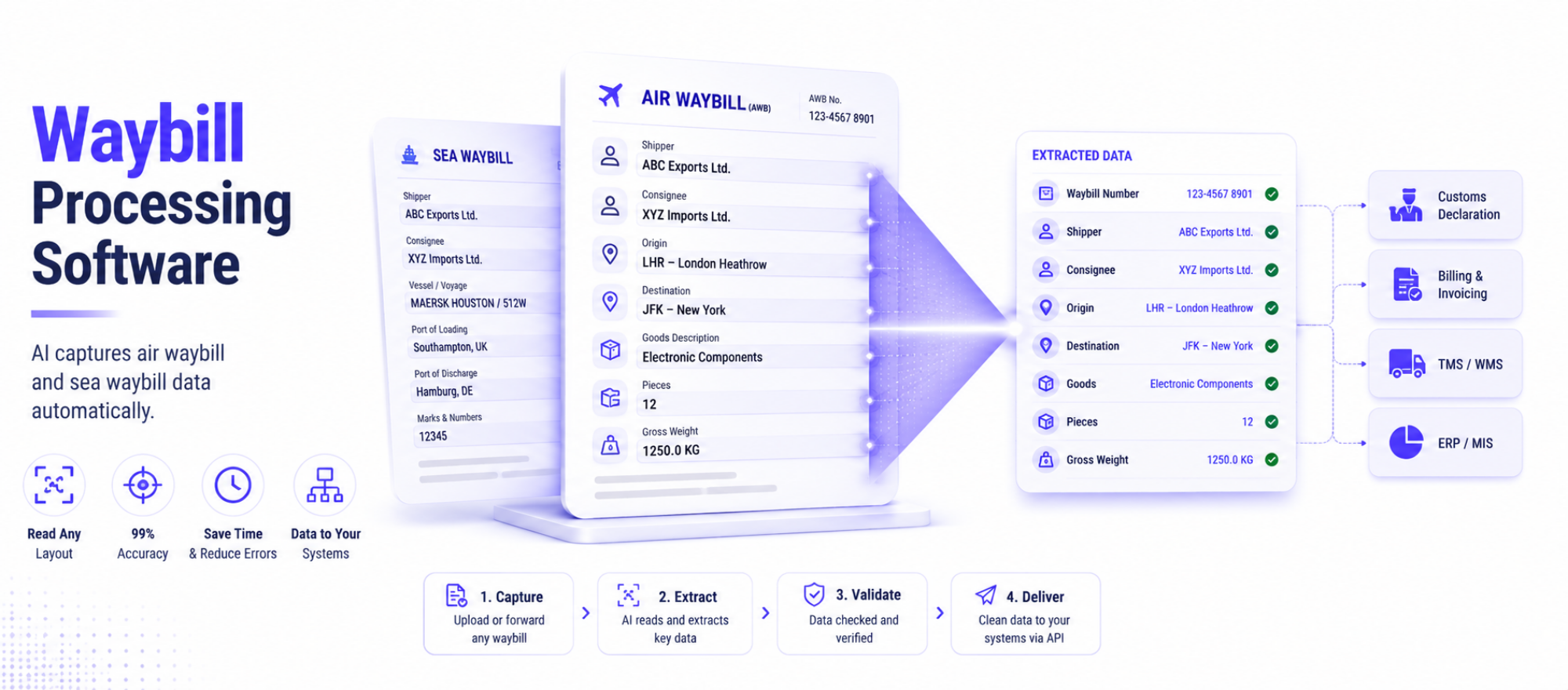
Waybill processing software uses AI to capture the data from an air waybill or sea waybill automatically, instead of a freight forwarder keying each field by hand. It reads the waybill document, extracts the key details, checks them, and passes the data into your systems or customs declaration. This guide explains what a waybill is, the difference between tracking and processing a waybill, and how waybill automation removes the slow, repetitive data entry that fills a forwarder’s day.
For freight forwarders, logistics coordinators, and operations managers, waybills arrive constantly, in every layout, from every carrier. Re-typing them into a system is slow and error-prone. Waybill software takes that job on, so your team can focus on moving freight rather than copying documents.
What Is a Waybill?
A waybill is the transport document that travels with a shipment and sets out the contract of carriage: who is shipping, to whom, what the goods are, and the route. Unlike a bill of lading, a waybill is not a document of title, so goods are released to the named consignee without an original being presented. There are two main types:
- Air waybill (AWB): the transport document for air freight, issued by the carrier or forwarder. A master air waybill covers the carrier-to-forwarder leg, and a house air waybill covers the forwarder-to-shipper leg.
- Sea waybill: the equivalent for sea freight, again non-negotiable, releasing goods to the named consignee.
The waybill number is the unique reference on the document. For air freight it is an 11-digit code made up of an airline prefix and a serial number. That number is what people search for when they want to track a shipment, which brings us to a common mix-up.
Waybill Tracking vs Waybill Processing: What Is the Difference?
These two are easy to confuse, so it helps to be clear:
- Waybill tracking means following where a shipment is, using the waybill number on the carrier’s system. If you searched for air waybill tracking or how to track a waybill number, you want the carrier’s tracking tool.
- Waybill processing means capturing and using the data on the waybill document, for customs entries, billing, and records. This is what waybill processing software does.
Both matter to a forwarder, but they are different jobs. Tracking tells you where the box is. Processing turns the paperwork into clean data you can act on. This article is about processing, and it is where most of the manual effort, and the errors, actually sit.
Why Manual Waybill Processing Slows Forwarders Down
Every shipment generates a waybill, and every waybill has to be read and entered somewhere. Doing that by hand causes familiar problems:
- Layouts vary by carrier, so staff hunt for the same fields in different places.
- High volumes mean hours of re-keying, especially at peak.
- Manual entry introduces errors that ripple into customs entries and invoices.
- Scanned or emailed waybills often need retyping from an image.
This is exactly the gap waybill AI data extraction closes: it reads any layout, pulls the right fields, and removes the retyping.
Re-keying air waybills and sea waybills every day?
Watch a demo and see AI capture waybill data from a real document in seconds.
How Waybill Processing Software Works
Waybill automation is built on intelligent document processing. Rather than reading and typing, your team lets the software do the waybill data capture.
- Capture the document. Upload or forward the air waybill or sea waybill in any format. Waybill OCR converts scans and images into machine-readable text.
- Identify the document. The software recognises it as a waybill and tells a master air waybill from a house air waybill.
- Extract the fields. AWB data extraction pulls the waybill number, parties, route, goods, and weights into structured data.
- Validate. The data is checked and any uncertain field is flagged for a quick human review.
- Route the data. Clean data flows into your customs declaration, billing, or transport system through an API.
Manual vs Automated Waybill Processing
| Factor | Manual Processing | Automated Processing |
|---|---|---|
| Speed | Minutes per waybill | Seconds, processing many waybills at once |
| Layout changes | Slows staff down and requires manual interpretation | Handled automatically by the OCR engine |
| Error risk | Higher due to manual retyping | Lower with built-in validation checks |
| Scanned documents | Information must be retyped by hand | Read automatically using waybill OCR |
| Data into systems | Manual re-entry into business systems | Automatically routed through APIs into connected systems |
What to Look for in Waybill Software
- Reads any carrier layout, including scanned and emailed waybills.
- Handles both air waybill and sea waybill documents, and tells master from house.
- Validates the extracted data and flags anything uncertain.
- Feeds your customs, billing, and transport systems through an API.
- Keeps an audit trail and scales with your volumes.
The Benefits for Freight Forwarders
Automating waybill processing gives forwarders back time and accuracy. Teams stop re-keying, customs entries and invoices are built on clean data, and shipments move faster because the paperwork keeps pace with the freight. As volumes grow, the software scales without extra headcount, which is where freight document automation earns its keep.
How iCustoms Automates Waybill Data Capture
iCustoms uses its intelligent document processing to capture waybill data as part of the wider trade-document workflow. Its iCheck feature detects and classifies documents such as waybills, invoices, and packing lists, then extracts and validates the data.
- Classification and extraction: iCheck recognises air and sea waybills and pulls the key fields, even from mixed document sets.
- Accuracy and validation: up to 99% accuracy, with a validation engine that flags any field under full confidence for review.
- Speed and savings: around 50% less time and cost, with data reused across repeat shipments.
- Integration and security: connects through API, EDI, or CSV, and holds ISO 27001 and ISO 9001 certification.
Waybills rarely arrive alone, so it also processes the invoices, waybills, and packing lists in the same shipment together, and supports freight forwarding customs processing end to end.
Frequently Asked Questions
What is a waybill in shipping?
A waybill is the transport document that travels with a shipment, setting out the contract of carriage. Unlike a bill of lading, it is non-negotiable, so goods are released to the named consignee without an original being presented.
What is an air waybill (AWB)?
An air waybill is the transport document for air freight, issued by the carrier or forwarder. A master air waybill covers the carrier-to-forwarder leg; a house air waybill covers the forwarder-to-shipper leg.
What is the difference between a waybill and a sea waybill?
A sea waybill is simply the sea-freight version of a waybill. Like the air waybill, it is non-negotiable and releases goods to the named consignee.
Can waybill data be automated?
Yes. Waybill processing software uses AI to read the document, extract the waybill number, parties, route, and goods, validate the data, and route it into your systems, with a person confirming anything uncertain.
Is this the same as waybill tracking?
No. Tracking follows where a shipment is, using the waybill number on the carrier's system. Waybill processing captures the data on the document for customs, billing, and records.
How does iCustoms process waybills?
iCustoms uses intelligent document processing to classify air and sea waybills, extract and validate the data with up to 99% accuracy, and route it into your customs declaration or systems.
You may also like:
Struggling to Extract, Catagorise & Validate Your Documents?

Capture & Upload Data in Seconds with AI & Machine Learning
Subscribe to our Newsletter
About iCustoms
iCustoms is an all-in-one solution helping businesses automate customs processes more efficiently. With AI-powered and machine-learning capabilities, iCustoms is designed to streamline your all customs procedures in a few minutes, cut additional costs and save time.
Struggling to Extract, Catagorise & Validate Your Documents?
Capture & Upload Data in Seconds with AI & Machine Learning