
EU TRACES API Integration: What Customs Brokers and ERPs Need to Know
- John Hall
- Customs Specialist at iCustoms.ai
A EU TRACES API integration lets your systems validate establishment codes automatically, instead of a person searching the portal and re-keying results. For customs brokers running hundreds of client shipments and ERP-driven importers with large product catalogues, it turns compliance checking from a scheduled task into a property of the workflow itself.
This guide covers what the official platform does and does not offer developers, what a good establishment validation API looks like, and the integration patterns that work in practice for ERPs, TMS platforms and broker systems.
Does TRACES provide an API?
Not one designed for traders. TRACES NT supports system-to-system exchange as part of IMSOC, but that machinery serves member state authorities and national systems rather than commercial operators. For a broker or an importer, there is no public TRACES API endpoint to POST a list of establishment codes and get validation results back.
In practice, businesses close this gap through compliance platforms that maintain validation against the official TRACES EU establishment data and expose it through a modern REST API. That is precisely what the iTraces API from iCustoms does: your systems talk to iTraces, and iTraces answers against the official lists.
What a TRACES establishment list API should offer
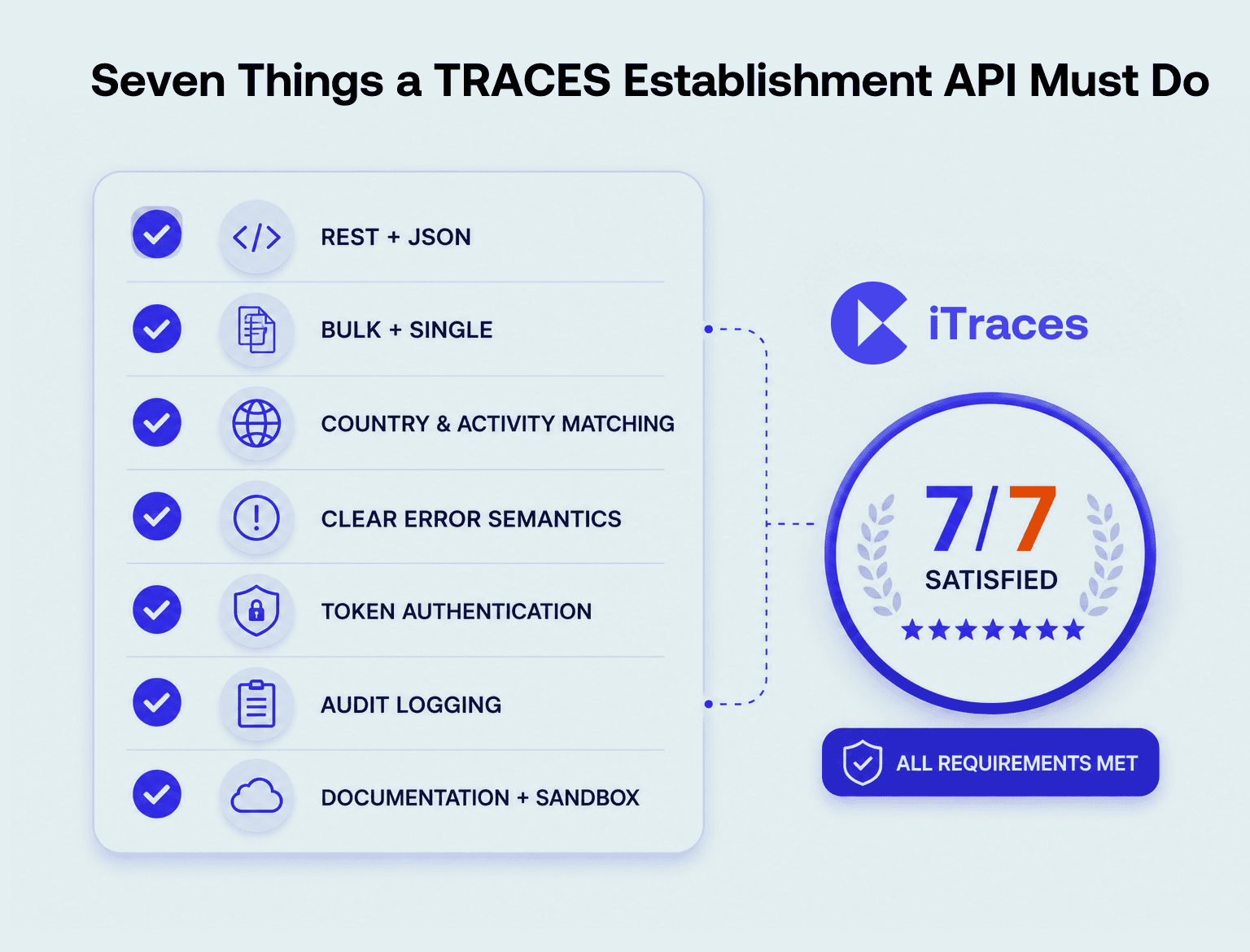
Whether you evaluate the iCustoms iTraces API or build a comparison shortlist, hold any establishment validation API to this checklist.
| Capability | Why It Matters |
|---|---|
| REST Endpoints with JSON Responses | Integrates easily with modern ERP, TMS, WMS, and middleware platforms without requiring custom adapters. |
| Bulk and Single-Code Requests | Supports both large-scale catalogue validation and real-time validation of individual establishment codes. |
| Country and Activity Matching | Confirms that an establishment code is approved for both the correct country and the specific activity (for example, meat processing versus dairy production). |
| Clear Error Semantics | Returns distinct responses for invalid, delisted, incorrect activity, and unknown establishment codes, making troubleshooting faster and more reliable. |
| Secure Authentication | Uses token-based authentication (OAuth-style) with secure token rotation instead of shared usernames and passwords. |
| Audit Logging | Records every validation request and response to support compliance, traceability, and regulatory audits. |
| Documentation and Sandbox | Allows developers to test integrations safely before relying on the API for live production shipments. |
How the iTraces API works
- Authenticate: your system obtains a token via the iCustoms Developers Hub credentials.
- Submit codes: send establishment codes with country and activity context, one at a time or in bulk.
- Validation runs: iTraces checks each code against the official TRACES EU database with 99% accuracy.
- Receive results: a structured response flags valid, invalid, delisted and mismatched codes with reasons.
- Evidence persists: every validation lands in the compliance dashboard and audit trail automatically.
Three integration patterns that work
- Nightly batch: your ERP exports the active catalogue after hours; every code is re-validated before the next working day.
- Event-driven checks: a new supplier, purchase order or booking triggers validation at the moment the data enters your system.
- Pre-shipment gate: the TMS refuses to confirm a booking while any establishment code on the consignment carries a red flag.

Connecting your ERP, TMS or broker system
Because the iTraces API speaks standard REST and JSON, it connects to SAP, Microsoft Dynamics, Oracle, NetSuite and most TMS or middleware platforms without exotic engineering. The design questions are business ones, not technical ones: where does the establishment code live in your master data, and at which moments should validation gate the process?
For most implementations, two gates earn their keep immediately: supplier onboarding, so unapproved facilities never enter the master data, and booking confirmation, so nothing ships against a delisted code. Brokers add a third dimension, running validation per client with separated dashboards, which turns a manual service into an automated, evidenced one across the whole book of business.
Still Exporting CSVs Between Systems? Connect your ERP or TMS to the iTraces API and make establishment validation part of the workflow itself. |
Before you integrate: a five-point checklist
- Clean the master data first: an API validating mistyped fields simply flags them faster; fix code formats and ownership before go-live
- Map activities, not just codes: store the product activity alongside each establishment so the pairing can be checked
- Decide the gates: agree which events trigger validation and what a red flag blocks
- Assign exception owners: automation surfaces problems; someone must own resolving them with suppliers
- Start with the sandbox: test against the iCustoms Developers Hub documentation before production traffic depends on it
Why choose iCustoms for API-based customs automation
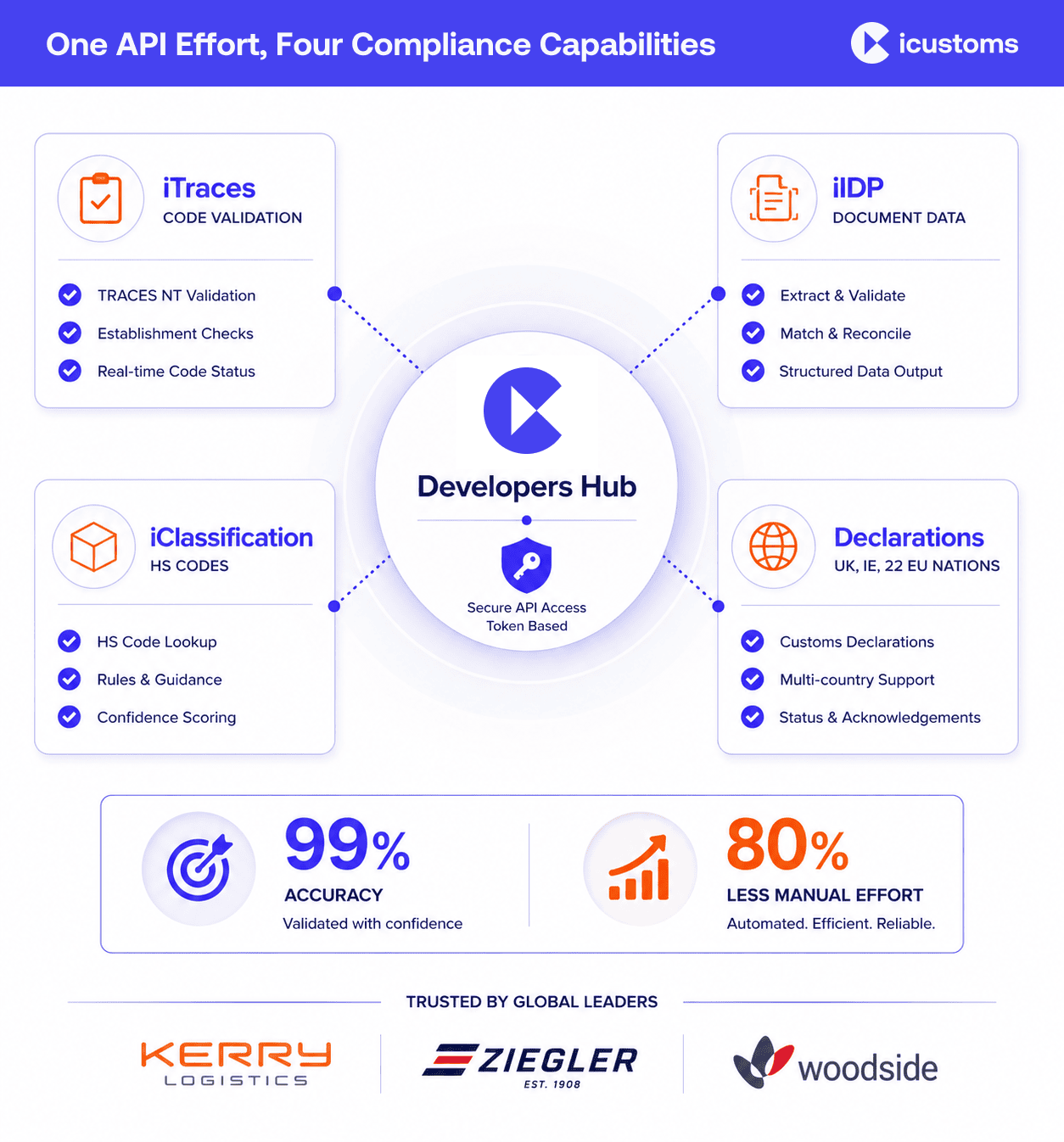
iCustoms is API-first across the platform, not just for establishment codes. The same Developers Hub covers Intelligent Document Processing for extracting and validating trade document data, iClassification for HS codes across 32+ countries, and declaration filing across the UK, Ireland and 22 EU nations. One integration effort, one vendor relationship, one audit trail, with our integrations already covering common ERP and logistics stacks.
The outcome mirrors what our customers see elsewhere: 99% accuracy on validations, 80% less manual effort, and compliance that runs at the speed of the workflow rather than the speed of the portal. Logistics leaders such as Kerry Logistics, Ziegler and Woodside Logistics Group already operate this way.
Ready to Put Validation Inside Your Stack? Book a demo and walk the iTraces API with our team, from sandbox credentials to your first bulk validation. |
Frequently Asked Questions
Does TRACES provide an API?
Not for commercial operators. TRACES NT exchanges data system-to-system within IMSOC for authorities and national systems, but traders have no public TRACES API for validation. Businesses integrate instead through platforms such as iTraces, whose REST API validates codes against the official TRACES EU data.
How do you integrate with TRACES NT workflows?
By automating the data around them. Your systems call the iTraces API to validate establishment codes, IDP prepares accurate document data, and the validated results feed your CHEDs and declarations, so what enters TRACES NT is right first time.
Can SAP or Microsoft Dynamics connect to iTraces?
Yes. The API uses standard REST and JSON, so SAP, Dynamics, Oracle, NetSuite and most TMS or middleware platforms connect with routine integration work. The Developers Hub provides documentation and sandbox access.
What data is exchanged through the API?
You send establishment codes with country and activity context; you receive structured validation results flagging valid, invalid, delisted and mismatched codes, with every request logged to the audit trail.
How do customs brokers automate TRACES checks across clients?
By running API validation per client against a shared integration, with separated dashboards and audit trails. The manual per-client portal routine becomes one automated process across the whole book of business.
What should businesses consider before integrating?
Master data quality, activity mapping, which workflow events trigger validation, who owns exceptions, and sandbox testing. Get those five right and the technical integration is the easy part.
You may also like:
Struggling to Extract, Catagorise & Validate Your Documents?

Capture & Upload Data in Seconds with AI & Machine Learning
Subscribe to our Newsletter
About iCustoms
iCustoms is an all-in-one solution helping businesses automate customs processes more efficiently. With AI-powered and machine-learning capabilities, iCustoms is designed to streamline your all customs procedures in a few minutes, cut additional costs and save time.
Struggling to Extract, Catagorise & Validate Your Documents?
Capture & Upload Data in Seconds with AI & Machine Learning