
How to Validate EU TRACES Establishment Codes in Bulk (Step-by-Step)
- John Hall
- Customs Specialist at iCustoms.ai
To validate EU TRACES establishment codes in bulk, you need three things: clean product data, an automated checker connected to the official TRACES EU database, and a workflow for resolving flagged codes. With those in place, a catalogue of thousands of codes takes seconds to verify rather than days of portal searching.
This guide walks through the full process, step by step, using the iTraces workflow as the working example. Along the way, we cover the data preparation that prevents most validation failures and the re-validation habits that stop silent delistings reaching the border.
Why bulk validation beats manual portal checks
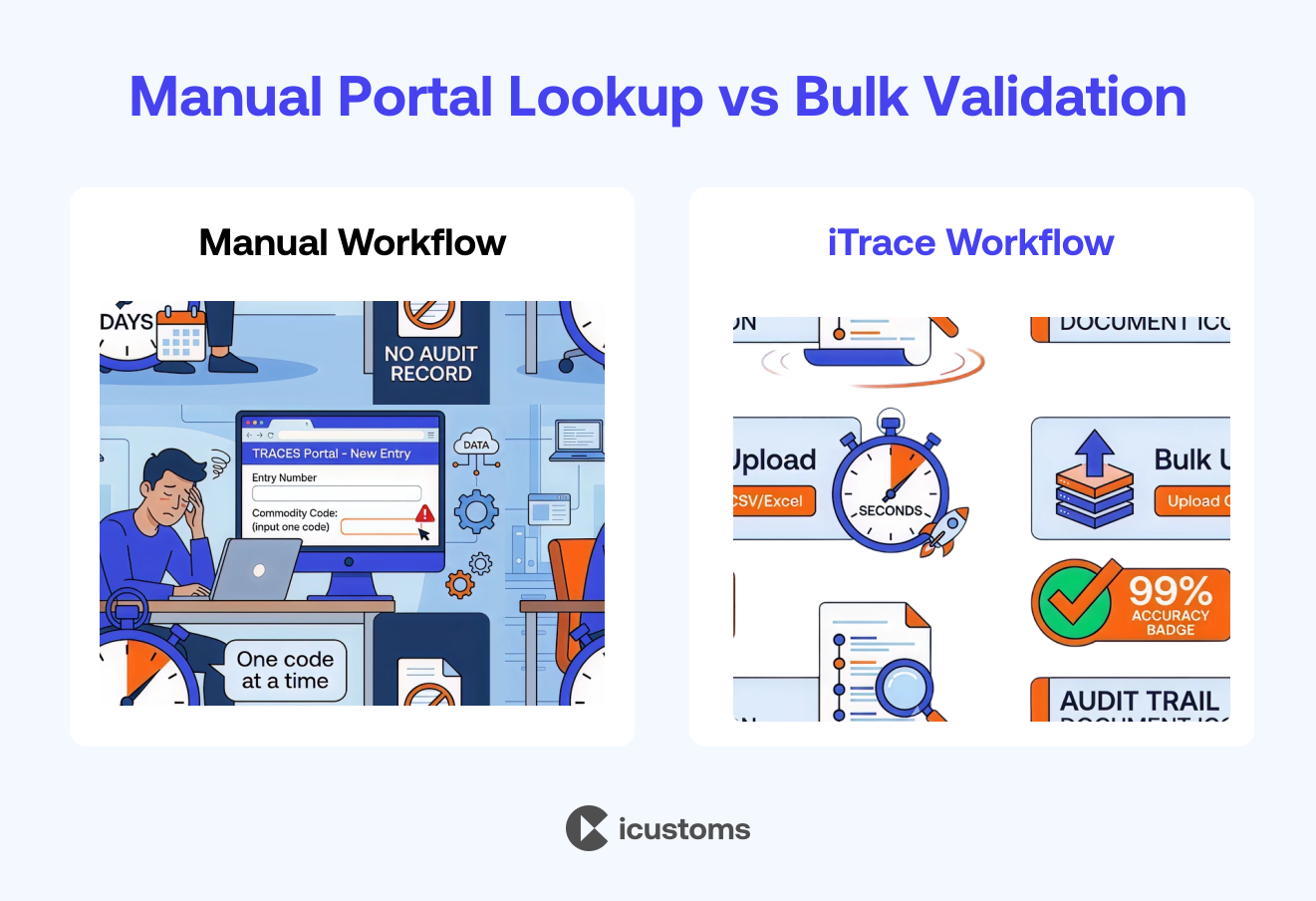
The official TRACES NT portal only supports one lookup at a time. That is fine for a single consignment. However, customs agents, food importers and freight forwarders rarely deal in single codes; they manage hundreds of product lines across dozens of suppliers. At that scale, the manual route breaks down quickly.
| Factor | Manual Portal Lookup | Bulk Validation (iTraces) |
|---|---|---|
| Speed | Minutes per code; days to validate an entire product catalogue. | Validates thousands of codes in seconds, delivering up to 50× faster processing. |
| Accuracy | Prone to typing errors and missed code matches. | Up to 99% accuracy when validated against the official TRACES database. |
| Coverage | Limited to the product codes manually selected for checking. | Automatically validates every code across the entire dataset. |
| Evidence | No built-in record showing when or how checks were performed. | Provides a complete audit trail to support compliance reviews and inspections. |
| Effort | High manual effort with repetitive validation tasks. | Reduces manual effort by up to 80% through automated bulk validation. |
Before you start: prepare your data
What to gather
- Product list: every SKU or product line that contains animal-origin ingredients
- Establishment codes: the approval number for each facility in the supply chain
- Country of origin: the exporting country for each establishment
- Activity type: meat, dairy, fishery products, animal by-products and so on, because approval is activity-specific
Common data problems that break validation
Most failed validations trace back to the spreadsheet, not the supplier. Typical culprits include typos in approval numbers, codes pasted with stray spaces, outdated codes carried over from old orders, and merged cells that scramble columns. Therefore, clean the file first; ready-made upload templates, such as those included with iTraces, standardise the format and remove most of these errors before they happen.
How to validate EU TRACES establishment codes in bulk
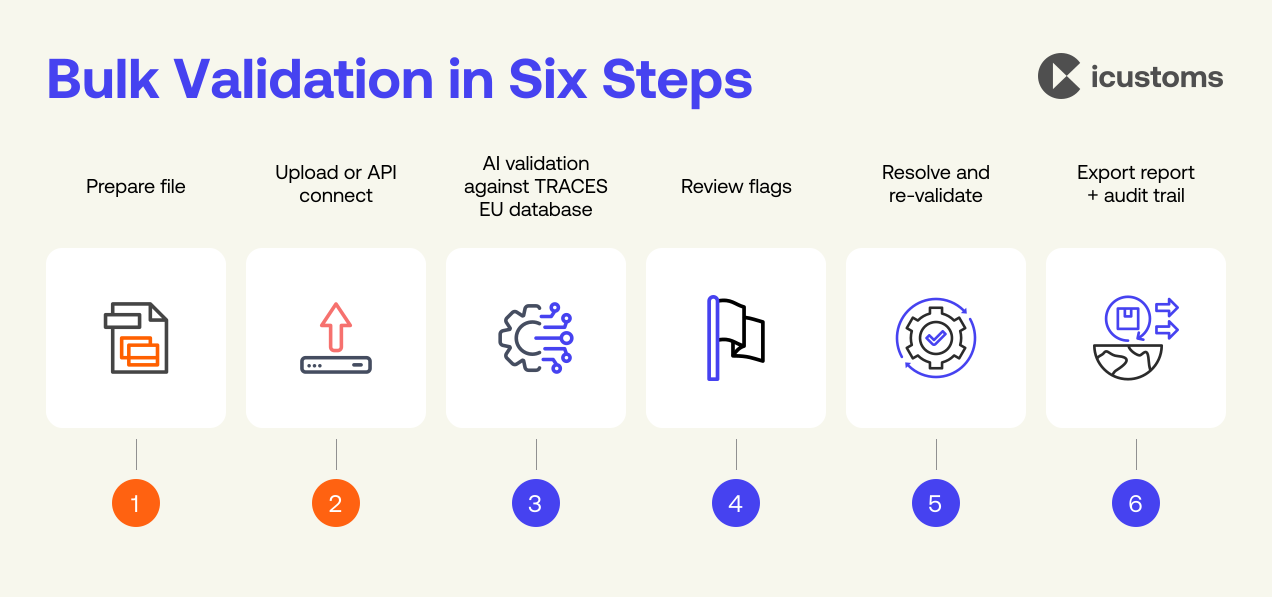
Here is the full workflow, from raw spreadsheet to audited compliance report. The steps follow the iTraces process, and the same logic applies to any properly automated checker.
Step 1: Prepare your product file
Export your product list with establishment codes into CSV or Excel. Next, map it to the upload template so each column (product, code, country, activity) sits where the validator expects it. Five minutes here saves hours of rework later.
Step 2: Upload the file, or connect your systems
Upload the file directly into iTraces. Alternatively, connect via API so product data flows in automatically from your ERP, TMS or supply chain platform. The API route suits businesses with frequently changing catalogues, because validation then runs continuously without anyone touching a spreadsheet.
Step 3: Run the AI validation
The iCustoms AI checks every establishment code against the official TRACES EU database, matching the approval number, the country and the activity category. Thousands of codes complete in seconds, with 99% accuracy and no manual searching.
Step 4: Review the flagged codes
Valid codes turn green; anything invalid, unrecognised or mismatched is flagged instantly. Consequently, your attention goes straight to the handful of problem codes instead of the thousands that are fine.
Step 5: Resolve and re-validate
For each flag, confirm the correct code with your supplier, fix typos, or replace delisted establishments before booking the shipment. Then re-run the validation to confirm every line is clear. Because re-validation takes seconds, there is no reason to ship with unresolved flags.
Step 6: Export your report and keep the audit trail
Finally, export the compliance report as CSV or Excel, or push results back through the API. iTraces keeps a complete history of every validation, so regulatory reviews and internal audits have dated evidence rather than screenshots and goodwill.
Still Validating TRACES Codes Manually?
Watch iTraces validate a full product catalogue in seconds and see how much time your team gets back.
How often should you re-validate?
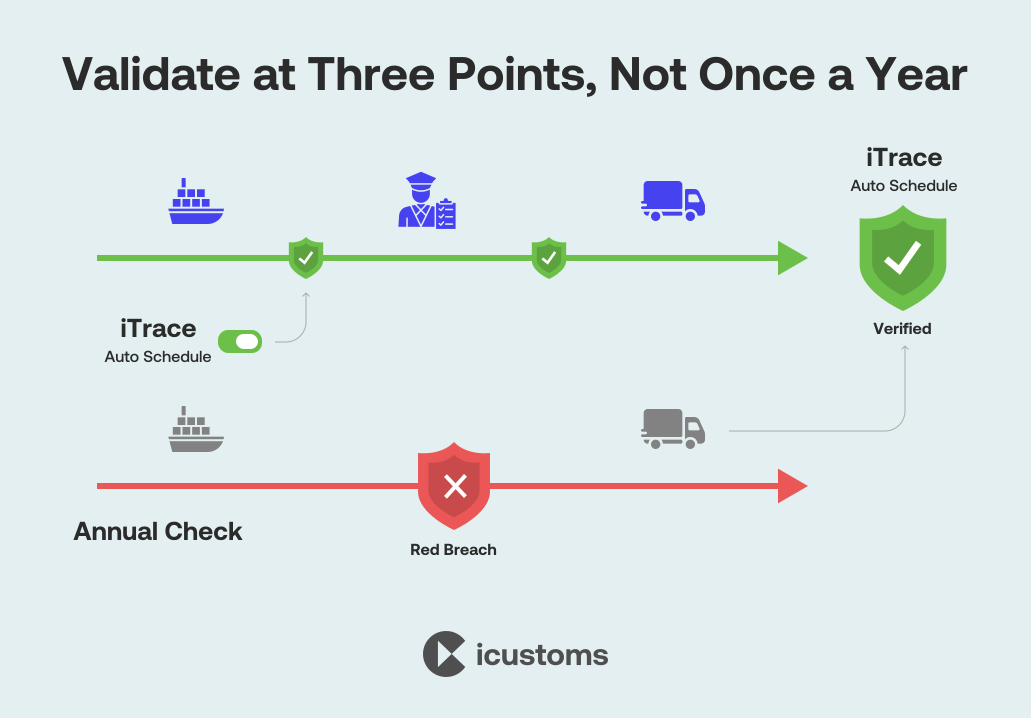
Establishment lists change continuously and without notice, so validation is a habit rather than a one-off task. As a minimum, validate at three points:
- Before every shipment: the check that actually protects the consignment at the border
- At supplier onboarding: confirm approval covers your exact product category before contracts are signed
- On a schedule: weekly or monthly sweeps of the full catalogue catch delistings between orders
Automated validation makes all three practical. In contrast, manual checking usually collapses to an annual review, which leaves months of exposure.
Why choose iCustoms for bulk TRACES validation?
The public portal was built for single lookups; iTraces was built for trade volumes. iCustoms customers validate up to 50 times faster than manual searching, cut manual effort by 80% and get 99% accuracy against the official TRACES EU database, with bulk upload, single code search, ready-made templates and smart error flags in one place.
Beyond the speed, iCustoms turns validation into evidence. The compliance dashboard shows every product, supplier and code status in one view, whilst the audit trail records each check for regulatory reviews. Your team stops hunting through portals and starts managing exceptions, which is where their judgement actually adds value.
Part of a complete customs workflow
Bulk validation rarely stands alone. The same consignments need accurate document data and correct HS codes, so iCustoms connects the steps: Intelligent Document Processing extracts and verifies data from trade documents, iTraces validates the establishment codes within it, and iClassification confirms HS codes across 32+ countries. For technical teams, our forthcoming TRACES API integration guide covers embedding validation into ERPs end to end. Logistics leaders such as Kerry Logistics, Ziegler and Woodside Logistics Group already run customs this way.
The documents you will meet in TRACES
Ready to Validate Your Whole Catalogue in Seconds?
Book an iTraces demo and bring your own product file; we will validate it live with iCustoms AI.
Frequently Asked Questions
Can I validate TRACES codes in bulk on the official portal?
No. The public TRACES NT establishment lists support single lookups only, one country and one activity at a time. For bulk validation you need an automated tool such as iTraces from iCustoms, which checks entire catalogues against the same official database in seconds.
What file formats work for bulk validation?
CSV and Excel are standard, and iTraces provides ready-made templates that keep columns consistent. Alternatively, an API connection removes files altogether by feeding product data directly from your systems.
How long does bulk validation take?
Seconds, even for thousands of codes. The practical time cost sits in data preparation, which the templates minimise. Manual checking of the same catalogue would take days.
What is an EU establishment number checker?
It is a tool that verifies establishment approval numbers against the official EU lists. iTraces is a purpose-built EU establishment number checker with bulk upload, API access and automatic flagging of invalid codes.
How accurate is automated validation?
iTraces validates with 99% accuracy because every check runs against the official TRACES EU database rather than a copy. Smart error flags catch mismatched countries and activity categories as well as unknown codes.
What should I do with flagged codes?
Confirm the correct number with your supplier, fix any typos, or source from an approved establishment instead. Then re-validate before shipping; never send a consignment with unresolved flags.
You may also like:
Struggling to Extract, Catagorise & Validate Your Documents?

Capture & Upload Data in Seconds with AI & Machine Learning
Subscribe to our Newsletter
About iCustoms
iCustoms is an all-in-one solution helping businesses automate customs processes more efficiently. With AI-powered and machine-learning capabilities, iCustoms is designed to streamline your all customs procedures in a few minutes, cut additional costs and save time.
Struggling to Extract, Catagorise & Validate Your Documents?
Capture & Upload Data in Seconds with AI & Machine Learning