
EUDR Due Diligence Statement (DDS): Contents, Who Files and How to Submit
- John Hall
- Customs Specialist at iCustoms.ai
An EUDR Due Diligence Statement (DDS) is the declaration an operator submits to the EU’s EUDR Information System, confirming that a product is deforestation-free, legally produced and that due diligence found no more than negligible risk. It carries company, product, quantity, origin and geolocation data. Once submitted, it returns a reference number that must accompany the goods through customs and down the supply chain.
This guide covers what a DDS contains, who submits one after the 2025 amendment, how to file it in EU TRACES step by step, and how to handle high volumes.
What Is an EUDR Due Diligence Statement?
The DDS is a formal confirmation, not an evidence file. It does not hold your satellite checks, supplier contracts, land titles or risk assessment reports. Those stay with you and must be kept for five years, ready for a competent authority to inspect. The DDS records the key data fields for a product or batch and links them to your due diligence through a signed statement.
- Information file: supplier and customer details, plot geolocation, production dates and legality documents for each product.
- Risk assessment: how you weighed country risk, supplier evidence and mixing risk, and your conclusion.
- Mitigation records: extra evidence, audits or supplier checks used to bring any risk down to negligible.
Under the EUDR, relevant products can only be placed on the EU market or exported if they are covered by a DDS or, for eligible micro and small producers, a simplified declaration. For customs purposes, the DDS reference number is what customs authorities check before releasing the goods.
Who Submits a DDS?
Regulation (EU) 2025/2650 changed who files. Earlier guidance, still quoted on many websites, said large traders had to submit their own DDS. That is no longer the case.
| Who | Situation | Submits |
|---|---|---|
| Upstream operator | First places a relevant product on the EU market or exports it | DDS before placing or export |
| Authorised representative | An EU-based person or company formally appointed by an operator, such as a service provider, a group company or a forest owners’ association | DDS on the operator’s behalf; registers separately and the operator stays responsible |
| Upstream micro or small primary operator | Micro or small producer in a low-risk country selling its own harvest | One-off simplified declaration instead of a DDS |
| First downstream operator or trader | The first buyer from an upstream operator | No DDS; keeps the DDS reference number for five years |
| Downstream operator or trader | Processes the product into a new CN code, or resells it unchanged | No DDS; keeps supplier and buyer records for five years |
Large downstream operators and traders still register in the EUDR Information System, even though they do not file statements. Non-EU suppliers usually cannot file for their EU customers: registration needs an EU EORI number and authorised representatives must be EU-based. Under the Commission’s guidance, a natural person or micro business can appoint its next buyer in the chain as its authorised representative.
A simplified declaration is lighter than a DDS. It is filed once rather than per shipment, holds key product information, can use a postal or cadastral address instead of geolocation, and only needs updating if something important changes. It returns a declaration identifier that goes to the first buyer and, at customs, is declared with code C717.
What a DDS Contains
The content of a DDS is set out in Annex II of the EUDR. In the Information System, it translates into the following fields for each product or batch.
| Field | What you enter | Where the data usually comes from |
|---|---|---|
| Company information | Operator name, address and EORI number | Your own records |
| Activity | Import, export or placing on the market from EU production | Your shipment |
| Product details | HS code, product description and trade name; scientific name for wood species | Product master data, supplier specifications |
| Quantity | Net mass in kilograms, plus volume or number of units where relevant | Commercial invoice, packing list |
| Country of production | Every country where the commodity was grown, raised or harvested | Supplier declarations |
| Geolocation | GPS points or polygons for every plot of land; polygons for plots over four hectares | Suppliers, cooperatives, farm mapping |
| Confirmation | Statement that due diligence was carried out and no or only negligible risk was found, with name, function and date | Your compliance team |
Most fields depend on suppliers. The hard part is not the form but getting accurate plot data in time for each shipment.
The EUDR Information System and TRACES: What Is What?
The EUDR Information System is the European Commission’s platform for registering, submitting and checking statements. It runs on TRACES, the Commission’s trade control system, which is why the two names are often used interchangeably. There are two environments: production, where statements have legal effect, and acceptance, used for training and testing.
There are two ways in. The web form lets you enter one statement at a time, with geolocation drawn on a map, typed as coordinates or uploaded as a GeoJSON file. The API lets systems submit statements machine to machine, which is the only official route for high volumes, but it requires development work and ongoing maintenance as specifications change.
Acceptance and production need separate registrations, so a test account will not let you file live statements. The Commission is also running free online training on the system until 26 November 2026.
How to Create and Submit a DDS in EU TRACES
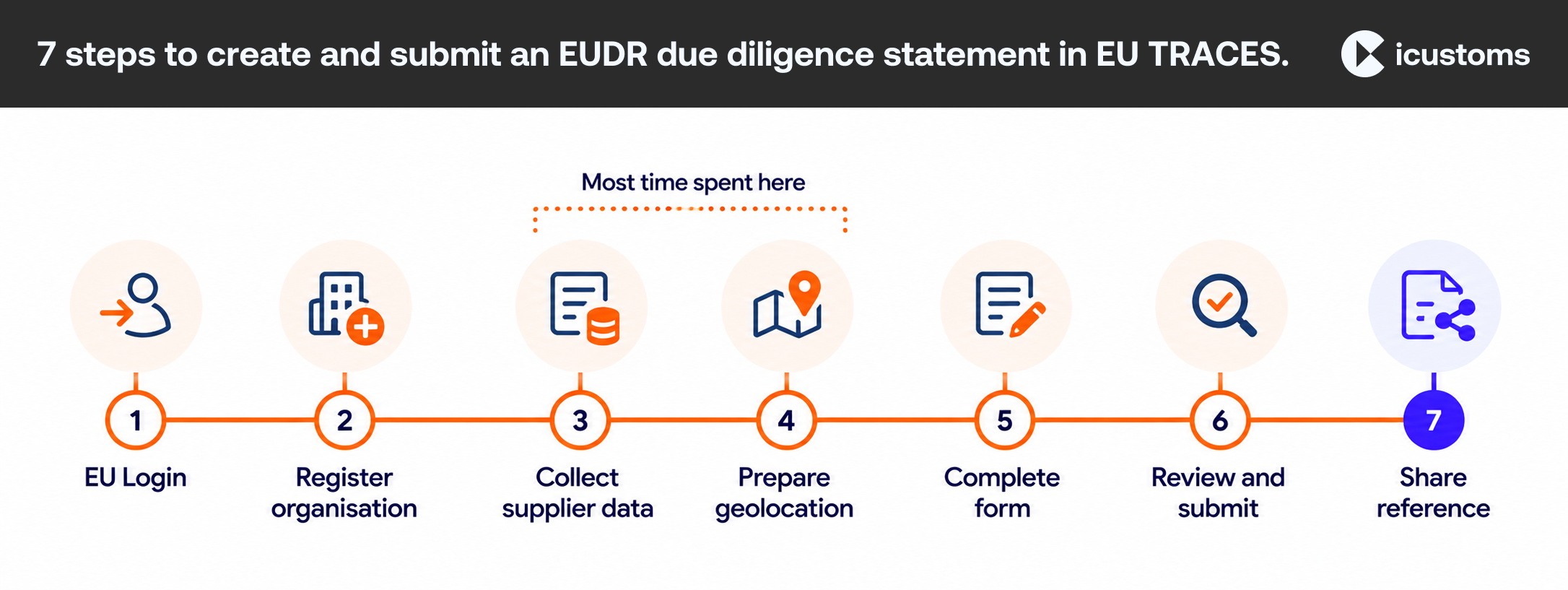
- Create an EU Login account for each person who will submit, using a company email address.
- Register your organisation in the EUDR Information System with your EORI number and select your role, such as operator or authorised representative.
- Collect supplier data for the shipment: product, quantity, country of production and geolocation for every plot, plus legality evidence for your own file.
- Prepare geolocation as points or polygons. Check that coordinates use decimal degrees, latitude and longitude are not swapped, and plots over four hectares are drawn as polygons.
- Complete the DDS form: activity type, HS code, description, quantity, country of production and geolocation upload.
- Review and submit, confirming the due diligence statement on behalf of your organisation.
- Record the reference and verification numbers the system returns, and share the reference number with your forwarder or customs agent and with your direct buyers.
Reference Number and Verification Number
Every accepted DDS returns two identifiers. The reference number is the one that travels: it goes on the customs declaration, usually under TARIC document code C716, and is passed to your direct buyers, the first downstream operators or traders. The verification number works with the reference number to let a third party confirm the statement exists and view its details in the system.
One DDS can cover several batches or shipments, provided due diligence covers all of them. Under the Commission’s FAQ, it must be submitted before the first shipment, covers no more than the declared quantity, and can be used for up to one year. The same reference can appear on several customs declarations, and one declaration can carry several references. Implementing Regulation (EU) 2026/1565 also lets operators group their own existing statements. According to the Information System user guide, a submitted DDS can be amended or withdrawn within 72 hours of receiving its reference number, but not once it has been used, for example on a customs declaration.
Common Reasons a DDS Goes Wrong
- Geolocation errors: polygons that cross over themselves, swapped coordinates, too few decimal places, or single points used for plots larger than four hectares.
- Wrong HS code: declaring a heading that does not match the customs declaration, or missing that an ‘ex’ code only partly falls in scope.
- Quantity mismatches: a DDS quantity that does not match the invoice or customs declaration.
- Statements that are too large: the Information System caps the number of product lines and production places per DDS, so very large consignments may need splitting.
- Reference not shared in time: the statement exists, but the forwarder files the customs declaration without it.
Where the Manual Process Breaks Down
A typical case: a mid-sized EU importer brings in cocoa beans from Côte d’Ivoire and Ghana, around 25 containers a month, sourced through four cooperatives representing several thousand smallholder plots.
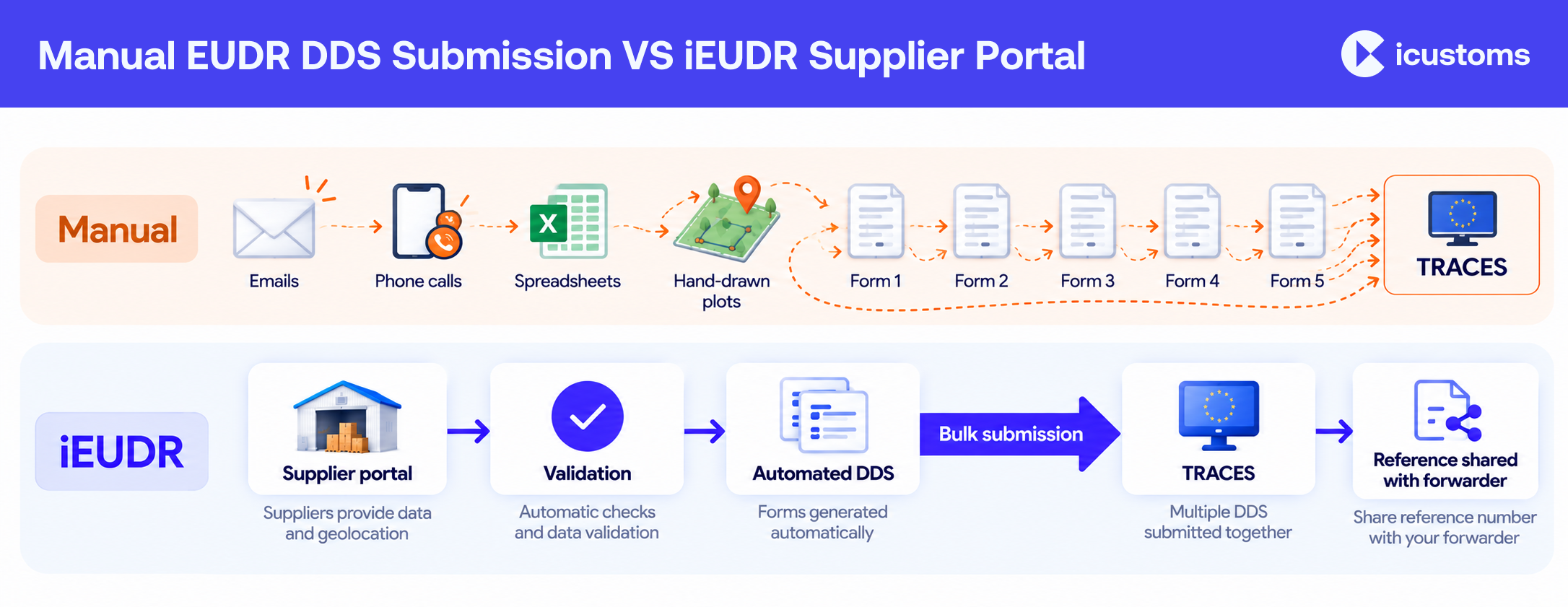
Done manually, the compliance team emails each cooperative for plot coordinates and harvest periods, follows up by phone, receives data in different spreadsheet formats, converts it to GeoJSON, fixes broken polygons, and then keys each statement into the TRACES web form one by one. The web form has no bulk upload, and building an API connection would take its IT team months. Each reference number is then copied into an email to the forwarder. A single delayed spreadsheet can hold a container at the port.
The bottleneck is not the rules. It is moving supplier data into statements, at volume, without errors.
Creating and Submitting DDS with iEUDR
iEUDR by iCustoms is AI-powered, cloud-based EUDR compliance software built to remove that manual work. It creates, validates and verifies every DDS, and submits each statement in your organisation’s name, through your own registration or as your authorised representative, so your company stays the legally responsible operator.
- Supplier portal: suppliers and cooperatives upload origin, geolocation and legality evidence directly.
- Client portal: your team approves or returns each supplier submission and sees every statement on one dashboard.
- Supplier verification: suppliers are checked against official EU TRACES records when they are added.
- AI checks and geolocation validation: iEUDR flags missing or unusual values, checks polygons and suggests CN codes for your team to confirm.
- Automated DDS creation and validation: iEUDR builds each statement per shipment or batch from portal data and validates it before submission.
- Bulk and automatic submission to EU TRACES: submit many statements at once, with no API project of your own, and get every reference back in iEUDR.
- DDS verification: already have a supplier’s DDS? iEUDR retrieves it from the EU system, verifies and validates it, and keeps it on record.
- Reference sharing and audit trail: references go to your forwarder before they file, and everything is kept with a time-stamped history for five years.
For the cocoa importer above, cooperatives upload plot data once and the compliance team reviews exceptions instead of retyping data.
| Task | Manual in TRACES | With iEUDR |
|---|---|---|
| Supplier data | Email, phone and spreadsheets | Supplier portal |
| Geolocation checks | Done by hand before upload | Automatic validation |
| Statement creation | Typed per statement | Built automatically from portal data |
| Submission | One at a time, or build your own API link | Bulk and automatic submission to EU TRACES |
| Reference handoff | Copied into emails | Shared with your forwarder in the platform |
Frequently Asked Questions
Do traders need to submit a due diligence statement?
No. Since Regulation (EU) 2025/2650, traders and downstream operators do not submit a DDS. They collect and keep supplier details and reference numbers, and large ones register in the Information System.
Can someone submit a DDS on my behalf?
Yes. An EU-based authorised representative, such as a customs agent or service provider, can submit for an operator. The operator remains legally responsible for the statement and the due diligence behind it.
Can I submit DDS in bulk?
Not through the TRACES web form, which handles one statement at a time. Bulk submission requires the Commission's API or EUDR compliance software, such as iEUDR, that connects to it for you.
Can one DDS cover several shipments?
Yes, where due diligence covers all of them. Under current guidance such a statement covers no more than the declared quantity and can be used for up to one year after submission.
What happens after I submit a DDS?
The system returns a reference number and a verification number. The reference number goes on the customs declaration and is passed to your direct buyers.
What if my DDS is rejected?
The statement shows as Rejected in the Information System with the reason. Correct the data, often a geolocation or code error, and submit a new statement before the goods are placed on the market or declared at customs.
You may also like:
Still chasing suppliers for plot coordinates by email?

iEUDR’s supplier portal collects origin and geolocation data and builds your DDS automatically.
Subscribe to our Newsletter
About iCustoms
iCustoms is an all-in-one solution helping businesses automate customs processes more efficiently. With AI-powered and machine-learning capabilities, iCustoms is designed to streamline your all customs procedures in a few minutes, cut additional costs and save time.
From supplier data to submitted DDS, without the spreadsheets.
See iEUDR create, validate and submit a DDS, from supplier portal to TRACES reference number.